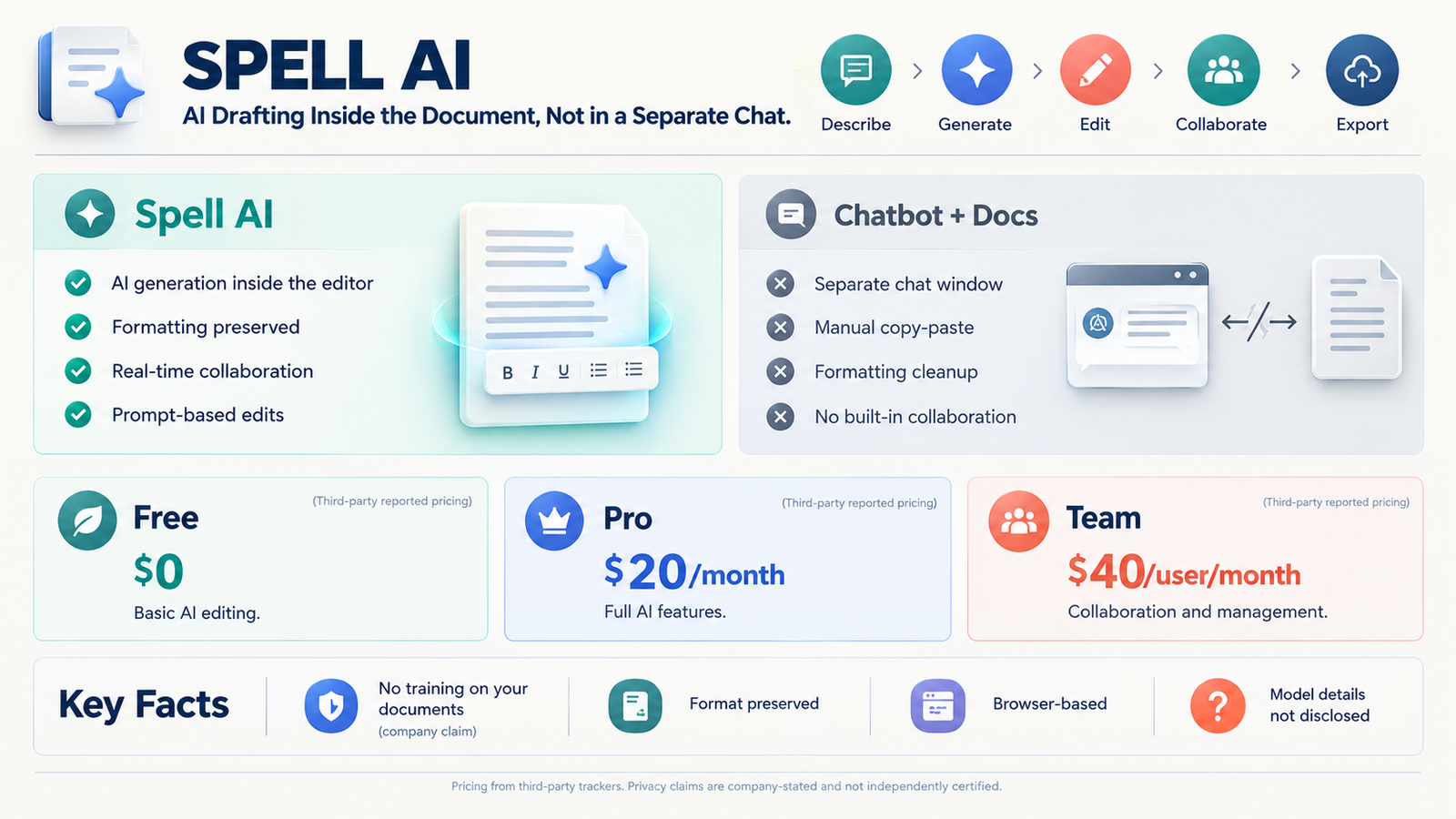
Spell AI is an AI-native document platform that generates first drafts, edits text through natural language prompts, and supports real-time collaboration inside a single workspace. It positions itself as a purpose-built alternative to copying text between ChatGPT and Google Docs, with the company claiming its outputs are fine-tuned for long-form professional documents. The platform offers a free tier and paid plans starting at $20 per month.
At-a-Glance
- What it is: A browser-based document editor with AI drafting and editing built in
- Core promise: Higher-quality document output than generic chatbots, with formatting preserved
- Key workflow: Describe what you need, generate a draft, then edit manually or with prompts
- Pricing: Free plan available; Pro at $20/month; Team at $40/user/month
- Privacy claim: Company states it does not train on user documents and does not sell data
- Key limitation: No public model transparency; relies on proprietary fine-tuning claims
What Is Spell AI?
Spell AI sits at the intersection of two familiar tools. It has the structure and collaboration features of Google Docs, combined with the generative capabilities of a large language model. The difference is that the AI is embedded in the document itself, not in a separate chat window.
The company describes the product as an “AI-first office suite” starting with documents, with spreadsheets and presentations planned next . Users type a natural language description of the document they need, and Spell generates a formatted draft. From there, they can edit manually or highlight sections and instruct the AI to revise them.
This workflow targets a specific frustration. Most people using ChatGPT for writing end up copying the output into Google Docs or Word, then spending time fixing formatting and structure. Spell removes that transfer step by keeping generation and editing in the same environment.
Spell AI vs. ChatGPT and Google Docs
| Dimension | Spell AI | ChatGPT + Google Docs |
|---|---|---|
| Draft generation | Built into the editor | Separate chat window |
| Formatting | Preserved in document | Requires manual cleanup |
| Editing | Manual or prompt-based | Manual, or copy back to chat |
| Collaboration | Real-time, like Google Docs | Google Docs only |
| Output focus | Long-form documents | General conversation |
How Spell AI Works
The workflow is designed to keep users inside one interface from start to finish.
Step 1: Describe the document. The user provides a prompt describing what they need. This could be a business plan, a job description, a strategy document, or a research summary .
Step 2: Generate a draft. Spell produces a structured first draft in seconds. The company claims the output is tuned for document formats rather than generic chat responses .
Step 3: Edit with prompts or manually. Users can highlight text and tell Spell what to change, or edit directly like a normal word processor. The AI does not lock the document into a specific format.
Step 4: Collaborate in real time. Documents can be shared with teammates who edit simultaneously, similar to Google Docs .
Step 5: Export or continue refining. Finished documents can be exported in standard formats.
The Fine-Tuning Claim
Spell’s central marketing claim is that it produces better document output than generic AI tools. The company states it has fine-tuned its system using feedback from thousands of real documents and that it is “not just a GPT wrapper” .
This claim is plausible but unverifiable from outside. Spell does not disclose which base models it uses, how the fine-tuning works, or what benchmarks support the quality assertion. Buyers should treat “better than ChatGPT” as a company claim rather than a verified fact. The free tier provides a low-risk way to test the claim directly.
Key Features
AI Draft Generation
The core feature is the ability to generate a complete document from a natural language description. Spell positions this as going from blank page to polished draft roughly ten times faster than starting manually .
Prompt-Based Editing
Instead of regenerating an entire document to fix one section, users can highlight text and issue targeted instructions. This reduces the friction of iterative refinement and keeps the rest of the document intact.
Real-Time Collaboration
Spell supports multiplayer editing with live updates, matching the collaboration model most teams already expect from Google Docs . This makes it viable for team workflows, not just individual writing.
Privacy Positioning
The company states that user documents are private, encrypted, and never used to train AI models. It also says it does not sell data or share it with third parties beyond what is needed to provide the service . These are company claims, not independently audited certifications. Spell does not publicly list SOC 2 or similar compliance credentials on its main pages.
Format Preservation
Because the AI operates inside the document editor, generated text retains proper formatting. Users do not need to fix headers, lists, or spacing after generation, which is a common pain point with copy-pasted chatbot output.
Pricing and Plans
Spell uses a freemium model with tiered subscriptions. Pricing details come from third-party tool directories and comparison sites.
| Plan | Price | What It Includes |
|---|---|---|
| Free | $0 | AI-powered document editing, basic access |
| Pro | $20/month | Full AI features, higher usage limits |
| Team | $40/user/month | Collaboration features, team management |
The free tier allows users to evaluate the core experience without a credit card commitment. The Pro tier targets individual professionals who write frequently. The Team tier adds per-seat collaboration, which matters for organizations that need shared document workflows.
Spell does not publish detailed usage caps or credit limits on its public pages. Users who generate high volumes of documents should clarify whether the Pro plan has fair-use thresholds before committing.
Main Use Cases
Spell is designed for document-heavy professional work. The company lists business plans, job descriptions, strategy documents, financial reports, research papers, lab reports, personal statements, essays, memos, marketing briefs, onboarding guides, meeting agendas, customer emails, speeches, and short stories as supported formats .
The strongest fit is repeatable business writing. Teams that produce proposals, reports, or internal documentation on a regular cadence can benefit from faster first drafts and in-editor editing. Individual professionals who write occasionally may find the free tier sufficient.
The product is less suited to highly technical or regulated writing where accuracy requires domain expertise and source verification. Like all generative AI, Spell can produce plausible but incorrect content. Users remain responsible for fact-checking.
Limitations and Considerations
Unverified Quality Claims
Spell’s “better than ChatGPT” positioning rests on company assertions. No independent benchmarks or third-party quality assessments are publicly available. The fine-tuning approach may genuinely improve document structure, but users should validate output quality themselves.
Model Transparency Gap
Spell does not disclose which underlying language models power its platform. This matters for buyers who need to understand data residency, inference location, or model provider policies. The company’s privacy claims are reassuring on paper, but the technical architecture remains opaque.
Pricing Without Usage Detail
The $20 Pro and $40 Team prices are clear. What is not clear is how much usage those prices include. Document generation is token-intensive, and heavy users could hit undisclosed limits. Prospective buyers should test the free tier thoroughly and ask about caps before upgrading.
Competitive Pressure
Spell competes with established tools that already bundle AI into document editing. Google Docs and Microsoft Word both offer AI features, and ChatGPT remains a familiar option for many users. Spell’s advantage is workflow integration, not unique AI capability. That advantage must be significant enough to justify a separate subscription.
Name Confusion
“Spell AI” is not a unique identifier. A separate entity called Spellai exists as an AI art generator app with its own user base and reviews . A Berlin-based AI automation company also used the Spell name before being acquired in 2025 . Users searching for Spell AI should confirm they are looking at spellapp.com, the document editor, not unrelated products.
Who Should Use Spell AI
Good fit:
- Professionals who write documents daily and want faster first drafts
- Teams that collaborate on reports, proposals, or internal documentation
- Users frustrated by formatting loss when copying from ChatGPT to Google Docs
- Individuals who want AI assistance without switching between tools
Poor fit:
- Users who only write short emails or messages
- Teams already satisfied with Google Docs or Word AI features
- Organizations requiring disclosed model architecture or formal compliance certifications
- Anyone who needs verified, source-cited research output
Technical and Privacy Considerations
Spell’s privacy statements are clear in intent. The company says documents are encrypted, private, and not used for AI training . It also states that only people explicitly granted access can view a document.
These are meaningful commitments, but they are not certifications. Spell does not publicly list SOC 2, ISO 27001, or Zero Data Retention policies on its main pages. A third-party transparency passport issued in October 2026 verified basic website claims and gave the product a “VITAL” score of 90/100, but it also noted that no Article 50 disclosure markings were found .
For most individual users and small teams, the company’s stated privacy practices are likely sufficient. For enterprises with formal procurement requirements, the absence of published certifications should prompt direct due diligence. SOC 2 certification does not automatically mean Zero Data Retention, and neither should be assumed without documentation.
Frequently Asked Questions
What is Spell AI used for?
Spell AI is an AI-powered document editor for drafting and editing professional writing. Users describe the document they need, generate a formatted first draft, then refine it manually or with prompts. It supports business plans, reports, job descriptions, essays, and similar long-form content.
How much does Spell AI cost?
Spell offers a free tier with basic AI document editing. The Pro plan costs $20 per month, and the Team plan costs $40 per user per month according to third-party pricing trackers . The company does not publish detailed usage caps for paid plans on its public site.
Is Spell AI better than ChatGPT for writing documents?
Spell claims its fine-tuned system produces higher-quality document output than generic chatbots. This is a company claim without independent verification. The key practical difference is workflow: Spell keeps generation and editing in one formatted document, while ChatGPT requires copying text into a separate editor.
Does Spell AI train on my documents?
Spell states that it does not use user documents to train its AI models and does not sell or share data with third parties . These are company claims, not independently audited certifications. Users with strict data governance requirements should request documentation directly.
Is Spell AI the same as Spellai AI Art Maker?
No. Spell AI at spellapp.com is a document editor. Spellai AI Art Maker is a separate mobile app for generating images, with its own reviews and limitations . The similar names cause confusion in search results, so users should verify the correct product.
Conclusion
Spell AI addresses a real inefficiency. Copying text between a chatbot and a word processor wastes time and introduces formatting errors. Embedding AI directly into a document editor with collaboration features is a logical solution, and Spell executes that vision clearly.
What matters most is whether the output quality justifies a separate subscription. Spell’s fine-tuning claims are plausible but unverified. The free tier provides the only reliable way to evaluate whether its drafts meet your standards. The privacy statements are reassuring, but formal certifications are not publicly documented.
Spell suits professionals and teams who write documents frequently and want a streamlined AI-assisted workflow. It does not suit casual writers, organizations with strict compliance requirements, or anyone expecting a general-purpose AI assistant. Before subscribing, test the free tier with your actual document types, confirm usage limits for paid plans, and verify that the privacy claims align with your organization’s requirements.