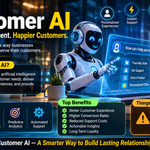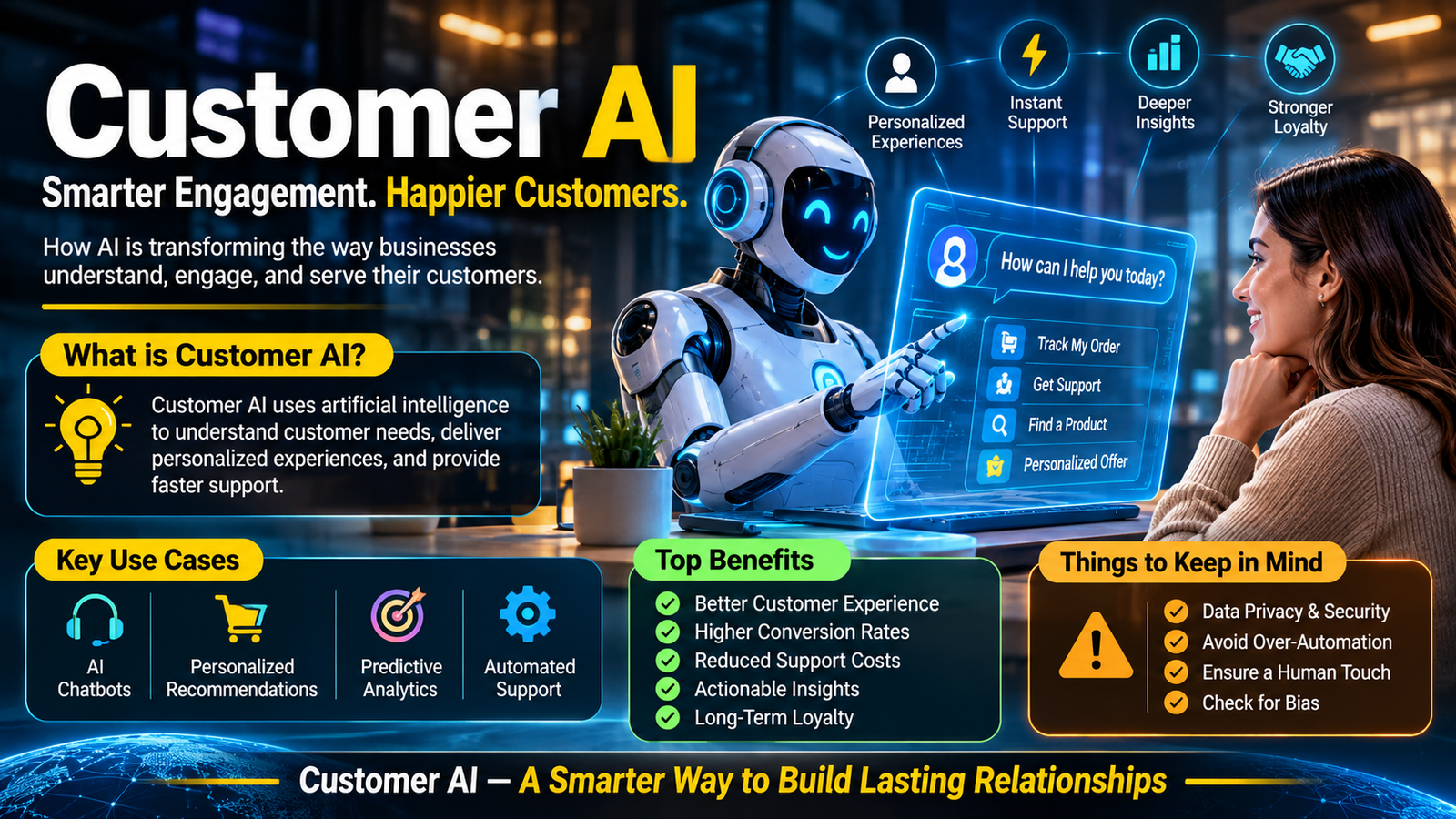
Customer AI uses artificial intelligence to help businesses understand customer needs, automate support, personalize interactions, and improve service across digital channels. It combines technologies such as machine learning, natural language processing, and AI agents to deliver faster assistance while helping human teams handle more complex customer needs.
Customer AI at a Glance
- Smarter customer support: AI assistants answer common questions and resolve routine requests.
- Personalized experiences: Machine learning helps businesses tailor recommendations and communication.
- Automated workflows: AI agents can retrieve information, update records, and execute approved actions.
- Better customer insights: AI analyzes conversations, feedback, and behavioral patterns.
- Human collaboration: Support employees can use AI for summaries, suggested responses, and case prioritization.
- Important limitations: Accuracy, privacy, integration costs, and human oversight remain essential considerations.
What Is Customer AI?
Customer AI refers to the use of artificial intelligence across customer-facing business operations. It helps organizations understand customer behavior, respond to inquiries, automate repetitive tasks, and deliver more relevant experiences.
Rather than relying entirely on manual support and predefined automation, businesses can use AI systems to interpret customer requests and respond based on available information.
For example, an online retailer might use customer AI to answer questions about delivery times, identify suitable products, check order information, and guide customers through returns.
A financial services company might use similar technology to explain account procedures, categorize service requests, and direct customers toward the appropriate department.
The technology covers several connected areas:
- AI-powered customer service
- Conversational AI and virtual assistants
- Customer relationship management (CRM)
- Predictive customer analytics
- Personalized marketing
- Automated customer experience workflows
- AI-powered sales and customer engagement
An important distinction is that customer AI does not refer to one specific software product. It describes a broader category of technologies and applications.
It also does not necessarily replace human customer service representatives. In many implementations, AI handles routine interactions while employees manage sensitive, complicated, or unusual situations.
How Does Customer AI Work?
Customer AI combines several technologies to understand requests, retrieve relevant information, and perform appropriate actions.
The exact architecture depends on the platform and business requirements. However, most implementations follow a similar process.
1. Collecting Customer Information
AI systems receive information from customer interactions and connected business platforms.
Common sources include:
- Website conversations
- Support tickets
- CRM records
- Purchase histories
- Customer feedback
- Email communications
- Product documentation
- Previous support interactions
The quality and relevance of this information directly affect the usefulness of AI-generated responses.
Businesses should collect only the information necessary for the intended task.
2. Understanding Customer Intent
Natural language processing (NLP) helps AI systems interpret everyday language.
For example, a customer might write:
“My package was supposed to arrive yesterday. Can you check where it is?”
An AI assistant can identify several important details:
- The customer has a delivery concern.
- The order may be delayed.
- The customer wants tracking information.
- An order lookup may be necessary.
Modern systems can also use large language models (LLMs) to understand context and generate natural responses.
3. Retrieving Relevant Information
After understanding a request, the system retrieves information from approved sources.
These sources might include product manuals, company policies, order databases, and knowledge bases.
Some platforms use retrieval-augmented generation (RAG). This approach allows an LLM to reference external information instead of relying entirely on knowledge learned during training.
RAG can improve relevance, but it does not guarantee factual accuracy. Retrieved documents may be outdated, incomplete, or contradictory.
4. Generating a Response or Taking Action
The system can respond directly or perform an approved workflow.
Depending on its permissions and integrations, an AI agent might:
- Check an order status.
- Create a support ticket.
- Update customer information.
- Recommend a troubleshooting step.
- Schedule an appointment.
- Route a request to a specialist.
This is an important difference between a basic chatbot and a more capable AI agent.
A chatbot primarily communicates. An AI agent may also interact with external systems to complete a task.
5. Escalating When Necessary
Not every customer request should be handled automatically.
A reliable customer AI implementation needs clear escalation rules.
For example, complaints involving suspected fraud, account security, complex refunds, or sensitive personal circumstances may require human attention.
The system should transfer the conversation with its relevant context so customers do not need to explain everything again.
Technical context: IBM’s explanations of AI in customer service and AI agents describe these technologies as tools for understanding requests, automating workflows, and improving service operations. IBM+1
Key Features of Customer AI
Not every platform offers the same capabilities. Nevertheless, several features commonly define modern customer AI solutions.
Intelligent Chatbots and Virtual Assistants
AI chatbots provide conversational support through websites, mobile applications, and messaging channels.
They can answer frequently asked questions, explain product features, and guide customers through routine processes.
Unlike traditional rule-based bots, generative AI assistants can interpret variations in wording and respond more naturally.
However, their performance depends on the quality of their knowledge sources and system configuration.
AI-Powered Personalization
Customer AI can analyze behavioral information to identify patterns and preferences.
Businesses can use these insights to personalize:
- Product recommendations
- Promotional messages
- Website experiences
- Customer onboarding
- Follow-up communications
- Relevant support content
Personalization should remain useful rather than intrusive. Excessive tracking or poorly targeted recommendations can damage customer trust.
Predictive Customer Analytics
Machine learning models can identify patterns in historical customer data.
Businesses may use predictive analytics to estimate:
- Customer churn risk
- Purchase likelihood
- Demand patterns
- Customer lifetime value
- Potential service problems
These predictions are estimates, not guaranteed outcomes. Their reliability depends on data quality, model design, and changing customer behavior.
Automated Customer Support
AI agents can perform specific support tasks through connected applications.
For example, an AI agent might retrieve an order record, check a delivery status, and provide an update.
More advanced workflows can combine several actions into one process.
Businesses must carefully control which actions an agent can perform. Access to refunds, payments, account changes, and sensitive records requires additional safeguards.
Sentiment and Conversation Analysis
AI can analyze customer messages to identify frustration, satisfaction, urgency, or recurring complaints.
Support managers can use these insights to identify service problems and improve response strategies.
Sentiment analysis is not a perfect measurement of emotion. Sarcasm, cultural differences, language variation, and limited context can affect results.
Main Use Cases of Customer AI
Customer AI has applications across industries. Its value depends on the type of customer interaction and the complexity of the business process.
1. Ecommerce and Online Retail
What Is Business Agent in Google Merchant Center?
ignitingbusiness.com
Online retailers manage large numbers of product inquiries, delivery questions, and return requests.
Customer AI can help by:
- Recommending products based on customer preferences.
- Answering questions about product availability.
- Providing order tracking information.
- Explaining return and exchange policies.
- Identifying frequently reported product problems.
For example, a customer shopping for headphones could ask an AI assistant to compare battery life, compatibility, and pricing.
The assistant could retrieve product information and present relevant options without requiring a human representative.
2. Banking and Financial Services
Financial institutions can use customer AI to improve routine customer interactions.
Potential applications include:
- Explaining banking procedures.
- Answering general account questions.
- Helping customers navigate digital banking services.
- Categorizing service requests.
- Identifying unusual patterns for further investigation.
However, financial applications require particularly strong security controls.
AI should not independently make high-impact financial decisions without appropriate authorization, validation, and oversight.
3. Healthcare and Patient Services
Healthcare organizations can use AI assistants to support administrative communication.
Examples include appointment scheduling, answering general questions about clinic procedures, and directing patients toward relevant departments.
AI can also help staff organize incoming requests and summarize administrative conversations.
Clinical decisions and urgent medical assessments require qualified healthcare professionals. Customer-facing AI should not present itself as a replacement for medical expertise.
4. Telecommunications
Telecommunication companies receive frequent questions about billing, connectivity, service interruptions, and subscription changes.
Customer AI can help customers:
- Understand billing information.
- Troubleshoot common connectivity problems.
- Explore available service plans.
- Check reported network disruptions.
- Submit technical support requests.
When integrated with operational systems, an AI agent may also retrieve service information and initiate approved troubleshooting workflows.
5. Travel and Hospitality
Hotels, airlines, and travel companies can use customer AI to simplify communication.
Typical applications include:
- Booking information.
- Reservation changes.
- Travel policy explanations.
- Hotel service requests.
- Frequently asked questions.
- Multilingual customer assistance.
For complicated travel disruptions or exceptional circumstances, human support remains important.
Benefits of Customer AI for Businesses
Customer AI can improve operational efficiency, but its benefits depend on implementation quality.
Faster Customer Responses
AI assistants can respond to common inquiries without waiting for a human representative to become available.
This is particularly useful during busy periods and outside normal business hours.
Faster responses do not automatically mean better service. Businesses should also measure whether customers receive accurate and complete solutions.
Improved Operational Efficiency
Support employees often spend significant time answering repetitive questions.
AI can automate suitable tasks and allow employees to focus on more complicated requests.
This can reduce repetitive workloads and help teams manage increasing support volumes.
Consistent Customer Communication
AI systems can use approved company information to provide consistent answers.
For example, an assistant connected to an updated return policy can explain the same policy across multiple customer conversations.
However, consistency depends on maintaining accurate knowledge sources and preventing outdated information from being retrieved.
Better Customer Insights
AI can analyze large volumes of customer interactions more efficiently than manual review alone.
Businesses can identify recurring complaints, common product questions, and potential service improvements.
These insights can inform product development, marketing strategies, and support operations.
Greater Scalability
Human support teams have practical capacity limits.
AI can handle multiple conversations simultaneously, although system capacity, integration performance, and service quality still matter.
Businesses can expand automated support without increasing human staffing at the same rate.
More Personalized Experiences
AI can use permitted customer information to make interactions more relevant.
A returning customer might receive assistance based on an existing support case rather than repeating the entire issue.
Personalization should respect customer consent, privacy expectations, and applicable data protection requirements.
Customer AI vs. Traditional Customer Service
Traditional customer service typically depends on human representatives, predefined rules, and conventional ticketing systems.
Customer AI introduces systems that can interpret natural language, retrieve information, and automate selected workflows.
| Area | Traditional Customer Service | Customer AI |
|---|---|---|
| Communication | Primarily human-led | Human and AI interactions |
| Response availability | Depends on staffing | Can support continuous availability |
| Routine inquiries | Handled manually or through basic automation | Can be handled by AI assistants |
| Personalization | Based on employee knowledge and CRM data | Can use AI-driven analysis |
| Complex problems | Human representatives | AI assistance with human escalation |
| Data analysis | Often requires manual reporting | Can analyze large interaction volumes |
| Scalability | Requires additional staffing | Can automate suitable interactions at scale |
The two approaches are not mutually exclusive.
A hybrid model often makes more practical sense. AI handles repetitive work, while human employees provide judgment, empathy, and accountability.
Popular Customer AI Platforms in 2026
Several established software companies offer AI-powered customer service and engagement capabilities.
These platforms differ in their integrations, pricing structures, automation capabilities, and intended customers.
The following comparison describes product positioning and publicly advertised pricing. It is not an independent performance ranking.
Home – AI Agents Directory | aiagentsly
1. Intercom Fin
Conversational customer support and AI-powered resolution workflows.
Published AI pricing: $0.99 per outcome. Intercom Help+1
Limitation: Outcome-based billing requires careful usage forecasting.
Official website
Oakstone & Zendesk | SaaS Executive Search
2. Zendesk AI
Customer support automation, ticket management, and AI-assisted service operations.
Published automated resolution pricing: $1.50 committed or $2 pay-as-you-go. Starting from $19/month
Limitation: Total costs also depend on the selected subscription and usage.
Official website
Salesforce Agentforce Pricing & Reviews 2026 | Techjockey.com
3. Salesforce Agentforce
AI agents designed to work with CRM information and business workflows.
Published consumption pricing: $2 per conversation or $500 per 100,000 Flex Credits. Salesforce
Limitation: Organizations should evaluate CRM requirements, licensing, and implementation complexity.
Official website
Freshdesk AI Helpdesk: Freddy AI Copilot for Customer Service
4. Freshdesk Freddy AI
AI-powered support, ticket management, and automated customer interactions.
Freshdesk Growth lists $19 per agent/month annually, with 500 AI agent sessions included; additional sessions cost $49 per 100. Freshworks
Limitation: Additional session packs and other features affect the total cost.
Official website
Platform Comparison
| Platform | Target User | Key Strength | Pricing Transparency | Main Consideration |
|---|---|---|---|---|
| Intercom Fin | SaaS and digital businesses | Conversational AI | Published usage rate | Outcome costs |
| Zendesk AI | Support teams | Ticketing and automation | Published usage rates | Subscription plus AI costs |
| Agentforce | CRM-driven enterprises | CRM-connected agents | Multiple published models | Implementation complexity |
| Freddy AI | Growing support teams | Helpdesk automation | Published plans and add-ons | Session consumption |
Editorial recommendation: Choose a platform based on your existing technology stack, customer volume, workflow requirements, and total cost of ownership. A published AI price alone does not establish which solution will be more economical.
Customer AI Pricing: What Does It Cost?
There is no universal price for customer AI.
Software vendors use different pricing structures, and the final expense depends on the platform, number of users, automation volume, and required integrations.
Common pricing models include:
Per-Seat Pricing
Businesses pay a monthly fee for each employee using the platform.
This model is common in helpdesk and CRM software.
It can make budgeting easier when staffing levels remain relatively stable.
Per-Resolution Pricing
Some providers charge when an AI system successfully resolves a customer interaction.
Intercom Fin, for example, advertises $0.99 per qualifying outcome. Its definition of an outcome includes more than one type of completed interaction. Intercom Help
Businesses should understand exactly which outcomes are billable.
Per-Conversation Pricing
Other providers charge for each AI conversation.
Salesforce publishes a $2 per conversation option for Agentforce. Salesforce
A short inquiry and a complicated conversation may therefore carry the same base conversation charge under this model.
Usage-Based Pricing
Some platforms charge according to sessions, credits, actions, or other consumption units.
This makes usage monitoring especially important.
For example, Freshdesk lists additional Freddy AI Agent sessions at $49 per 100 sessions. Its documentation also explains that sessions operate within a 24-hour window. crmsupport.freshworks.com+1
Hidden Costs Businesses Should Consider
The advertised AI price may not represent the full implementation cost.
Evaluate these expenses before purchasing:
- Existing helpdesk or CRM subscriptions.
- Additional employee licenses.
- Integration and implementation work.
- API usage and third-party services.
- AI session or resolution overages.
- Premium security and governance features.
- Knowledge base preparation.
- Testing, maintenance, and monitoring.
A practical approach is to estimate the monthly cost using expected interaction volume rather than relying on a vendor’s starting price.
Limitations and Challenges of Customer AI
Despite its advantages, customer AI introduces operational and technical challenges.
Businesses should understand these limitations before deploying automated customer interactions.
1. Incorrect or Misleading Responses
Generative AI can produce convincing but inaccurate information. This behavior is commonly called hallucination.
For customer support, an incorrect response about pricing, refunds, warranties, or account procedures can create serious problems.
Businesses should connect AI systems to reliable knowledge sources and restrict unsupported answers.
2. Customer Data Privacy
Customer AI may process names, contact details, purchase histories, account information, and conversation records.
Organizations must understand:
- What information the system collects.
- Where customer information is stored.
- How long conversation records are retained.
- Whether customer data is used for model training.
- Which third parties can access the information.
- Whether customers can request data deletion.
Privacy requirements vary by jurisdiction and industry.
Businesses should also examine vendor data-processing agreements and applicable regulatory obligations.
3. Limited Human Understanding
AI can interpret language and identify emotional signals, but it does not experience human emotions.
It may misunderstand sarcasm, frustration, cultural expressions, or complicated personal circumstances.
Sensitive conversations should have a clear path to human assistance.
4. Integration Difficulties
Customer AI becomes more useful when connected to existing business applications.
However, integration can be complicated.
Legacy software, incompatible APIs, inconsistent customer records, and outdated databases can prevent systems from exchanging information correctly.
An AI assistant that cannot retrieve accurate order information may provide little practical value.
5. Unexpected Operating Costs
Usage-based pricing can become expensive when interaction volumes increase.
Businesses may also underestimate implementation, testing, maintenance, and integration expenses.
Regular cost monitoring is necessary to avoid unexpected spending.
6. Customer Trust and Transparency
Some customers prefer speaking with a person, particularly when dealing with complicated problems.
Organizations should clearly communicate when customers are interacting with AI.
They should also make human support accessible instead of forcing customers through endless automated conversations.
Customer AI Privacy and Security: What Businesses Should Check
Security should be part of the initial platform evaluation, not an afterthought.
A customer AI system may interact with several applications containing sensitive business and customer information.
Before deployment, examine the following areas.
| Security Area | What to Verify |
|---|---|
| Data encryption | Encryption during transmission and storage |
| Access controls | Permissions based on employee roles |
| Data retention | Clear storage and deletion policies |
| Model training | Whether customer information is used for training |
| API security | Authentication and permission restrictions |
| Audit logs | Records of system activity and automated actions |
| Human oversight | Approval processes for sensitive actions |
| Compliance | Relevant regulatory and contractual requirements |
Does SOC 2 Mean Customer Data Is Never Retained?
No.
SOC 2 is an independent examination framework that evaluates controls related to areas such as security, availability, and confidentiality.
It does not automatically establish that a provider offers Zero Data Retention (ZDR).
ZDR refers to specific data-handling arrangements that restrict the retention of submitted information.
Businesses should verify the actual retention policy, contractual commitments, model-provider arrangements, and available configuration options.
Why AI Permissions Matter
An AI agent connected to a CRM may have access to customer records and internal information.
Giving it unrestricted permissions can create unnecessary risks.
A better approach is to apply the principle of least privilege.
For example, an agent that only needs to check an order should not automatically receive permission to modify payment details or issue refunds.
How to Implement Customer AI Successfully
A successful implementation requires more than installing a chatbot.
Businesses should introduce AI through a structured process.
Step 1: Identify a Specific Customer Problem
Start with a measurable business requirement.
Examples include:
- Reducing repetitive support inquiries.
- Improving response times.
- Automating order-status requests.
- Helping employees find customer information.
- Identifying common customer complaints.
Avoid automating every customer interaction at once.
Step 2: Prepare Reliable Customer Data
Review existing knowledge bases, support documentation, CRM records, and company policies.
Remove outdated information and resolve contradictory instructions.
Poor-quality information can produce unreliable AI responses.
Step 3: Select the Appropriate Technology
Compare platforms according to your requirements.
Consider:
- Supported communication channels.
- CRM and helpdesk integrations.
- Automation capabilities.
- Language support.
- Data retention controls.
- Human escalation options.
- Pricing structure.
A small business may need a straightforward support assistant, while a large enterprise may require advanced workflow orchestration.
Step 4: Define AI Permissions
Decide which tasks the system can perform independently.
For example:
| Task | Suggested Control |
|---|---|
| Answer common questions | Automated |
| Retrieve order information | Automated with access controls |
| Create support tickets | Automated |
| Change customer account details | Restricted or verified |
| Issue large refunds | Human approval |
| Handle sensitive complaints | Human escalation |
These are suggested governance choices, not universal rules.
Step 5: Test Before Launch
Test the AI system using realistic customer questions.
Include unusual requests, incomplete information, contradictory instructions, and potentially harmful inputs.
Check whether the assistant:
- Provides accurate answers.
- Retrieves the correct information.
- Recognizes uncertainty.
- Escalates appropriately.
- Respects access permissions.
- Avoids exposing private information.
Step 6: Monitor Performance
After launch, continuously evaluate the system.
Important performance indicators include:
- Customer satisfaction (CSAT).
- First-contact resolution.
- Average resolution time.
- Automated resolution rate.
- Human escalation rate.
- Repeat contact rate.
- Cost per resolved interaction.
- Incorrect answer rate.
A high automation rate is not necessarily a sign of success. If customers repeatedly contact support after receiving automated answers, the system may simply be shifting work rather than resolving it.
Customer AI vs. Chatbots vs. AI Agents
These terms are related, but they describe different levels of capability.
| Technology | Primary Function | Example |
|---|---|---|
| Traditional chatbot | Follows predefined conversation rules | Answers fixed FAQs |
| AI chatbot | Understands natural language and generates responses | Explains product policies |
| AI assistant | Helps users complete information-based tasks | Finds relevant account guidance |
| AI agent | Executes tasks through connected tools | Retrieves an order and initiates an approved workflow |
| Customer AI | Broader category covering customer-facing AI applications | Support, personalization, analytics, and automation |
The distinction matters because businesses sometimes purchase a chatbot expecting the capabilities of an autonomous AI agent.
Before selecting software, determine whether the actual requirement is answering questions, assisting employees, or completing business transactions.
Who Should Use Customer AI?
Customer AI can benefit organizations that manage frequent customer interactions or large amounts of customer information.
However, the right implementation depends on business size and operational complexity.
Small Businesses
Small businesses can use AI assistants to answer common questions, explain services, and manage routine customer inquiries.
A simple platform with transparent pricing may be sufficient.
Ecommerce Companies
Online stores can benefit from automated product assistance, order tracking, and return-policy guidance.
Integration with ecommerce and order-management systems is particularly important.
SaaS Companies
Software businesses can use customer AI for onboarding, troubleshooting, subscription questions, and technical support.
A well-maintained product knowledge base can improve response quality.
Enterprise Organizations
Large organizations may need more advanced AI agents connected to CRM, ERP, contact center, and internal knowledge systems.
These deployments require stronger governance, access controls, testing, and cost management.
Marketing and Customer Experience Teams
Marketing and CX professionals can use AI-driven analysis to understand customer preferences, identify behavioral patterns, and improve communication.
However, personalization must remain consistent with privacy expectations and customer consent.
The Future of Customer AI in 2026 and Beyond
Customer AI is moving beyond simple automated conversations.
One important development is the growing use of agentic AI systems that can perform multi-step tasks through connected business applications.
Instead of simply answering a question about an order, an agent might retrieve the relevant record, check delivery information, and initiate an approved support workflow.
Another emerging development is the rise of personal AI agents acting on behalf of customers.
These agents may eventually compare products, contact businesses, submit complaints, and negotiate routine service requests.
This creates a different challenge for businesses. Customer-facing systems may increasingly interact with other AI systems rather than directly with people.
A November 2026 analysis by Deloitte Digital discusses how personal AI agents are beginning to contact companies on customers’ behalf, including through calls, messages, and complaint processes. Deloitte Digital
Several developments deserve attention:
More Capable AI Agents
AI systems are becoming increasingly focused on completing tasks rather than simply generating responses.
Businesses will need to define which actions agents can perform and under what conditions.
Multichannel Customer Experiences
Customers expect consistent assistance across websites, mobile applications, email, messaging, and voice channels.
AI platforms will need to maintain relevant context as conversations move between channels.
Greater Focus on AI Governance
As automated systems receive access to business applications, organizations will need stronger controls over permissions, data handling, monitoring, and accountability.
Human and AI Collaboration
The future of customer service is unlikely to involve only humans or only AI.
A hybrid approach can combine AI’s ability to process repetitive requests with human judgment in situations requiring empathy, flexibility, and responsibility.
The competitive advantage will depend less on deploying the most visible AI technology and more on solving real customer problems reliably.
Frequently Asked Questions
1. What is customer AI?
Customer AI refers to artificial intelligence technologies used to improve customer service, personalization, engagement, and business interactions. It includes AI chatbots, virtual assistants, predictive analytics, and autonomous customer service agents.
2. How does customer AI improve customer experience?
Customer AI improves customer experience by providing faster responses, personalized recommendations, automated assistance, and more convenient access to information. It can also help businesses identify recurring problems and improve their services.
3. Is customer AI suitable for small businesses?
Yes. Small businesses can use customer AI to answer frequently asked questions, assist with product inquiries, manage basic support requests, and automate repetitive tasks. The best solution depends on budget, customer volume, and integration requirements.
4. What is the difference between customer AI and a chatbot?
A traditional chatbot generally follows predefined rules, while an AI chatbot can interpret natural language and generate contextual responses. More advanced AI agents can also retrieve information and execute approved actions through connected business applications.
5. Is customer AI safe for handling personal information?
Customer AI can be used with appropriate privacy and security controls, but safety depends on the implementation and provider. Businesses should examine data retention, encryption, access permissions, model-training policies, and applicable compliance requirements before processing customer information.
Conclusion
Customer AI is changing how businesses communicate with customers, manage support operations, and deliver personalized experiences.
Its capabilities extend beyond conventional chatbots. Modern AI systems can interpret requests, retrieve business information, analyze customer interactions, and execute approved workflows.
However, successful adoption requires more than choosing a popular platform. Businesses must evaluate data quality, privacy protections, integration requirements, operating costs, and human escalation procedures.
For small companies, a focused AI assistant may provide sufficient value. Larger organizations may benefit from integrated AI agents connected to their existing CRM and customer service infrastructure.
Ultimately, the most effective customer AI strategy is one that solves genuine customer problems, maintains trust, and keeps human oversight where it matters.