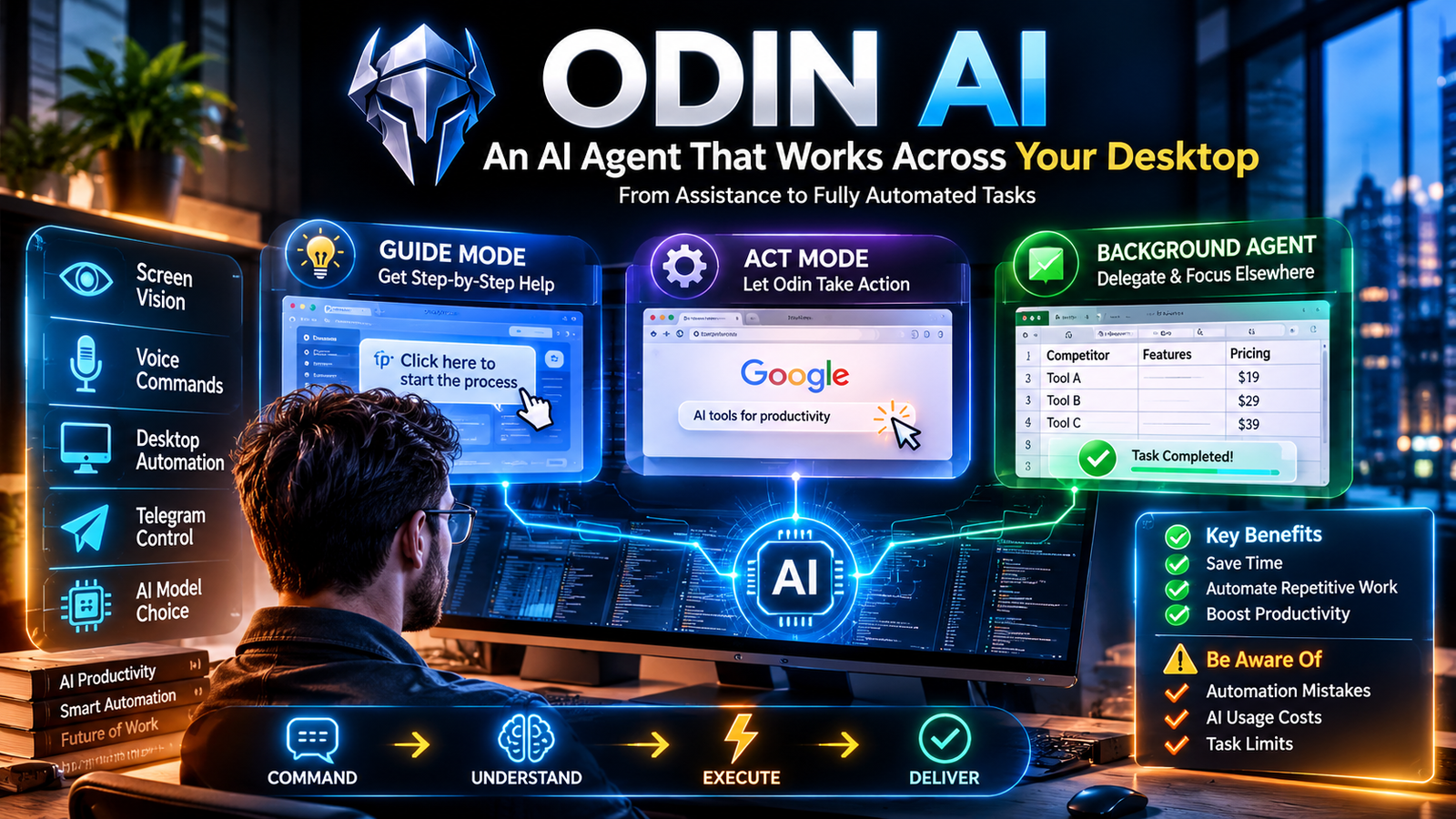
Odin AI is a desktop-based AI agent designed to operate your computer, automate browser activities, research information, and complete multi-step digital tasks. Unlike conventional AI chatbots, it can interact with applications and files on your machine through screen vision, keyboard and mouse control, and background task execution.
Odin AI at a Glance
Odin AI Review: The Desktop AI Assistant That Actually Does the Work
Odin AI
Desktop AI agent by Hey Odin AI
Available product
Official product website
- Primary purpose: Desktop task automation.
- Operating systems: Windows and macOS, according to the vendor.
- Interaction: Voice, text, screen vision, keyboard, and mouse.
- Automation: Guide, Act, and Background Agent modes.
- Remote control: Telegram integration.
- Payment model: Vendor advertises one-time software licensing, with separate AI model usage costs.
- Odin AI focuses on completing tasks rather than simply generating answers.
- It works with the user’s existing desktop and browser sessions.
- Guide Mode provides assistance without fully handing over control.
- Act Mode allows direct interaction with the computer.
- Background Agent Mode handles delegated tasks while the user is away.
- Its practical value depends on task reliability, model costs, and human supervision.
Product identification note: This article covers the desktop product marketed at Hey Odin AI, not the separate enterprise automation platform at GetOdin.ai. These are different products sharing a similar name.
What Is Odin AI?
Odin AI is an agentic AI desktop assistant designed to perform practical computer-based work.
Traditional AI assistants usually generate text, explain concepts, or recommend actions. Users must then transfer those recommendations into their applications and complete the actual work.
Odin attempts to reduce that manual effort.
Instead of asking an AI chatbot how to research competitors, you can delegate the research process. Odin can navigate websites, collect information, organize files, and prepare deliverables.
The central idea is simple: move from asking AI for instructions to delegating tasks to an AI agent.
According to its official product website, Odin is designed for Windows and macOS computers. It uses the user’s desktop environment rather than relying exclusively on a separate hosted browser.
This distinction makes it relevant to people whose workflows involve multiple applications, local documents, and browser-based services. get.heyodinai.com+1
Understanding Odin AI’s Desktop Approach
Odin belongs to the growing category of computer-use AI agents.
These systems combine language models with tools that let them interact with graphical interfaces.
For example, a conventional chatbot might explain how to create a spreadsheet. A computer-use agent can potentially open a spreadsheet application, enter information, organize columns, and save the result.
Odin’s approach centers on three capabilities:
- Screen understanding: Interpreting visible information on the desktop.
- Computer interaction: Using keyboard and mouse actions to complete operations.
- Task delegation: Executing multiple steps based on a natural-language instruction.
However, computer interaction does not guarantee perfect execution. Website changes, unexpected pop-ups, application errors, and unclear instructions can interrupt automated workflows.
How Does Odin AI Work?
Odin AI uses a task-oriented workflow. Users describe the desired outcome, and the agent attempts to complete the necessary steps.
Odin AI Review: The Desktop AI Assistant That Actually Does the Work
1. Give Odin a Task
Users can communicate through voice or text.
For example:
“Research 15 competitors in the project management software market and organize their pricing, features, and website links in a spreadsheet.”
The instruction describes the final outcome rather than requiring the user to specify every individual click.
2. Odin Interprets the Screen
The desktop agent uses screen vision to understand the current application and its visible content.
This allows it to identify interface elements, navigate pages, and determine what action may be necessary next.
Screen understanding is particularly useful when a workflow involves applications that do not offer convenient automation APIs.
3. It Executes the Required Actions
Depending on the task and selected mode, Odin can interact with applications through keyboard and mouse operations.
Possible activities include:
- Opening websites.
- Searching for information.
- Filling forms.
- Navigating browser pages.
- Downloading files.
- Organizing documents.
- Entering information into spreadsheets.
4. It Produces a Deliverable
The objective is to return completed work rather than just instructions.
That might include an organized spreadsheet, downloaded research materials, collected information, or prepared content.
Users should still review important outputs for missing information, incorrect entries, and unsupported conclusions.
5. Users Maintain Control
Odin’s product pages describe controls intended to let users interrupt execution and regain control.
The vendor also describes automatic pausing when the user takes over the mouse or keyboard.
These controls are important because desktop agents can make mistakes that affect real files and accounts. get.heyodinai.com+1
Key Features of Odin AI
Odin’s main selling point is its ability to interact with the desktop. Its different operating modes support different levels of automation.
1. Guide Mode
Guide Mode provides instructions directly within the desktop environment.
Instead of automatically completing every action, Odin can guide users through the steps required to accomplish a task.
This can be useful for:
- Learning unfamiliar software.
- Understanding complicated workflows.
- Following multi-step procedures.
- Getting assistance with application navigation.
It is particularly relevant to beginners who want AI assistance without immediately delegating full control.
2. Act Mode
Act Mode moves beyond recommendations and allows Odin to interact with the computer.
It can perform actions such as clicking interface elements, typing information, and filling forms.
For example, a freelancer might ask Odin to organize research gathered from several websites.
Rather than manually copying every detail, the agent can attempt to navigate the relevant pages and transfer information into a structured document.
The user should supervise actions involving payments, account settings, confidential information, or irreversible changes.
3. Background Agent Mode
Background Agent Mode is one of Odin’s most important features.
It allows users to delegate tasks that can continue while they focus on other activities.
Potential applications include:
- Collecting market research.
- Downloading relevant documents.
- Preparing spreadsheets.
- Gathering competitor information.
- Organizing files.
- Completing repetitive administrative work.
The vendor advertises up to five background tasks per day on the Personal license, with one task running at a time. Higher limits are available through its Pro Unlimited offering. get.heyodinai.com+1
4. Screen Vision and Voice Interaction
Odin combines visual desktop context with voice-based interaction.
Users can issue instructions using a push-to-talk hotkey rather than typing every command.
This creates a more conversational workflow.
However, voice recognition and screen interpretation can still produce mistakes, particularly when instructions are ambiguous or an interface contains unfamiliar elements.
5. Telegram Remote Control
Another interesting feature is Telegram integration.
The vendor describes a workflow in which users send instructions from their phones while Odin executes tasks on their desktop computer.
This can help people who want to delegate work without sitting directly in front of their computers.
The important distinction is that the desktop must remain available to execute the task. Remote control does not mean Odin independently runs every desktop operation in the cloud. get.heyodinai.com+1
6. AI Model Choice
Odin advertises a bring-your-own-AI-engine approach.
Rather than treating its own interface as the only possible source of intelligence, the product allows users to connect an AI provider or model account.
This approach can provide flexibility, but it also introduces an additional cost consideration.
The software license and the model usage are separate parts of the overall expense.
Users should check which providers and models are currently supported before purchasing.
What Can You Use Odin AI For?
Odin’s strongest potential use cases involve repetitive digital tasks with reasonably clear instructions and measurable outputs.
How to Access Perplexity Computer: The Step-by-Step Guide
Market Readiness: How To Achieve It Fast (Complete Guide)
Trouver une niche Amazon FBA : 2 méthodes redoutables ! – Oseille TV
10
Research and Data Collection
Researchers and business owners can delegate information-gathering tasks.
Examples include:
- Comparing competitor websites.
- Collecting product specifications.
- Gathering supplier information.
- Summarizing online materials.
- Preparing market research spreadsheets.
The output still needs verification, especially when the information influences business decisions.
Content Creation
Bloggers and content creators can use Odin to reduce preparation time.
Potential workflows include researching article topics, gathering references, organizing content ideas, preparing outlines, and downloading supporting materials.
It may also help with repetitive publishing-related tasks.
However, AI-generated content should receive editorial review before publication. Research quality, factual accuracy, and originality remain human responsibilities.
Digital Marketing
Marketing professionals often work across several websites and applications.
Odin may help with:
- Competitor research.
- Campaign preparation.
- Lead research.
- Content organization.
- Product information collection.
- Drafting outreach materials.
Its usefulness depends on whether the agent can reliably navigate the specific marketing platforms involved.
E-commerce Operations
Online sellers can potentially use Odin for routine store-management activities.
Examples include collecting supplier prices, organizing product information, researching competing listings, and preparing product descriptions.
It should not be trusted to make consequential pricing or purchasing decisions without approval.
Freelancing and Virtual Assistance
Freelancers can use desktop automation to reduce repetitive administrative work.
A virtual assistant, for example, might delegate initial research, document preparation, spreadsheet organization, and information gathering.
This could create more time for client communication and higher-value work.
However, faster task execution does not automatically guarantee more clients or additional income.
Education and Research
Students and researchers can potentially use Odin to organize study materials, collect references, summarize documents, and prepare comparison tables.
Academic users should independently verify sources and avoid submitting unreviewed AI-generated work.
Odin AI Pricing: What Does It Cost?
Pricing deserves careful attention because Odin separates its software license from the AI usage needed to operate it.
The official product pages advertise a one-time payment model rather than a standard monthly software subscription. However, the purchase amount can vary across offers and promotional packages.
The vendor also advertises different task limits depending on the license.
Personal vs. Pro Unlimited
| Feature | Personal | Pro Unlimited |
|---|---|---|
| Desktop installation | 1 computer | Up to 3 computers |
| Guide Mode | Included | Included |
| Act Mode | Included | Included |
| Background tasks | 5 per day | Unlimited |
| Concurrent background tasks | 1 | Unlimited |
| Telegram tasks | 5 per day | Unlimited |
| Commercial use | Included | Included |
| AI model usage | Separate | Separate |
| Monthly software fee | $0 advertised | $0 advertised |
Based on the vendor’s published plan comparison. Confirm the current checkout terms before purchasing. get.heyodinai.com+1
Additional AI Usage Costs
Odin’s software purchase does not necessarily cover the cost of every AI request.
Users connect their own AI account, which means the selected provider may charge separately.
The product’s sales page estimates that heavy daily usage on its recommended model may cost approximately $0.20–$0.50.
This is a vendor-provided estimate, not a guaranteed rate. Actual expenses depend on model selection, task complexity, usage volume, and provider pricing. get.heyodinai.com+1
What Should Buyers Check?
Before purchasing, examine these details:
- The exact license price at checkout.
- Whether the payment is genuinely one-time.
- Which AI providers require separate accounts.
- Whether model usage has additional charges.
- The number of permitted background tasks.
- The duration of software maintenance and updates.
- The refund policy and license conditions.
The vendor describes a five-year maintenance period and a 14-day refund guarantee on its sales materials. Read the applicable purchase terms rather than assuming every offer has identical conditions. get.heyodinai.com+1
Odin AI Privacy and Security: What Users Should Know
Privacy is especially important for desktop AI agents because they may interact with local documents, browser sessions, and business applications.
Odin promotes a local-computer execution approach.
According to its product materials, the desktop application, screen reading, and browser automation run on the user’s own machine. However, AI requests are sent to the selected model provider.
This distinction matters.
Local execution does not automatically mean that all information stays on your computer.
How Does Odin Handle Browser Logins?
Odin says it works inside existing Chrome sessions.
Its sales materials state that it does not type, see, or store passwords or payment-card details. Instead, users sign in to websites themselves, allowing the agent to work within those authenticated sessions. get.heyodinai.com+1
This approach may reduce the need to share credentials directly with a remote automation environment.
However, an authenticated browser session still provides access to sensitive information. Users should consider what the agent can see and modify.
Important Privacy Considerations
Before connecting personal or business accounts, investigate:
- Which AI provider receives prompts and screen-related information.
- Whether screenshots or extracted content are stored.
- Whether the selected model provider retains submitted data.
- How conversation history is managed.
- Whether local files are uploaded during particular workflows.
- What permissions are required.
- Whether sensitive actions require confirmation.
The available product descriptions do not independently establish a universal Zero Data Retention guarantee.
Likewise, local desktop execution should not be confused with independently verified security certification.
For organizations handling confidential records, a formal review of the vendor’s privacy policy, security documentation, and model-provider agreements is essential.
Benefits of Using Odin AI
Odin’s desktop-first approach offers several potential advantages.
Reduces Repetitive Computer Work
One of its biggest benefits is the ability to delegate repetitive activities.
Instead of manually navigating several websites, users can describe the desired result and let the agent attempt the workflow.
Works Beyond a Single Browser Tab
Many browser-based assistants operate within restricted environments.
Odin’s desktop approach is designed to work with local files and applications as well as browser activities.
This can be useful for people whose work is spread across multiple programs.
Supports Different Automation Levels
Guide, Act, and Background Agent modes offer different levels of assistance.
Users can start with guidance and move toward more autonomous task execution when appropriate.
Offers Flexible Model Selection
The advertised bring-your-own-model approach gives users more control over their preferred AI provider.
It also allows them to consider model capabilities and usage expenses separately from the software license.
Supports Remote Task Delegation
Telegram integration provides another way to send instructions without being physically present at the computer.
This can be convenient for workflows that do not require immediate human interaction.
Limitations and Potential Drawbacks
Despite its interesting approach, Odin AI is not a replacement for every type of automation software or human assistant.
Understanding its limitations is important before making a purchasing decision.
1. The Computer Must Remain Available
Odin is designed to execute desktop tasks locally.
This means the computer must remain available while background work is running.
Power interruptions, operating-system updates, network problems, and unexpected restarts can interrupt automation.
2. Automation Can Make Mistakes
Computer-use agents interpret interfaces and perform actions based on their understanding of the task.
They can misunderstand instructions, click the wrong elements, or enter incorrect information.
Complex workflows require testing and supervision.
3. AI Usage Is a Separate Expense
The one-time software license does not necessarily eliminate ongoing AI inference costs.
Heavy users should calculate the cost of their selected model and expected workload before choosing a plan.
4. Background Task Limits Matter
The Personal license has advertised daily limits.
Five background tasks per day and one simultaneous task may be sufficient for occasional users, but less suitable for people managing high-volume workloads.
5. Desktop Automation Is Not Always Reliable
Websites regularly change their layouts.
Buttons move, authentication requirements change, and pop-ups appear unexpectedly.
These issues can make visual automation less predictable than integrations that use stable APIs.
6. It Still Requires Human Judgment
Odin can help gather information and prepare deliverables.
It cannot guarantee that every source is accurate, every spreadsheet is correct, or every business decision is appropriate.
Human review remains necessary.
Odin AI vs. Other AI Automation Tools
Odin operates in a competitive market that includes computer-use agents, browser automation platforms, and workflow automation software.
The most useful comparison is not simply which tool has more features. It is how each platform approaches task execution.
Computer Use | ChatGPT Learn
Anthropic Computer Use – David Hariri
Zapier vs. Integrately Comparison: Pricing, Apps & AI | Zapier
6
Comparison of Popular Alternatives
| Platform | Target User | Key Strength | Pricing Transparency | Main Limitation |
|---|---|---|---|---|
| Odin AI | Freelancers and desktop users | Local desktop task execution | Vendor advertises one-time licensing | Computer must remain available |
| OpenAI computer-use tools | Developers and AI application builders | Model-driven computer interaction | API pricing | Requires implementation and integration |
| Claude computer use | Developers and technical users | Visual computer interaction | API usage pricing | Requires a suitable technical setup |
| Zapier | Businesses and marketers | App-to-app workflow automation | Published plan structure | Less suited to arbitrary desktop interaction |
| Microsoft Power Automate | Business and IT teams | Desktop and enterprise workflow automation | Published plans vary by product | Configuration can become complex |
| Browser Use | Developers | Programmable browser automation | Open-source options and usage-dependent infrastructure | Requires technical implementation |
These products are not identical alternatives. Some are development technologies, while others are complete automation platforms.
Odin AI vs. Traditional AI Chatbots
The main difference is task execution.
A traditional chatbot can explain how to research a topic or organize a spreadsheet.
Odin is designed to interact with the applications needed to complete those activities.
This makes it more relevant when the bottleneck is repetitive computer work rather than information generation.
Odin AI vs. Zapier
Zapier focuses on connecting applications through predefined triggers and actions.
For example, a business can automatically send customer information from a form into a CRM.
Odin focuses more on interacting with the desktop and completing tasks through visible interfaces.
Zapier may be more suitable for predictable, repeatable integrations. Odin may be more relevant when the work involves navigating applications manually.
Odin AI vs. Claude Computer Use
Claude’s computer-use capabilities allow developers to build systems that interact with graphical interfaces.
However, this is not the same purchasing experience as a ready-made desktop application.
Odin packages desktop interaction into a product aimed at everyday users, while Claude’s computer-use functionality is primarily a capability developers can incorporate into their own applications.
Odin AI vs. OpenAI Computer Use
OpenAI’s computer-use technology provides another approach to agentic computer interaction.
Developers can build workflows around models that interpret screenshots and generate actions.
Odin offers a more direct desktop-product experience, while OpenAI’s tools are relevant to developers building custom agent systems.
The better choice depends on whether users want an existing desktop application or a foundation for developing their own automation solution.
Who Should Use Odin AI?
Odin is most relevant to people who spend significant time completing repetitive computer-based activities.
| User Type | Potential Benefit | Suitability |
|---|---|---|
| Freelancers | Research and client deliverables | High |
| Digital marketers | Competitor and campaign research | High |
| Content creators | Research and content preparation | High |
| E-commerce sellers | Product and supplier research | High |
| Virtual assistants | Repetitive administrative work | High |
| Students | Document organization and research | Moderate |
| Enterprise IT teams | Governed automation at scale | Requires further evaluation |
| Casual chatbot users | General questions and writing | Limited |
Who May Not Need Odin?
Odin may be unnecessary for users who primarily want:
- Basic AI conversations.
- Occasional text generation.
- Simple document summaries.
- Static question-and-answer assistance.
- Predictable app integrations that existing automation tools already handle.
In these cases, a conventional AI assistant or workflow automation platform may be more practical.
Practical Example: Using Odin AI for Competitor Research
Consider a freelance digital marketer who needs to analyze competitors before preparing a client proposal.
The manual process might involve opening multiple websites, collecting pricing information, comparing services, and organizing findings in a spreadsheet.
With Odin, the user could delegate the initial research process.
Example task workflow
- Give the instructionAsk Odin to identify 15 competitors and compare their services, pricing, and positioning.
- Research websitesOdin navigates relevant websites and collects available information.
- Organize findingsIt attempts to structure the information into a spreadsheet.
- Review the resultsThe marketer checks pricing, source links, missing entries, and accuracy.
- Prepare the client deliverableThe reviewed information becomes part of a research report or proposal.
This is an illustrative workflow, not an independently verified performance benchmark.
Its value comes from reducing manual information gathering. The marketer still provides the expertise needed to interpret the findings and make recommendations.
Common Mistakes to Avoid When Using Odin AI
Desktop automation works best when users provide clear instructions and understand the risks of delegating computer access.
Avoid these common mistakes:
Giving vague instructions: Instead of saying “research competitors,” specify the number of competitors, required information, preferred sources, and output format.
Trusting every result: Check source links, numerical values, and extracted information before using the results.
Ignoring model costs: Calculate the additional expense of AI usage instead of considering only the software license.
Delegating sensitive operations: Avoid unrestricted automation involving banking, payments, account security, and confidential records.
Overlooking task limits: Check the daily and concurrent execution limits before relying on Odin for recurring work.
Skipping testing: Start with low-risk tasks before allowing the agent to interact with important business applications.
Latest Developments and Product Direction
Odin’s product positioning centers on moving AI from conversational assistance toward computer-based execution.
Its desktop product materials emphasize three modes, local computer interaction, screen vision, and remote task delegation through Telegram.
The vendor also promotes expanded task capacity through Pro Unlimited.
One important distinction is that these developments describe the Hey Odin desktop product. The separate GetOdin enterprise platform has its own agent-building, integrations, and deployment capabilities.
Because promotional pages and licensing offers can change, buyers should verify current features, compatibility, and purchase terms directly with the relevant product website. get.heyodinai.com+2
Frequently Asked Questions
1. What is Odin AI used for?
Odin AI is used to automate computer-based tasks, including online research, browser navigation, spreadsheet preparation, file organization, and repetitive administrative activities. It is designed to interact with desktop applications rather than only generate conversational responses.
2. Is Odin AI free to use?
Odin AI is marketed through paid software licenses rather than a permanently free desktop plan. Its Personal and Pro Unlimited offerings advertise one-time payments, while AI model usage may incur separate costs.
3. Does Odin AI work on Windows and Mac?
Yes. According to its official product information, Odin supports both Windows and macOS. The Personal license is advertised for one computer, while Pro Unlimited supports up to three computers.
4. Is Odin AI safe for personal and business information?
Odin says its desktop automation runs locally and uses existing browser sessions. However, AI requests are sent to the selected model provider, so users should review that provider’s data retention and privacy policies before handling confidential information.
5. Can Odin AI complete tasks without human supervision?
Odin’s Background Agent Mode is designed to execute delegated tasks without continuous user interaction. However, automation can make mistakes, so users should review important results and supervise sensitive operations.
Conclusion
Odin AI represents an interesting direction in desktop automation. Instead of simply answering questions, it attempts to interact with the applications people already use and complete practical digital tasks.
Its Guide, Act, and Background Agent modes offer different levels of assistance. Telegram integration and model choice add further flexibility.
However, its value depends on execution reliability, computer availability, model usage costs, and the quality of its results.
For freelancers, digital marketers, content creators, and professionals handling repetitive computer work, Odin is worth evaluating.
Before purchasing, test its performance on real tasks, examine the license restrictions, calculate AI usage expenses, and review its privacy arrangements.
The most important question is not how many features an AI agent advertises. It is whether it can consistently complete useful work with acceptable accuracy and human oversight.