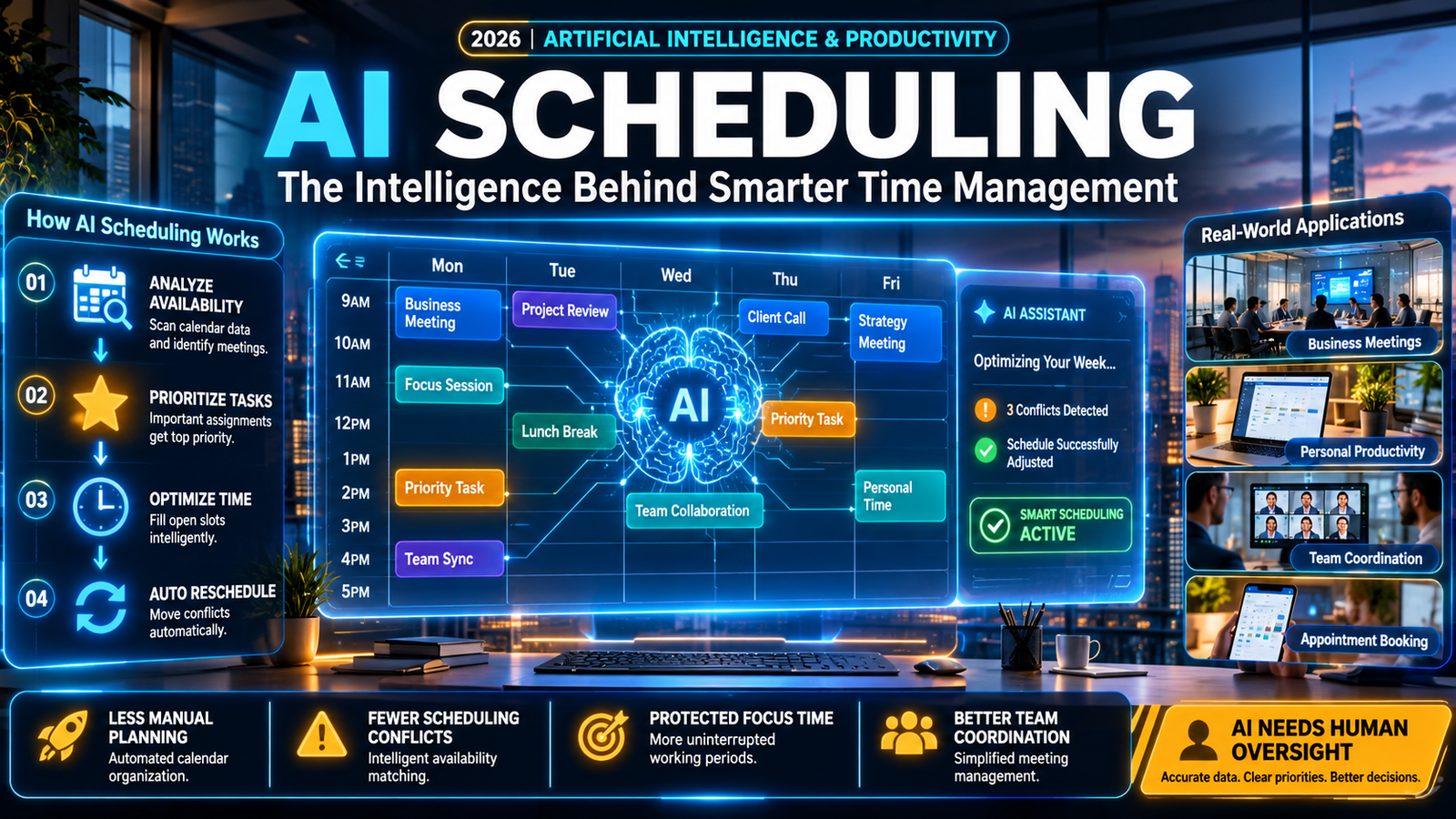
AI scheduling uses artificial intelligence to organize tasks, manage calendars, coordinate meetings, and adjust schedules automatically. It analyzes availability, priorities, deadlines, and scheduling preferences to reduce manual planning and help individuals and teams use their time more effectively.
AI Scheduling at a Glance
- What it does: Automates calendar management, task planning, appointment booking, and meeting coordination.
- How it works: Uses scheduling rules, optimization algorithms, calendar data, and increasingly AI-powered assistants.
- Main benefit: Reduces repetitive scheduling work and helps prevent calendar conflicts.
- Popular tools: Motion, Reclaim.ai, Calendly, and Google Calendar.
- Best applications: Business meetings, personal productivity, employee scheduling, and customer appointments.
- Main limitation: Results depend on accurate calendar data, reliable integrations, and sensible scheduling preferences.
What Is AI Scheduling?
AI scheduling is the use of artificial intelligence and automated scheduling technology to organize time, tasks, appointments, and meetings.
Traditional scheduling requires people to check calendars, compare availability, negotiate meeting times, and rearrange conflicting commitments. AI scheduling software can handle many of these activities automatically.
Instead of manually deciding when every task should happen, users provide priorities, deadlines, working hours, and preferences. The software then identifies suitable time slots and creates or adjusts schedules.
For example, a freelancer might enter three assignments with different deadlines. An AI scheduling assistant can distribute those assignments across available working hours while considering existing meetings.
If an urgent meeting appears, the system may move flexible tasks to other available periods.
However, not every scheduling product uses advanced AI. Some rely primarily on predefined rules and calendar automation, while others combine machine learning, natural language processing, and optimization algorithms.
Understanding this difference helps users evaluate products more accurately.
How Does AI Scheduling Work?
AI scheduling combines calendar information, scheduling rules, user preferences, and optimization techniques to generate practical schedules.
Although implementation differs between platforms, most systems follow a similar process.
1. Collecting Calendar and Availability Data
The software first gathers information from connected calendars and scheduling applications.
Depending on the platform and permissions, this may include:
- Existing meetings and appointments.
- Working hours and availability.
- Task deadlines and estimated durations.
- Personal commitments and recurring activities.
- Meeting participants and time zones.
- Scheduling preferences and priorities.
Integrations with Google Calendar, Microsoft Outlook, project management software, and communication platforms can provide additional context.
2. Understanding Priorities and Scheduling Requirements
The system evaluates which activities deserve priority.
For example, an urgent client meeting may take precedence over a flexible administrative task. A fixed appointment should remain unchanged, while a personal focus session may move to another suitable time.
Some platforms use user-defined rules. More advanced systems can interpret natural-language instructions and recommend adjustments.
3. Finding Suitable Time Slots
Scheduling algorithms examine available periods and evaluate possible arrangements.
Common considerations include:
- Task importance.
- Deadline proximity.
- Meeting duration.
- Participant availability.
- Working-hour restrictions.
- Breaks and preparation time.
- Time-zone differences.
The objective is to produce a schedule that respects important constraints while making efficient use of available time.
4. Creating and Adjusting the Schedule
After evaluating available options, the software creates calendar events, reserves time for tasks, or proposes meeting slots.
More advanced tools can automatically rearrange flexible activities when circumstances change.
For example, if a meeting runs longer than expected, the system may move an unfinished task to the next available period.
5. Learning From User Preferences
Some AI scheduling platforms use historical behavior and user feedback to improve recommendations.
They may recognize preferred working hours, recurring meeting patterns, and frequently selected time slots.
However, learning capabilities vary considerably. Users should not assume that every scheduling application continuously learns from personal behavior.
Main Types of AI Scheduling
AI scheduling is not a single product category. Different platforms solve different scheduling problems.
Personal AI Calendar Scheduling
Personal scheduling tools organize daily activities, recurring habits, and individual tasks.
They can help users protect focus time, manage deadlines, and maintain a realistic daily workload.
Example: Reclaim.ai automatically schedules flexible activities around existing calendar commitments.
AI Meeting Scheduling
Meeting scheduling software helps people find suitable meeting times without lengthy email conversations.
These tools consider participant availability, time zones, meeting duration, and scheduling preferences.
Example: Calendly allows users to share booking links so others can select available meeting times. Its newer AI workflows also support meeting-related assistance.
AI Task Scheduling
Task scheduling tools convert to-do lists into structured calendar plans.
They consider deadlines, estimated completion times, and task priorities when organizing work.
Example: Motion combines task management, project planning, and calendar scheduling.
Employee and Workforce Scheduling
Workforce scheduling software helps businesses organize employee shifts and operational coverage.
Depending on the system, it may consider:
- Employee availability.
- Shift requirements.
- Staff qualifications.
- Labor constraints.
- Workload distribution.
- Business demand.
This category is particularly relevant to retail, hospitality, healthcare operations, and customer support.
Importantly, workforce scheduling software is not interchangeable with personal AI calendar assistants.
Key Features of AI Scheduling Software
The usefulness of an AI scheduler depends on how well its features match actual scheduling requirements.
| Feature | What It Does | Practical Value |
|---|---|---|
| Smart calendar management | Organizes calendar events | Reduces manual planning |
| Automatic time blocking | Reserves time for tasks | Protects focused work |
| Meeting coordination | Finds suitable meeting times | Simplifies collaboration |
| Priority management | Ranks activities by importance | Helps manage deadlines |
| Conflict detection | Identifies overlapping commitments | Prevents scheduling errors |
| Automatic rescheduling | Moves flexible activities | Adapts to changing plans |
| Time-zone management | Adjusts meeting times | Supports distributed teams |
| Calendar integrations | Connects scheduling applications | Keeps information synchronized |
| Natural-language input | Accepts conversational instructions | Makes scheduling easier |
Not every platform includes every feature. Some specialize in appointment booking, while others focus on automated task planning.
Benefits of AI Scheduling
1. Less Time Spent on Manual Planning
Manually organizing meetings and tasks can consume valuable working hours.
AI scheduling automates repetitive activities, including finding available time slots, placing tasks on calendars, and adjusting flexible commitments.
This allows users to spend more time completing work rather than managing their calendars.
2. Better Time Management
A calendar can look organized while still containing an unrealistic workload.
AI scheduling tools can help distribute tasks across available working hours and identify potential capacity problems.
This makes it easier to recognize when deadlines exceed the time available.
3. Fewer Scheduling Conflicts
Double bookings and overlapping appointments create unnecessary disruption.
Scheduling software can check connected calendars and identify unavailable periods before confirming meetings.
The reliability of this process depends on calendar permissions and integration settings.
4. Improved Team Coordination
Distributed teams often work across different time zones and availability windows.
AI scheduling can simplify meeting coordination by identifying overlapping working hours and proposing suitable times.
This reduces repeated communication between participants.
5. More Protected Focus Time
Frequent meetings can interrupt concentrated work.
Some AI calendar tools automatically reserve focus periods and move flexible activities when conflicts arise.
This can help professionals maintain longer periods for writing, development, research, and other demanding tasks.
6. More Flexible Daily Planning
Traditional calendars often require manual adjustments whenever plans change.
Intelligent scheduling systems can recalculate parts of a schedule after new commitments appear.
However, automatic changes should follow clearly defined priorities to avoid moving important activities unexpectedly.
Best AI Scheduling Tools to Consider in 2026
The right platform depends on whether you need personal task planning, appointment booking, or team calendar coordination.
The following products represent different approaches to scheduling rather than identical competitors.
1. Motion
Best for: Professionals managing multiple projects and deadlines.
Motion combines AI-powered calendar management, task planning, project organization, and meeting management.
Its calendar can prioritize tasks, schedule available work periods, and reorganize plans when commitments change.
The platform is particularly relevant to professionals who want their tasks and meetings managed within one workspace.
Pricing: Motion’s official pricing page lists Pro AI at $19 per seat per month and Business AI at $29 per seat per month. Billing options and included credits should be checked before subscribing.
Core limitation: Its broader productivity features may be unnecessary for people who only need a basic meeting-booking link. AI usage also involves plan-specific credit allowances.
Official website: https://www.usemotion.com/
2. Reclaim.ai
Best for: Individuals and teams protecting focus time and recurring habits.
Reclaim.ai works with existing calendars and automatically finds suitable periods for flexible activities.
Its features include:
- Focus time scheduling.
- Recurring habit scheduling.
- Automatic buffer time.
- Smart meeting management.
- Calendar synchronization.
- Scheduling links.
The platform supports Google Calendar and Outlook, with features varying by subscription.
Pricing: Its official pricing page lists a free Lite plan, Starter at $12 per seat per month, and Business at $18 per seat per month.
Core limitation: The scheduling automation works within configured availability, scheduling priorities, and plan-specific limits. It cannot guarantee that every preferred activity will fit into an overloaded calendar.
Official website: https://reclaim.ai/
3. Calendly
Best for: Appointment booking, sales meetings, and external scheduling.
Calendly focuses on helping people coordinate meetings without manually exchanging availability.
Users create scheduling pages and share links with clients, customers, or colleagues.
Its AI capabilities extend beyond basic booking. Calendly’s AI offering includes Callie, an assistant that can help manage scheduling conversations through email and provide meeting-related information.
Pricing: Calendly offers a free entry-level option, while advanced features and AI capabilities depend on subscription eligibility.
Core limitation: Calendly primarily addresses meeting coordination rather than automatically organizing an individual’s complete workload.
Official website: https://calendly.com/
4. Google Calendar
Best for: Individuals and businesses already using Google’s productivity ecosystem.
Google Calendar provides event management, availability controls, calendar sharing, and appointment scheduling.
Its appointment schedules allow users to create booking pages and share available time slots. Bookings are added directly to the calendar, helping prevent conflicts with existing events.
Some advanced appointment features require eligible Google Workspace or Google One subscriptions.
Pricing: Basic calendar functionality is available with a Google Account. Additional appointment features depend on the subscription.
Core limitation: Its appointment scheduling capabilities should not be confused with a fully autonomous AI task scheduler.
Official website: https://calendar.google.com/
AI Scheduling Tools Compared
| Platform | Target User | Key Strength | Pricing Transparency | Core Limitation |
|---|---|---|---|---|
| Motion | Professionals and teams | Task and calendar automation | Public plans | Credit allowances |
| Reclaim.ai | Individuals and teams | Focus time and flexible scheduling | Public plans | Scheduling constraints |
| Calendly | Sales teams and professionals | Meeting booking | Public plans | Not a complete task planner |
| Google Calendar | General users | Calendar and appointment management | Subscription-dependent | Limited autonomous planning |
Editorial takeaway: Motion is worth evaluating for deadline-driven task planning. Reclaim.ai suits flexible calendar optimization, while Calendly is more appropriate for coordinating external meetings. Google Calendar remains a practical starting point for basic scheduling.
AI Scheduling vs. Traditional Scheduling
Traditional scheduling depends heavily on manual decisions and fixed calendar arrangements.
AI scheduling introduces automated recommendations, dynamic adjustments, and more advanced coordination.
| Comparison | Traditional Scheduling | AI Scheduling |
|---|---|---|
| Time allocation | Mostly manual | Can be automated |
| Meeting coordination | Email or manual booking | Automated availability matching |
| Task prioritization | User-managed | Rules or AI-assisted |
| Schedule changes | Manual adjustments | Potential automatic rescheduling |
| Conflict detection | Manual checking or basic rules | Automated conflict checks |
| Personalization | Static preferences | May adapt to user preferences |
| Workload visibility | Depends on user planning | Can identify scheduling capacity |
AI scheduling does not eliminate the need for human judgment. It makes repetitive decisions easier to manage.
Real-World Applications of AI Scheduling
Business Meetings
Companies can use AI scheduling to coordinate internal meetings, client calls, interviews, and project discussions.
The software can check availability and reduce the time spent negotiating suitable meeting slots.
Healthcare Administration
Healthcare organizations can use scheduling systems to coordinate appointments, staff availability, and operational resources.
These systems may help reduce administrative work, but clinical decisions and urgent patient priorities require appropriate human oversight.
Freelancers and Content Creators
Freelancers often manage multiple clients, deadlines, revisions, and personal commitments.
An AI scheduler can reserve time for assignments, organize recurring work, and adjust flexible activities when urgent requests appear.
Sales and Customer Support
Sales teams can use appointment scheduling to simplify lead follow-ups and customer meetings.
Support organizations can use workforce scheduling systems to align staff coverage with expected demand.
Remote and Hybrid Teams
Remote teams need to coordinate employees across locations and time zones.
AI scheduling can identify overlapping availability and help reduce unnecessary scheduling exchanges.
Limitations and Risks of AI Scheduling
AI scheduling offers practical advantages, but its recommendations are only as reliable as the information and rules behind them.
Inaccurate Calendar Information
An outdated calendar can cause incorrect scheduling recommendations.
Missing appointments, incorrect working hours, or disconnected calendars may create double bookings.
Users should connect the relevant calendars and regularly verify synchronization.
Overloaded Schedules
An AI scheduler cannot create additional working hours.
If someone assigns more tasks than their available capacity allows, the software may move activities around without solving the underlying workload problem.
A useful system should identify unrealistic plans rather than simply filling every available slot.
Limited Contextual Understanding
Scheduling software may not understand every human consideration.
For example, a calendar might show an available afternoon, but that period could be unsuitable because of preparation requirements, personal preferences, or an important deadline.
Natural-language interfaces also require clear instructions to avoid misunderstandings.
Integration Problems
Different platforms support different calendars, communication tools, and project management applications.
An integration may offer read-only access rather than permission to create or modify events.
Before subscribing, check which actions each integration actually supports.
Privacy and Data Protection
AI scheduling applications may process sensitive information, including meeting details, employee availability, email content, and personal commitments.
Before connecting an account, review:
- What information the application collects.
- Whether calendar data is shared with third parties.
- How long personal information is retained.
- Whether customer information is used for AI training.
- Whether data deletion options are available.
- Which administrative and access controls are provided.
Business customers should also examine relevant contractual and security documentation.
A SOC 2 report, where available, should not be treated as proof of Zero Data Retention. These are different security and data-handling concepts.
How to Choose the Right AI Scheduling Tool
Selecting scheduling software requires more than comparing feature lists.
The best option depends on your actual scheduling problem.
Identify Your Main Requirement
Start by identifying what takes the most time.
- For managing personal tasks, consider automated task scheduling.
- For booking external meetings, prioritize scheduling links and availability management.
- For protecting focus time, look for flexible time blocking.
- For managing employee shifts, evaluate dedicated workforce scheduling software.
- For coordinating distributed teams, prioritize time-zone support and shared availability.
Check Calendar Compatibility
Confirm whether the platform supports your existing calendar.
Google Calendar and Microsoft Outlook are common integrations, but the available features differ between providers.
Check whether synchronization is bidirectional and whether the application can create, update, and delete events.
Evaluate Automation Controls
Automation should not mean losing control.
Look for options to:
- Set task priorities.
- Protect fixed appointments.
- Define working hours.
- Control automatic rescheduling.
- Set minimum meeting buffers.
- Review proposed changes.
The ability to override recommendations is particularly important.
Compare Total Costs
Subscription prices do not always reflect the complete cost of using a scheduling platform.
Consider:
- Per-user subscription fees.
- AI credit limits.
- Additional team seats.
- Premium integrations.
- Usage-based charges.
- Enterprise requirements.
A free plan may be sufficient for basic scheduling but inadequate for complex workflows.
Test It With a Real Working Week
Use a trial or free plan to evaluate the software with actual scheduling requirements.
Check whether it respects your priorities, handles conflicts correctly, and reduces manual work.
A short practical test is more useful than choosing a platform based entirely on marketing claims.
The Future of AI Scheduling
AI scheduling is moving beyond simple calendar automation toward more context-aware assistants.
Several developments are shaping this direction.
Natural-Language Scheduling
Users increasingly expect to describe scheduling requirements conversationally.
For example, someone might ask an assistant to arrange a 30-minute meeting next week, avoid Friday afternoons, and prioritize participants in a particular time zone.
Natural-language processing can translate these instructions into structured scheduling requirements.
More Capable AI Assistants
AI assistants are gradually becoming more capable of interacting with calendars, email, and productivity applications.
Instead of merely recommending a time, an assistant may be able to identify availability, propose options, and carry out approved scheduling actions.
However, capabilities and permissions remain platform-dependent.
Better Integration Across Applications
Scheduling tools are increasingly connecting with project management, messaging, video conferencing, and business applications.
This creates opportunities for more coordinated workflows.
For example, a project management system could provide task deadlines while a calendar assistant allocates available working periods.
More Context-Aware Planning
Future systems may improve their ability to consider task importance, workload, meeting frequency, and personal preferences.
The challenge is balancing automation with user control, privacy, and realistic workload expectations.
These developments are promising, but fully autonomous scheduling should not be assumed to work reliably across every application or business environment.
Who Should Use AI Scheduling?
AI scheduling can benefit different users, but its value depends on the complexity of their daily commitments.
Freelancers: Useful for balancing client work, meetings, and deadlines.
Business owners: Helpful for coordinating appointments and protecting time for important decisions.
Project managers: Relevant for organizing deadlines, task dependencies, and team meetings.
Remote teams: Valuable for coordinating availability across time zones.
Sales professionals: Useful for reducing friction in customer meeting bookings.
Students: Can help organize study sessions, assignments, and recurring activities.
People with simple calendars may not need a dedicated AI scheduling subscription. Standard calendar tools can already handle many basic requirements.
Frequently Asked Questions
1. What is AI scheduling used for?
AI scheduling is used to automate calendar management, organize tasks, coordinate meetings, book appointments, and manage employee shifts. It helps individuals and businesses reduce repetitive scheduling work.
2. What is the best AI scheduling tool?
The right tool depends on your requirements. Motion is designed for task and project scheduling, Reclaim.ai focuses on calendar optimization, Calendly specializes in appointment booking, and Google Calendar provides general calendar management.
3. Can AI scheduling automatically manage my calendar?
Yes. Supported applications can create calendar events, reserve time for tasks, identify conflicts, and reschedule flexible activities. The level of automation depends on the platform, account permissions, and user settings.
4. Is AI scheduling safe for business use?
It can be suitable for business use when the provider offers appropriate security controls, data protection policies, access management, and contractual safeguards. Businesses should review data retention, third-party processing, and AI training policies before connecting company calendars.
5. Is AI scheduling better than traditional scheduling?
AI scheduling can reduce manual work and respond more quickly to changing commitments. Traditional scheduling may be sufficient for simple calendars, while AI-powered solutions are more useful for complex workloads and frequent schedule changes.
Conclusion
AI scheduling is changing how individuals and organizations manage their time. It combines calendar automation, task prioritization, appointment coordination, and intelligent scheduling recommendations.
However, choosing the right platform matters more than simply choosing software with AI features.
Motion may suit professionals managing multiple deadlines, Reclaim.ai offers flexible calendar optimization, Calendly simplifies external meeting coordination, and Google Calendar covers many everyday scheduling requirements.
Before choosing a solution, evaluate its integrations, automation controls, pricing, privacy policies, and scheduling limitations.
The goal is not to automate every calendar decision. It is to reduce administrative work while keeping control over how your time is used.