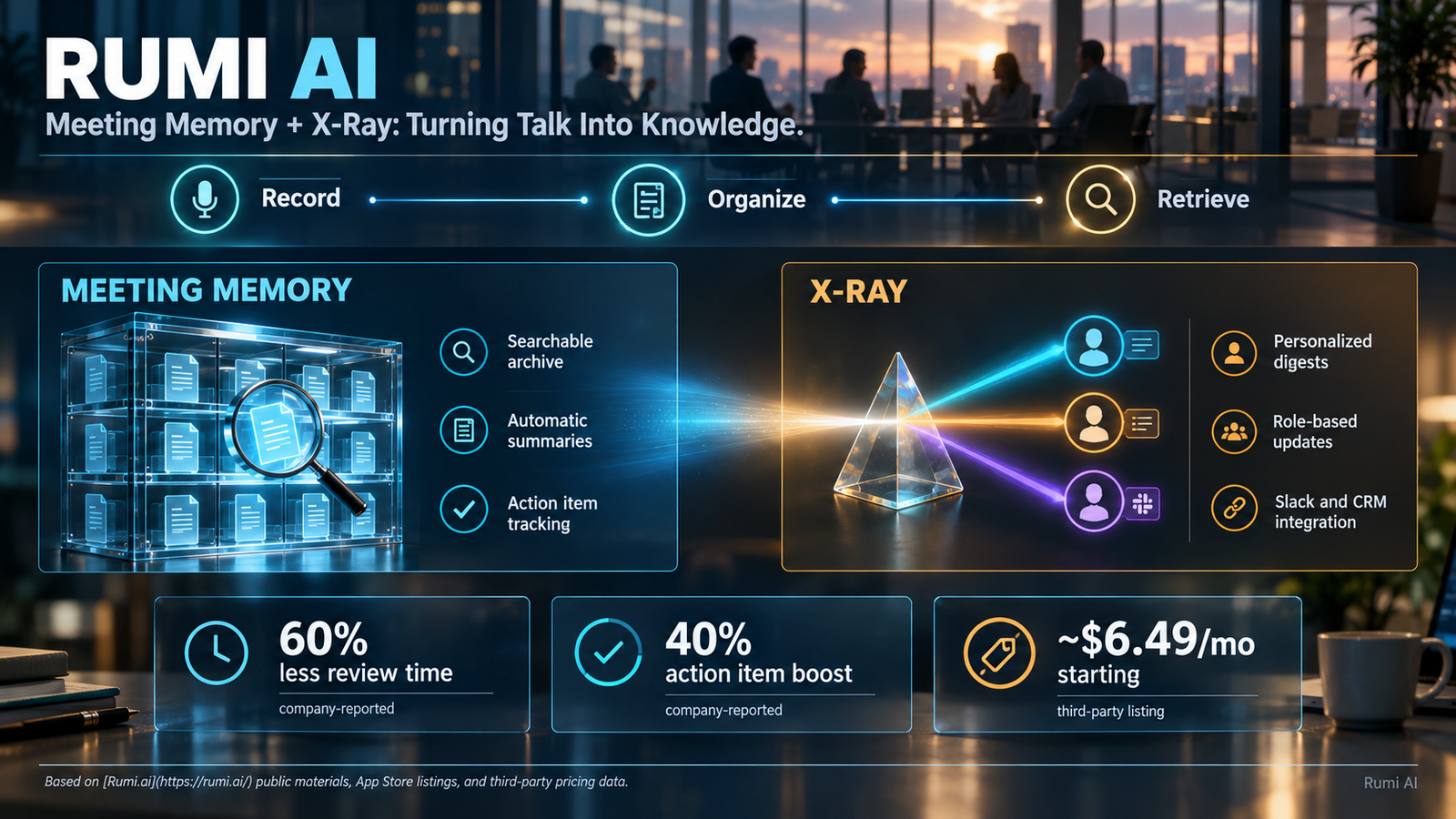
Rumi AI is an AI meeting assistant built by Waitroom Inc. that captures, summarizes, and organizes team conversations into a searchable knowledge base called Meeting Memory. It pairs this persistent archive with X-Ray, a personalized digest system that surfaces relevant updates, decisions, and action items without requiring users to attend every call. The platform targets distributed and hybrid teams dealing with information overload, meeting fatigue, and cross-time-zone alignment gaps.
At-a-Glance
- What it is: An AI meeting assistant focused on persistent, searchable meeting memory
- Developer: Waitroom Inc., based in La Jolla, California
- Core features: Meeting Memory (searchable archive), X-Ray (personalized digests), Slack and Jira integrations
- Free trial: Available; paid plans reportedly start around $6.49 per month
- Privacy controls: Off-record mode for sensitive discussions; data encrypted in transit
- Key limitation: Public pricing details are limited; enterprise features require direct sales contact
What Is Rumi AI?
Rumi AI is not a general-purpose chatbot or a writing assistant. It is a meeting-focused productivity tool designed around one central premise: conversations contain valuable information that teams routinely lose.
The platform records meetings, generates summaries, extracts action items, and stores everything in a searchable archive. Users can query past discussions the way they would search a document repository. The system remembers what was said, who committed to what, and when decisions were made.
This positions Rumi AI in the meeting intelligence category alongside tools like Otter.ai and Fireflies.ai. Its differentiation rests on two branded features: Meeting Memory and X-Ray. Both aim to reduce the need for status meetings and repetitive updates by making recorded knowledge accessible on demand.
Who Built It
Rumi AI is developed by Waitroom Inc., a company based in La Jolla, California . The app is available on iOS and Android, with a web presence at rumi.ai. The developer describes the product as a virtual administrative assistant with “infinite memory” that accompanies users to every meeting .
How Meeting Memory Works
Meeting Memory is the foundation of Rumi’s value proposition. It functions as a living archive of team conversations.
Step 1: Capture. Rumi joins meetings through calendar integration or manual initiation. It records audio and generates transcripts. The mobile app allows users to start smart meetings with a single tap .
Step 2: Summarize and tag. Each meeting receives an automatic summary. Decisions, action items, and key topics are tagged for retrieval. The system organizes these elements so they can be referenced later without re-watching recordings .
Step 3: Make searchable. Users can search across their entire meeting history. The platform positions this as a “second brain” for enterprises, where institutional knowledge becomes queryable rather than trapped in individual memory or scattered notes .
Step 4: Surface proactively. Meeting Memory does not wait for users to search. It feeds into X-Ray, which delivers personalized summaries and updates.
X-Ray: Personalized Intelligence Delivery
X-Ray analyzes meeting data alongside connected sources like Slack and CRM updates. It then generates role-based digests tailored to each user’s responsibilities .
A sales leader might receive a summary of customer objections raised in calls. A product manager might see feature requests tagged from support conversations. The system aims to deliver relevant context without requiring attendance at every meeting.
Rumi claims that distributed teams using these features report 60% less time spent in weekly meeting reviews and a 40% boost in action item completion . These are company-reported figures and have not been independently verified. They should be treated as marketing claims rather than audited benchmarks.
Key Features
Meeting Capture and Summarization
Rumi records and transcribes meetings, then generates organized summaries that go directly to user inboxes . The system identifies action items and can assign them to owners in connected tools like Asana .
Slack Integration
Meeting notes can be automatically shared to Slack channels, informing team members who did not attend. Product Hunt reviewers have highlighted this as a useful feature for keeping distributed teams aligned without scheduling additional syncs .
Jira Integration
Rumi offers a Jira Cloud integration that allows users to create issues directly from meetings. The Atlassian Marketplace listing shows this as a free commercial app with basic issue-creation functionality . The integration appears relatively basic at version 1.0.0, suggesting limited depth compared to native Jira workflows.
Privacy Controls
Rumi emphasizes privacy as a design principle. Users can go “off-record” to exclude sensitive discussions from capture and storage . The app’s App Store privacy disclosure states that data is encrypted in transit and that contact info and user content may be collected and linked to identity .
The platform’s blog acknowledges that not every meeting should be recorded. One-on-ones, HR conversations, and strategic negotiations should remain private by default. Rumi positions its off-record controls as a way to maintain that boundary while still capturing general team knowledge .
Pricing and Access
Public pricing for Rumi AI is not prominently displayed on the main website. Third-party listings suggest a starting price of approximately $6.49 per month . The platform offers a free trial, and enterprise pricing requires contacting the sales team .
The lack of transparent, tiered pricing on the public site is a friction point for evaluation. Teams considering Rumi should request a demo or trial to understand actual costs, usage limits, and feature gating. This is common in B2B SaaS, but it makes direct comparison with competitors like Otter.ai (which publishes pricing) more difficult.
Pricing Comparison
| Platform | Published Starting Price | Free Tier | Pricing Transparency |
|---|---|---|---|
| Rumi AI | ~$6.49/month (third-party listing) | Free trial | Limited; enterprise via sales |
| Otter.ai | Published on website | Yes, limited minutes | High |
| Fireflies.ai | Published on website | Yes, limited credits | High |
| Fathom | Published on website | Yes, unlimited free recording | High |
Rumi’s opacity on pricing is a notable gap for a tool targeting team adoption. Buyers should request clear quotes before committing.
Who Should Use Rumi AI
Appropriate for:
- Distributed teams with members across time zones who miss meetings
- Organizations seeking a searchable archive of decisions and commitments
- Teams already using Slack and Jira that want meeting output to flow into those tools
- Managers who need visibility into cross-functional updates without attending every call
Not appropriate for:
- Individuals seeking a personal AI assistant for writing or research
- Teams with strict data residency requirements that prohibit cloud meeting recording
- Organizations unwilling to record meetings due to legal or cultural constraints
- Small teams where meeting volume is low and memory loss is not a pain point
Limitations and Considerations
Recording Consent and Legal Risk
Rumi records meetings. In many jurisdictions, recording requires consent from all participants. Teams must establish clear policies and use the off-record feature for sensitive discussions. Rumi provides the technical capability, but compliance responsibility rests with the user organization.
Accuracy Dependency
The value of Meeting Memory depends on transcription and summarization accuracy. No AI meeting tool achieves perfect transcription, especially with accents, technical jargon, or poor audio quality. Errors in summaries or action item extraction can propagate into the knowledge base.
Integration Depth
The Jira integration is listed as version 1.0.0 with “basic functionality only” . Teams expecting deep two-way synchronization between Rumi and their project management tools may find the integration limited. The Slack integration appears more mature based on user feedback .
Company-Reported Metrics
The productivity statistics Rumi publishes (60% less review time, 40% more action item completion) lack independent verification . They are useful as directional indicators, not as reliable benchmarks for procurement decisions.
Rumi AI vs. Competitors
| Platform | Core Focus | Key Strength | Pricing Model | Notable Limitation |
|---|---|---|---|---|
| Rumi AI | Meeting Memory + X-Ray digests | Persistent searchable archive, personalized delivery | ~$6.49/mo starting, enterprise via sales | Limited public pricing, basic Jira integration |
| Otter.ai | Transcription + summaries | Mature transcription, broad integrations | Freemium + published tiers | Less emphasis on persistent memory search |
| Fireflies.ai | Meeting intelligence | Strong search and analytics | Freemium + published tiers | Pricing scales with features |
| Fathom | Free meeting recording | Unlimited free recording, simple setup | Free tier + paid | Less enterprise-focused memory features |
Rumi’s differentiation is its emphasis on memory persistence and personalized delivery through X-Ray. Competitors focus more on transcription quality or integration breadth. The right choice depends on whether the primary pain point is lost information (Rumi’s strength) or meeting documentation (where others may be stronger).
Frequently Asked Questions
What is Rumi AI used for?
Rumi AI records, summarizes, and organizes team meetings into a searchable knowledge base. Users can query past conversations, retrieve action items, and receive personalized updates through X-Ray. It targets distributed teams that struggle with information silos and meeting overload .
Is Rumi AI free?
Rumi AI offers a free trial. Paid plans reportedly start around $6.49 per month, though exact tiers and limits are not prominently published . Enterprise pricing requires contacting sales. Teams should request a quote before committing.
Does Rumi AI record all my meetings?
Rumi captures meetings that are scheduled through its integration or initiated manually. Users can enable off-record mode to exclude sensitive discussions from capture . Organizations should establish consent policies before deploying meeting recording tools.
Is Rumi AI private?
Rumi states that data is encrypted in transit and offers off-record controls . The App Store privacy disclosure indicates that contact info and user content may be collected and linked to identity. Rumi is not a Zero Data Retention platform based on public disclosures. Teams with strict privacy requirements should review the full privacy policy and consider whether cloud meeting recording aligns with their compliance obligations.
How does Rumi AI compare to Otter.ai?
Rumi emphasizes persistent Meeting Memory and personalized X-Ray digests. Otter.ai focuses on transcription quality and broad integrations. Rumi’s Jira integration is basic , while Otter has a more mature integration ecosystem. The better choice depends on whether searchable organizational memory or transcription accuracy is the priority.
Conclusion
Rumi AI addresses a real problem: teams lose institutional knowledge because conversations are ephemeral. Meeting Memory creates a searchable archive. X-Ray delivers personalized context. Together, they aim to reduce meeting load and improve alignment across distributed teams.
What matters most is understanding the tradeoffs. Recording meetings creates value only if transcription and summarization are accurate enough to trust. Privacy controls exist, but users must configure them intentionally. Pricing is not fully transparent, which complicates evaluation against published competitors.
Rumi AI suits distributed teams with high meeting volume, Slack-centric workflows, and a willingness to establish clear recording policies. It does not suit organizations that cannot record conversations, teams needing deep Jira synchronization, or buyers who require fully transparent pricing before engaging.
Before choosing Rumi, evaluate your actual meeting culture, test the transcription accuracy on your team’s audio, and request a clear pricing quote. The memory is only as useful as the data it captures.