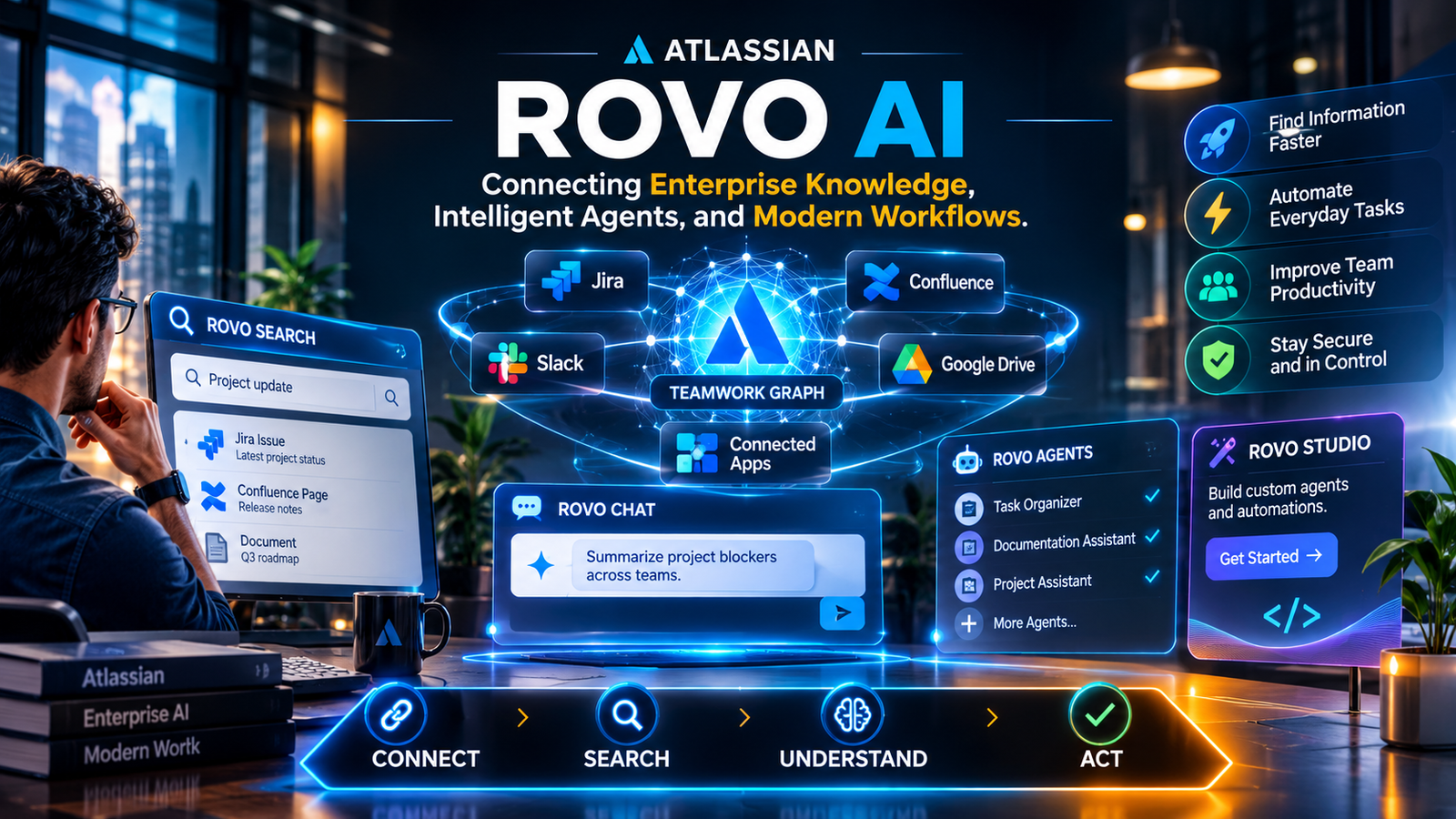
Rovo AI is Atlassian’s enterprise AI platform that helps businesses find information, understand company knowledge, and automate workplace tasks. It connects tools such as Jira and Confluence with supported third-party applications, allowing employees to get answers and work with information from one connected environment.
Atlassian developed Rovo to solve a familiar problem in modern workplaces: important information is scattered across too many applications.
A software team might manage tasks in Jira, maintain documentation in Confluence, discuss projects in Slack, and store files in Google Drive. Finding a single answer can mean checking several different platforms.
Rovo brings these information sources closer together. Employees can search company resources, ask questions in natural language, and use specialized AI agents to assist with everyday work.
What makes the platform interesting is its connection to Atlassian’s Teamwork Graph. This technology maps relationships between people, projects, documents, teams, and other business information.
Instead of treating every document or task as an isolated item, Rovo can use these relationships to understand more of the surrounding work.
For companies already using Atlassian products, this creates an additional way to access organizational knowledge without constantly switching between applications.
How Does Rovo AI Work?
Rovo combines enterprise search, organizational data, and generative AI. Its Teamwork Graph provides context about how different parts of a business are connected.
The process is easier to understand through three main stages.
1. Connecting Business Applications
Rovo can connect Atlassian products with supported third-party applications. These integrations allow employees to search for information across different workplace tools.
Common examples include:
- Jira for project management and issue tracking.
- Confluence for internal documentation.
- Google Drive for business files.
- Slack for team communication.
- Microsoft SharePoint for shared documents.
Not every integration works in exactly the same way. Atlassian offers synced, direct, and Smart Link connectors, each with different data retrieval and indexing behavior.
For example, synced connectors index supported workspace content, while direct connectors retrieve information through the provider’s search API.
This distinction matters when evaluating search coverage, permissions, and data handling.
2. Understanding Information Through Teamwork Graph
The Teamwork Graph is one of Rovo’s most important components.
It connects information about employees, projects, teams, work items, documents, and business relationships.
Imagine a project manager asking why a product release is delayed.
The relevant information might exist in several places:
- A delayed Jira issue.
- A technical discussion in Slack.
- A project update in Confluence.
- A document containing the revised delivery schedule.
Rovo can use available connections to help bring this information together.
The result is a more contextual search experience than simply matching words in individual documents.
However, the quality of the result still depends on available information, connector configuration, and user permissions.
3. Generating Answers and Assisting With Tasks
Once Rovo has relevant information, its AI-powered features can help employees understand it.
Users can ask questions, request summaries, explore related information, or work with specialized agents.
This approach is similar to retrieval-augmented generation (RAG), where an AI system retrieves relevant information before generating an answer.
The important difference is that Rovo also uses the Teamwork Graph to understand relationships across organizational information.
Its agents can take supported actions, depending on their configuration and permissions.
This moves Rovo beyond a conventional chatbot and makes it more relevant to everyday business workflows.
Main Features of Rovo AI
Rovo includes several connected capabilities. Each serves a different purpose, from finding information to building AI-powered workflows.
Rovo Search
Rovo Search helps employees find information across Atlassian applications and supported third-party services.
Instead of opening multiple applications, users can search for documents, projects, tasks, and other business information through a unified interface.
Its useful capabilities include:
- Searching connected workplace applications.
- Finding relevant Jira issues and Confluence pages.
- Discovering information through natural-language queries.
- Displaying personalized results based on access permissions.
- Surfacing related organizational knowledge.
For example, an employee could search for the latest product requirements without remembering the exact document title.
Rovo Search is particularly useful in organizations where employees regularly work across multiple departments and information systems.
Rovo Chat
Rovo Chat provides a conversational way to interact with company information.
Employees can ask questions in everyday language rather than constructing detailed search queries.
For example:
- What are the main blockers in this project?
- Find the latest documentation about our onboarding process.
- Summarize the decisions made during the last planning meeting.
- Which Jira tasks are related to this product release?
Rovo can use available organizational information to prepare relevant answers.
Its usefulness depends on the quality of connected sources. Important answers should still be checked against original documents, particularly when they involve deadlines, financial information, or business decisions.
Rovo Agents
Rovo Agents are specialized AI assistants designed to handle particular tasks.
Organizations can use existing agents or create customized ones around their own processes.
Examples include:
| Agent type | What it can help with |
|---|---|
| Project assistant | Summarize progress and identify blockers |
| Issue organizer | Organize and update Jira work items |
| Documentation assistant | Draft and improve internal documents |
| Onboarding assistant | Help employees find company resources |
| Research assistant | Gather and summarize relevant information |
The actual capabilities depend on each agent’s instructions, available tools, and permissions.
For example, a project management agent might review related Jira issues, identify incomplete tasks, and prepare a summary for the project manager.
An agent should not automatically receive permission to change important project records. Businesses should test its behavior and restrict access before using it in production.
Rovo Studio
Rovo Studio is Atlassian’s workspace for creating AI-powered agents, automations, and apps.
It allows teams to describe a workflow and build a solution using natural-language instructions and available tools.
For example, a company could create an internal workflow that reviews incoming project requests, checks for missing information, and helps route them to the appropriate team.
Studio is particularly relevant to administrators, operations teams, and employees responsible for improving internal processes.
Its main appeal is that organizations can build solutions around their existing Atlassian environment rather than starting with an entirely separate AI platform.
What Can Businesses Use Rovo AI For?
Rovo becomes more useful when applied to real workplace problems. Its strongest applications involve finding information, reducing repetitive tasks, and helping employees understand ongoing work.
Software Development
Development teams maintain technical documentation, bug reports, project discussions, and release information across multiple tools.
Rovo can help developers:
- Find technical documentation.
- Review project requirements.
- Summarize development discussions.
- Locate related Jira issues.
- Identify outstanding work.
- Understand previous project decisions.
A developer joining an existing project, for example, could use Rovo to locate relevant architecture documents and summarize the current development status.
This can make project onboarding easier, although the developer should still review the original technical documentation.
Project Management
Project managers often need information from several teams before preparing a status update.
Rovo can help gather relevant project information, summarize discussions, and highlight outstanding work.
A manager could use it to prepare a weekly project overview or identify Jira issues that need attention.
These summaries can save time, but they should not replace direct checks of project records.
Human Resources
HR teams manage policies, onboarding documents, employee resources, and internal procedures.
Rovo can make approved company information easier to find.
For example, employees could ask where to find leave policies or onboarding instructions rather than contacting HR for every routine question.
HR administrators must pay particular attention to access permissions because employee records and internal documents may contain sensitive information.
IT and Customer Support
IT teams often investigate incidents using technical documentation, previous tickets, and internal discussions.
Rovo can help locate relevant resources and summarize available information.
Support teams may also use it to find troubleshooting guides, identify related issues, and prepare internal responses.
However, Rovo should not automatically be considered a replacement for dedicated service management or customer support software.
Marketing and Business Operations
Marketing teams can use Rovo to find campaign documents, product information, brand guidelines, and previous project discussions.
Operations teams may use agents to assist with repetitive administrative tasks and internal reporting.
These applications are most valuable when information is already maintained in connected business systems.
Rovo AI Pricing: What Does It Cost?
Rovo is included with eligible paid Atlassian Cloud subscriptions. It is not simply a free, unlimited AI chatbot.
Atlassian provides monthly Rovo credit allowances according to the subscribed products and plan level.
The published allowance structure is:
| Subscription | Standard | Premium | Enterprise |
|---|---|---|---|
| Jira or Confluence | 25 | 70 | 150 |
| Teamwork Collection or Service Collection | 250 | 700 | 1,500 |
Credits per user per month. Allowances are pooled at the organization level.
These credits measure certain AI interactions and enriched Teamwork Graph API usage.
How Rovo Credits Work
Not every Rovo activity consumes credits.
Atlassian distinguishes between free embedded AI features and billable AI interactions.
For example, basic AI interactions cost 10 credits per billable event under the published pricing structure. More advanced interactions have variable costs based on their complexity.
Some features, including Rovo Search within Atlassian apps, are listed as free.
This means that opening Rovo and using every feature does not necessarily have the same cost.
Additional Usage Charges
Atlassian publishes an additional usage price of $0.01 per credit, equivalent to $10 per 1,000 credits.
However, there is an important date to understand: additional usage billing is scheduled to take effect on December 3, 2026.
As of November 11, 2026, that billing change has not yet taken effect.
Administrators can monitor organizational usage and configure spending limits through Atlassian Administration.
For businesses planning a wider rollout, credit consumption deserves attention. An organization with many employees and frequent agent activity may have different costs from a small team using Rovo mainly for search.
Check Atlassian’s current licensing documentation before purchasing because subscription allowances and billing arrangements can change.
Is Rovo AI Safe for Business Data?
Security is an important consideration when an AI platform can access company documents, project information, and internal conversations.
Atlassian documents several security and privacy measures for Rovo. However, businesses should understand the actual data-handling arrangements rather than relying on certification labels alone.
Permissions and Access Controls
Rovo is designed to respect existing permissions across Atlassian applications and supported connected sources.
For example, a user who cannot access a restricted Confluence document should not receive its contents through an ordinary Rovo search result.
Third-party connector permissions also matter. Administrators should check how permissions are synchronized and whether the selected connector supports the required access controls.
Data Retention
Atlassian states that its third-party hosted LLM providers operate under zero-data-retention agreements.
The providers do not retain customer inputs and outputs or use them to train their models.
However, this does not mean Atlassian itself retains no information.
Atlassian states that Rovo Chat and Agents inputs and outputs are retained within its platform for 30 days for safety and security purposes.
This distinction is important for organizations handling confidential business information.
SOC 2 and ISO 27001
Atlassian states that Rovo has completed external assessments and compliance certifications for SOC 2 and ISO 27001.
These provide useful information about its security controls, but they do not automatically guarantee that every business configuration meets an organization’s compliance requirements.
Companies should also review applicable data residency arrangements, connector policies, and internal access restrictions.
Before connecting sensitive information, administrators should:
- Review which applications Rovo can access.
- Check permissions on connected data sources.
- Identify confidential documents.
- Understand retention and processing policies.
- Establish internal rules for AI-generated content.
- Restrict agent permissions where necessary.
Rovo AI vs. ChatGPT, Glean, and Microsoft Copilot
Rovo competes in a market that includes general-purpose AI assistants and enterprise knowledge platforms.
However, these products are designed around different working environments.
| Platform | Main purpose | Best suited to |
|---|---|---|
| Atlassian Rovo | Enterprise search, workplace AI, and agents | Jira and Confluence organizations |
| ChatGPT | General-purpose AI assistance and connected workflows | Individuals, teams, and developers |
| Glean | Enterprise knowledge search and AI assistance | Organizations with information across many applications |
| Microsoft 365 Copilot | AI assistance across Microsoft 365 | Microsoft-focused businesses |
| Google Workspace with Gemini | AI productivity within Google Workspace | Organizations using Google applications |
Rovo vs. ChatGPT
ChatGPT is a general-purpose AI assistant that supports writing, research, coding, analysis, and other tasks.
Rovo has a narrower workplace focus. It is designed to work with organizational knowledge and Atlassian workflows.
A business may use both products for different purposes.
Rovo vs. Glean
Glean focuses on enterprise search and knowledge discovery across business applications.
Rovo offers similar knowledge-discovery capabilities but has a particularly close relationship with Atlassian’s project and collaboration ecosystem.
The better option depends on existing integrations, search requirements, implementation costs, and organizational needs.
Rovo vs. Microsoft 365 Copilot
Microsoft 365 Copilot is built around Microsoft’s productivity environment.
It is a natural alternative for organizations that rely heavily on Teams, SharePoint, Outlook, and other Microsoft applications.
Rovo is more relevant when Jira, Confluence, and Atlassian-based workflows play a central role.
Businesses should compare the products using their actual applications and processes rather than relying on feature lists alone.
Limitations of Rovo AI
Rovo offers useful enterprise capabilities, but it is not a perfect solution for every organization.
Dependence on information quality: Outdated documentation and conflicting project records can produce misleading answers. Connecting more applications does not automatically improve data quality.
AI-generated errors: Rovo can misunderstand questions or generate inaccurate summaries. Important information should be checked against original sources.
Credit management: Advanced AI interactions and enriched Teamwork Graph usage can consume credits. Businesses need to understand their allowances and potential additional costs.
Integration differences: Not every connector provides the same search, indexing, or permission behavior. Administrators should test the applications that matter most.
Cloud requirements: Full Rovo functionality requires an eligible Atlassian Cloud subscription. Data Center customers can use supported connectors to connect existing infrastructure to Cloud-based Rovo capabilities, but should not assume that the complete experience runs directly inside Data Center.
Implementation effort: Connecting applications, reviewing permissions, building agents, and training employees all require planning.
These limitations do not make Rovo unsuitable. They simply show why organizations should evaluate it against their actual needs before expanding its use.
How to Get Started With Rovo AI
Businesses considering Rovo should begin with a specific problem rather than enabling every available feature immediately.
A practical approach looks like this:
- Check eligibility: Confirm that your organization has a supported Atlassian Cloud subscription and meets the business-domain requirements.
- Choose information sources: Decide which Jira projects, Confluence spaces, and external applications should be available.
- Review permissions: Make sure employees can only access information they are authorized to see.
- Test Search and Chat: Use common workplace questions to evaluate the relevance of results.
- Create a focused agent: Choose one repetitive task and configure an agent around it.
- Measure the results: Review answer quality, employee feedback, time saved, and credit usage.
For example, a development team could begin with a project assistant that summarizes open blockers.
After testing its answers and permissions, the company can decide whether additional agents or automations are worthwhile.
A small pilot also makes it easier to identify problems before they affect the wider organization.
Frequently Asked Questions
1. What is Rovo AI used for?
Rovo AI helps businesses search organizational information, interact with company knowledge, and automate supported workflows through AI agents. It connects Atlassian products and supported third-party applications to provide context-aware workplace assistance.
2. Is Rovo AI free to use?
Rovo is included with eligible paid Atlassian Cloud subscriptions, including Standard, Premium, and Enterprise plans. These subscriptions provide monthly Rovo credit allowances, while certain advanced AI activities and additional usage may incur extra costs.
3. Does Rovo AI work with Jira and Confluence?
Yes. Rovo integrates with Jira and Confluence and can use organizational information from these applications. It also supports third-party connectors for accessing information from compatible external platforms.
4. Is Rovo AI safe for business data?
Atlassian documents permission-based access controls, SOC 2 and ISO 27001 assessments, and zero-data-retention agreements with its third-party LLM providers. However, businesses should review connector permissions, Atlassian’s own retention policies, and applicable compliance requirements before connecting sensitive information.
5. How is Rovo different from ChatGPT?
ChatGPT is a general-purpose conversational AI platform, while Rovo is designed around organizational knowledge and workplace collaboration. Rovo connects business information, integrates with Atlassian workflows, and supports specialized agents that can perform permitted workplace actions.
Final Thoughts
Rovo AI is Atlassian’s attempt to make workplace information easier to find and business processes easier to manage.
Its value comes from combining enterprise search, conversational assistance, organizational context, and specialized agents.
For companies already using Jira and Confluence, it offers a practical way to bring AI into existing workflows.
However, businesses should consider integration requirements, data quality, security policies, and credit consumption before adopting it across the organization.
It is not necessarily the right choice for individuals looking for a simple chatbot or companies that do not use Atlassian products.
The best way to evaluate Rovo is to test it against a real workplace problem. If it helps employees find reliable information or complete repetitive tasks with less effort, it may justify a wider rollout.