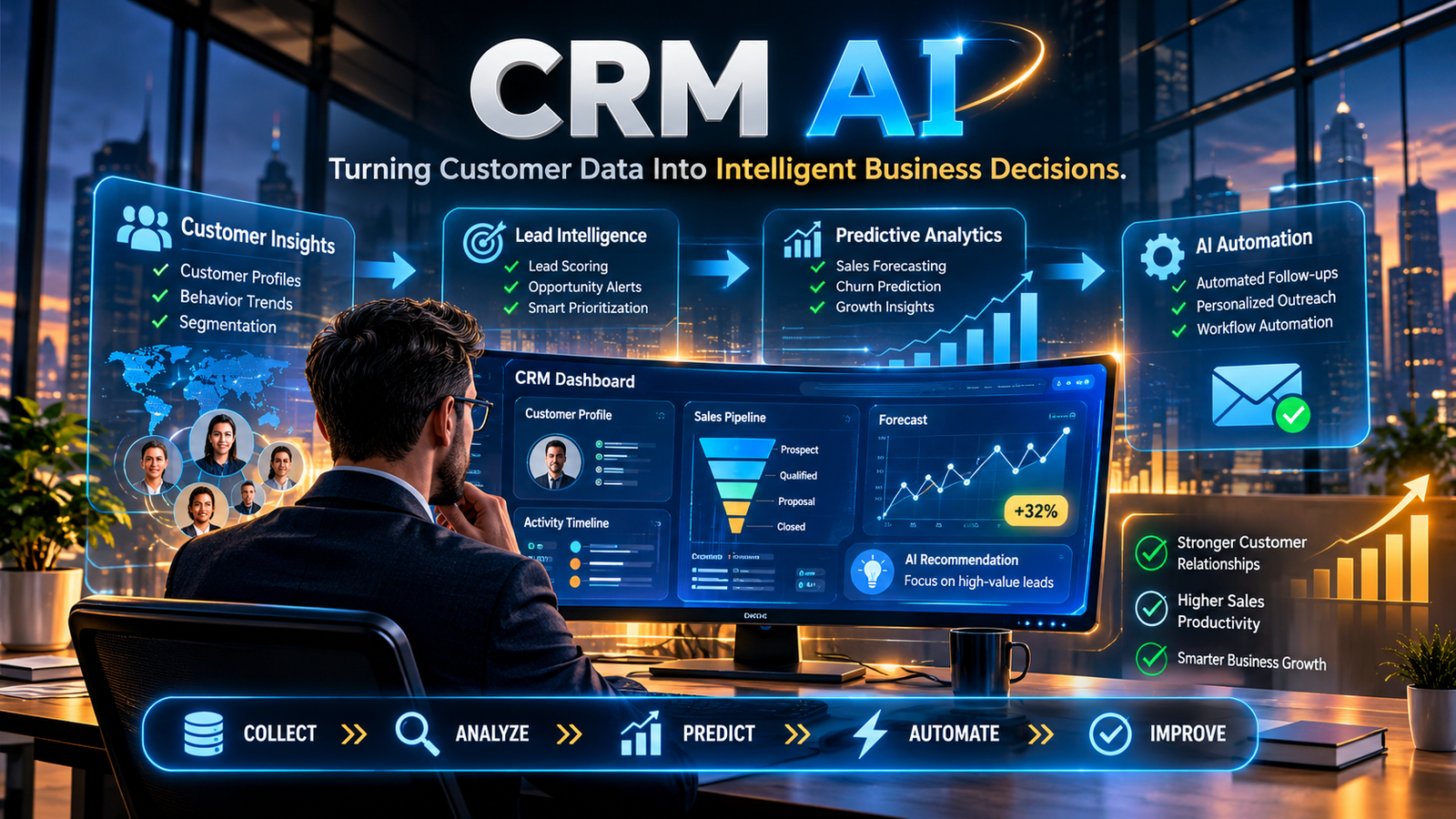
CRM AI uses artificial intelligence to analyze customer information, automate repetitive tasks, and help businesses make better sales and marketing decisions. It brings capabilities such as predictive analytics, generative AI, and intelligent automation into customer relationship management software.
CRM AI at a Glance
- Customer insights: Analyzes customer records and interactions to identify useful patterns.
- Sales automation: Helps manage lead assignment, follow-ups, and routine administrative tasks.
- Predictive analytics: Estimates lead conversion potential and identifies possible customer churn.
- Generative AI: Creates email drafts, meeting summaries, and customer reports.
- Business productivity: Reduces manual work and gives employees faster access to customer information.
- Main consideration: Results depend on data quality, software capabilities, integration, and proper human oversight.
What Is CRM AI?
CRM AI refers to artificial intelligence integrated into customer relationship management software. It helps businesses understand their customers, manage sales activities, and automate parts of their daily operations.
A traditional CRM system stores information about customers, leads, deals, and previous interactions. Employees use these records to manage relationships and track business opportunities.
An AI-powered CRM adds another layer. It can analyze that information, identify patterns, recommend actions, and generate useful content.
Consider a sales team managing hundreds of potential customers. Without AI, representatives may need to review individual records to decide which prospects deserve attention.
With AI-powered lead scoring, the CRM can examine available customer information and rank prospects according to their likelihood of converting.
The salesperson still makes the final decision, but has better information to work with.
CRM AI generally combines several technologies:
- Machine learning: Finds patterns in historical customer and sales data.
- Natural language processing: Helps software understand emails, conversations, and written requests.
- Generative AI: Produces summaries, email drafts, reports, and other content.
- Predictive analytics: Estimates future outcomes using available data.
- AI agents: Perform selected tasks across connected business applications.
These capabilities are changing how companies use CRM software. Instead of simply recording customer interactions, modern platforms can help employees decide what to do next.
How Does CRM AI Work?
CRM AI works by analyzing information already available within a business’s systems. It then uses that information to generate predictions, recommendations, or automated actions.
The process usually involves four stages.
1. Collecting Customer Information
The CRM gathers information from different sources, including:
- Contact details and company records.
- Email conversations and meeting notes.
- Website forms and customer inquiries.
- Previous purchases and transactions.
- Sales calls and support tickets.
- Marketing campaign interactions.
Connecting these sources gives employees a more complete view of customer relationships.
2. Analyzing Patterns
AI models examine customer records and historical activity to identify patterns.
For example, a business might discover that prospects who attend demonstrations and respond to follow-up emails are more likely to purchase.
The system can use these patterns to help prioritize similar prospects.
3. Generating Insights
After analyzing the information, the CRM can provide useful recommendations.
These might include:
- Which leads deserve attention first.
- Which deals may be losing momentum.
- Which customers could be at risk of leaving.
- When a sales representative should follow up.
- Which accounts need additional attention.
Predictions are estimates rather than guaranteed outcomes. Their reliability depends on the available data and the model being used.
4. Automating Selected Tasks
Once an action is approved or configured, the CRM can execute parts of the workflow.
For example, it might assign a new lead, create a follow-up task, summarize a customer conversation, or draft an email.
More advanced AI agents can coordinate several steps across connected applications. Businesses should define permissions carefully, especially when an action changes customer records or sends external communications.
Key Features of AI-Powered CRM Software
The features available depend on the CRM provider and subscription plan. However, several capabilities are becoming particularly important.
AI Lead Scoring
Lead scoring helps sales teams decide which prospects to contact first.
AI-powered systems can analyze customer characteristics, engagement history, and previous conversion patterns to estimate lead quality.
Instead of treating every inquiry equally, representatives receive additional information about which opportunities may deserve priority.
This is especially useful for businesses handling large numbers of incoming leads.
Predictive Sales Forecasting
Sales forecasting helps managers estimate future revenue and understand the health of their pipelines.
AI-assisted forecasting can analyze historical sales, deal progress, and current pipeline activity to identify potential problems.
For example, a manager might discover that several large opportunities have remained inactive for longer than expected.
The system can highlight those deals for review, allowing the team to investigate before the reporting period ends.
Generative AI Assistance
Generative AI helps employees work with CRM information using natural language.
Depending on the platform, it can:
- Draft customer emails.
- Summarize meetings.
- Prepare account overviews.
- Create sales reports.
- Rewrite customer communications.
- Answer questions about accessible CRM records.
These tools save time when used appropriately. However, employees should review generated information before sending it to customers.
Customer Segmentation
Customer segmentation groups people according to shared characteristics and behavior.
AI can examine purchasing patterns, engagement, preferences, and other available signals to identify useful customer groups.
Marketing teams can then develop campaigns that are more relevant to each audience.
Churn Prediction
Customer churn occurs when customers stop purchasing from or using a business.
AI models can identify warning signs such as declining engagement, fewer purchases, and changes in customer activity.
Businesses can use these insights to investigate problems and contact customers who may need additional support.
A churn score does not explain the customer’s actual reasons for leaving. Direct feedback remains important.
AI-Powered Customer Support
CRM platforms can also assist customer service teams.
AI features may classify support tickets, summarize previous conversations, suggest relevant knowledge articles, and prepare response drafts.
Some platforms offer AI agents that can handle selected customer requests. More complicated issues should have a clear path to human support.
How Businesses Use CRM AI
CRM AI is useful across several departments. Its applications depend on the type of customer information a business collects and the processes it wants to improve.
| Business area | Practical application |
|---|---|
| Sales | Lead scoring, deal summaries, follow-up recommendations |
| Marketing | Customer segmentation, campaign personalization |
| Customer support | Ticket classification, response assistance |
| E-commerce | Product recommendations, repeat-purchase analysis |
| Account management | Customer summaries, retention monitoring |
| Management | Sales forecasting, pipeline analysis |
For example, an e-commerce company can use customer purchase histories to identify people who regularly buy particular product categories.
Its marketing team can use those insights to prepare more relevant campaigns.
A B2B sales organization might use AI to summarize previous meetings and highlight unresolved questions before an important client call.
These applications demonstrate where CRM AI can help without requiring businesses to automate every customer interaction.
Benefits of CRM AI
The biggest advantage of CRM AI is its ability to turn existing customer information into more useful business insights.
Less Time Spent on Manual Work
Sales representatives often spend time updating records, reviewing conversations, and preparing follow-up messages.
AI-generated summaries and workflow automation can reduce some of this administrative work.
Employees can then devote more attention to customer conversations and active opportunities.
Better Lead Prioritization
AI-powered lead scoring provides another way to evaluate incoming prospects.
Rather than relying entirely on manual judgments, sales teams can consider patterns found in previous customer activity.
More Relevant Customer Communication
Access to customer histories and preferences helps businesses understand what customers may need.
This information can support more relevant recommendations, follow-ups, and marketing messages.
Improved Sales Visibility
AI-assisted reporting can help managers identify stalled deals, changing pipeline activity, and potential revenue risks.
These insights support better planning, although managers should not treat model predictions as confirmed results.
Consistent Business Processes
CRM automation helps teams follow established procedures for lead assignment, reminders, and customer support.
It can also reduce mistakes caused by inconsistent manual record updates.
Best CRM AI Platforms to Consider
Several established CRM providers offer AI capabilities within their software. They differ in their target audiences, integrations, pricing structures, and available features.
The following platforms are worth comparing when researching AI CRM software.
| Platform | Best suited for | AI capabilities | Pricing considerations |
|---|---|---|---|
| Salesforce Einstein and Agentforce | Mid-sized and enterprise businesses | Predictive scoring, sales intelligence, AI agents | Multiple licensing and usage-based options |
| HubSpot Breeze | Growing businesses and marketing-led teams | AI assistants, content generation, AI agents | Subscription plans and AI credit consumption |
| Microsoft Dynamics 365 Copilot | Microsoft-focused organizations | Sales summaries, meeting preparation, email assistance | Licensing depends on products and entitlements |
| Zoho CRM with Zia | Small and medium-sized businesses | Predictions, workflow assistance, analytics, generative AI | Feature availability varies by edition |
Salesforce Einstein and Agentforce
Salesforce offers AI capabilities through Einstein and Agentforce.
Einstein supports sales intelligence and predictive features, including lead and opportunity scoring. Agentforce extends the platform with AI agents that can perform defined tasks.
Salesforce is worth considering for organizations that already use its CRM ecosystem and need extensive customization.
However, businesses should carefully examine licensing and consumption costs before expanding AI usage.
Official information: https://www.salesforce.com/agentforce/pricing/
HubSpot Breeze
HubSpot integrates Breeze AI with its CRM and wider marketing, sales, and customer service products.
Its capabilities include AI assistance, content generation, research, and specialized agents.
The platform may suit growing businesses that want customer management and marketing tools within one ecosystem.
One detail worth checking is its credit system. HubSpot states that credits cost $0.01 each, with 1,000-credit packs priced at $10. Included monthly credits expire rather than carrying over.
This makes usage planning important for businesses relying heavily on AI agents.
Official information: https://www.hubspot.com/products/artificial-intelligence/credits
Microsoft Dynamics 365 Copilot
Microsoft integrates Copilot into Dynamics 365 Sales to assist employees with everyday sales activities.
Documented capabilities include record summaries, meeting preparation, email assistance, and natural language questions about accessible sales information.
Its main appeal is integration with Microsoft’s business ecosystem.
Organizations already using Microsoft 365 may find this approach convenient. However, licensing requirements, supported regions, and language availability should be checked before implementation.
Official information: https://learn.microsoft.com/dynamics365/sales/copilot-overview
Zoho CRM with Zia
Zoho CRM includes Zia, its AI assistant for customer management and sales operations.
Its documented capabilities include predictive scoring, churn prediction, sales forecasting, workflow suggestions, email intelligence, and generative AI assistance.
Zia also supports natural language interactions through Ask Zia, allowing users to retrieve information and perform selected CRM tasks.
It is worth evaluating for businesses seeking a broad CRM feature set without immediately moving to a more complex enterprise platform.
AI feature availability depends on the relevant Zoho CRM edition and configuration.
Official information: https://www.zoho.com/crm/ai-features-in-zoho-crm.html
CRM AI Pricing: What Does It Actually Cost?
CRM AI pricing is not always straightforward.
Some platforms include basic AI features in their subscriptions. Others charge extra for advanced assistants, AI agents, or high-volume usage.
Businesses should pay attention to four common pricing models.
Per-user pricing: Each employee requires a paid license.
Feature-based pricing: Advanced AI capabilities are available only with selected plans or additional subscriptions.
Credit-based pricing: Each AI action consumes credits from an allocated balance.
Consumption-based pricing: Businesses pay according to the number of conversations, actions, or other measurable activities.
Two examples illustrate why checking the details matters.
Salesforce lists Agentforce Flex Credits at $500 per 100,000 credits and conversation-based pricing at $2 per conversation. These are specific Agentforce pricing options, not the total cost of using Salesforce CRM.
HubSpot lists AI credits at $0.01 per credit. Its included monthly credits expire at the end of the billing month if unused.
Before purchasing, calculate the complete cost:
- CRM subscription fees.
- Additional AI licenses.
- Monthly credit allowances.
- Extra usage charges.
- Third-party integrations.
- Implementation and employee training.
A platform with an affordable starting plan may become considerably more expensive when a business increases its AI usage.
CRM AI Limitations and Privacy Risks
AI can improve customer management, but its output is only as useful as the information and controls behind it.
Businesses should consider several issues before adopting it.
Poor Customer Data
Outdated contact information, duplicate records, and missing customer histories can affect predictions and recommendations.
For example, a lead-scoring system may produce misleading results if important sales activities are not recorded consistently.
Cleaning existing records should be part of the implementation process.
Inaccurate AI Responses
Generative AI can misunderstand conversations or produce incorrect information.
A summary might omit an important customer request. An email draft might include a product detail that was never confirmed.
Employees should review important outputs before acting on them.
Customer Privacy
CRM systems often contain personal details, communication histories, and confidential business information.
Before enabling AI features, businesses should investigate:
- What customer information the AI can access.
- Whether data is used for model training.
- How prompts and outputs are stored.
- Which external service providers process the data.
- How long information is retained.
- Whether access permissions are respected.
SOC 2 reporting should not be confused with Zero Data Retention. Organizations must examine the provider’s actual data-retention commitments separately.
Integration Problems
AI features may have limited value if customer information is scattered across disconnected applications.
Businesses should verify that their CRM integrates properly with email, marketing, support, and other essential systems.
Over-Automation
Automating every customer interaction can make communication feel impersonal.
Important sales negotiations, sensitive complaints, and unusual customer requests still require human judgment.
The objective should be to automate suitable tasks, not remove people from customer relationships.
How to Choose the Right AI CRM
The right platform depends on the problems a business wants to solve.
A small company may need basic lead management and email assistance. An enterprise may require predictive forecasting, complex integrations, and controlled AI agents.
Use these questions when evaluating different platforms:
- Which problem needs solving? Identify whether the priority is lead management, sales forecasting, marketing, or customer support.
- Does the AI feature actually exist in your plan? Check feature availability instead of relying on general product demonstrations.
- Does it connect with existing software? Review integrations with email, calendars, marketing applications, and support systems.
- How is customer data handled? Examine privacy policies, data retention, access permissions, and contractual protections.
- What is the total cost? Include subscriptions, additional licenses, credits, integrations, and maintenance.
- Can you test it first? Run a pilot using a realistic business workflow and compare its results with your existing process.
A useful pilot should measure something specific, such as time spent preparing customer reports or the accuracy of lead prioritization.
This provides a stronger basis for purchasing decisions than relying on promotional claims.
Frequently Asked Questions
What does CRM AI mean?
CRM AI means artificial intelligence integrated into customer relationship management software. It helps businesses analyze customer information, automate routine activities, predict sales outcomes, and improve customer interactions.
What is the difference between traditional CRM and AI CRM?
Traditional CRM software primarily stores customer information and tracks sales activities. AI CRM adds capabilities such as predictive analytics, automated recommendations, generative AI, and intelligent workflows.
Which CRM platforms offer AI features?
Popular examples include Salesforce Einstein and Agentforce, HubSpot Breeze, Microsoft Dynamics 365 Copilot, and Zoho CRM with Zia. Their capabilities and pricing depend on the selected products, subscription plans, and usage requirements.
Can CRM AI replace human sales representatives?
No. CRM AI can assist with lead scoring, customer research, summaries, and administrative work. Sales representatives remain important for negotiation, relationship building, complex decisions, and understanding individual customer needs.
Is AI CRM worth it for small businesses?
It can be useful for small businesses that manage regular customer inquiries or sales activities. The best starting point is a CRM with affordable AI features that solve a clearly defined business problem.
Conclusion
CRM AI is making customer relationship management more intelligent by combining customer data, predictive analytics, generative AI, and automation.
For businesses, its practical value lies in reducing repetitive work, identifying promising sales opportunities, and helping employees understand customers more effectively.
Salesforce, HubSpot, Microsoft Dynamics 365, and Zoho CRM offer different ways to introduce these capabilities into existing workflows.
However, choosing a platform requires more than comparing AI features. Businesses should consider data quality, privacy, integrations, licensing, and actual usage costs.
The most sensible approach is to start with one business problem, test the relevant AI feature, and measure whether it delivers a meaningful improvement.