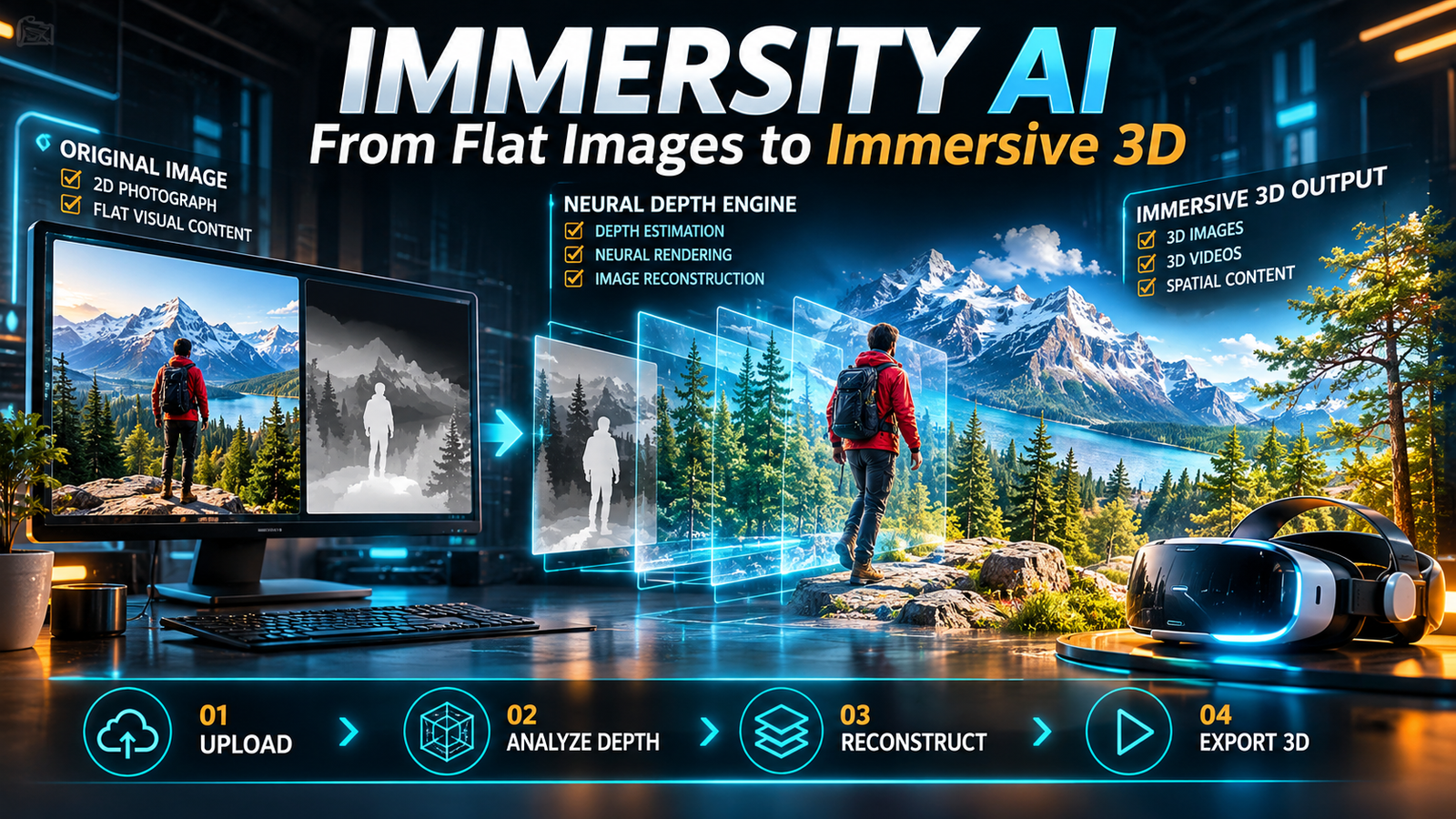
Immersity AI is an AI-powered platform that transforms ordinary 2D images and videos into immersive 3D visuals using neural depth estimation and image reconstruction. It helps creators produce animated depth effects, stereoscopic images, 3D videos, and spatial content without manually building complete 3D scenes.
Immersity AI at a Glance
- Primary purpose: Convert traditional 2D visual content into immersive 3D experiences.
- Core technology: AI-powered depth estimation and neural depth rendering.
- Main features: Immersive Motion, 3D image conversion, 3D video conversion, and depth map generation.
- Supported workflows: Social media content, creative projects, album artwork, and XR experiences.
- Free option: Watermarked exports with limited resolution and non-commercial usage.
- Paid pricing: Monthly subscriptions start at $4.99 for the image plan, according to the published pricing page.
What Is Immersity AI?
Immersity AI is a visual conversion platform developed by Leia Inc. It specializes in transforming conventional images and videos into immersive 3D content.
Its main purpose is to add depth and perspective to media that originally contains only two-dimensional visual information.
For example, imagine uploading a photograph of a mountain landscape. The platform analyzes the image, estimates the distance between different objects, and creates a depth structure.
It can then use that information to produce a moving 3D effect or a stereoscopic image.
This approach gives traditional photographs a more dimensional appearance without requiring creators to construct an entire scene in professional 3D software.
Immersity AI is particularly relevant to photographers, digital artists, musicians, marketers, and video creators who want to make existing visual assets more engaging.
It is also useful for people exploring spatial media and extended reality (XR).
How Does Immersity AI Work?
Immersity AI uses proprietary neural depth technology to estimate spatial information from conventional visual content.
A regular photograph contains color, texture, and lighting information. However, it does not directly provide a complete representation of the distance between objects.
AI-based depth estimation attempts to reconstruct that missing information.
The process can be understood through four main stages.
1. Upload a 2D Image or Video
Users begin by uploading an existing visual asset.
Depending on the workflow, supported image formats include JPG, JPEG, PNG, HEIC, and WebP. Video workflows support formats such as MP4, MKV, and MOV.
The platform analyzes the uploaded content before generating its depth representation.
2. AI Depth Estimation
The Neural Depth Engine estimates which objects appear closer and which appear farther away.
For example, in a photograph of a person standing in front of a building, the system attempts to distinguish the person, background architecture, and distant surroundings.
This process produces a depth map.
A depth map is a grayscale representation of spatial distance. Different brightness levels represent different estimated depth values.
3. Neural Depth Rendering
Immersity’s newer Neural Depth Rendering technology takes the process further.
Instead of simply shifting different image layers, it uses inpainting techniques to reconstruct portions of objects that were hidden behind foreground elements.
This helps create additional visual information when the virtual camera moves.
It can reduce some distortion associated with conventional 2D-to-3D conversion, although it cannot guarantee perfect reconstruction.
4. Generate and Export the 3D Result
After processing, users can preview and refine the output before exporting it.
Depending on the selected feature, exports may include:
- Immersive motion videos.
- Stereoscopic 3D images.
- Side-by-side 3D videos.
- Spatial video formats.
- Depth maps.
- Animated GIFs.
The appropriate format depends on the intended viewing device and distribution platform.
Key Features of Immersity AI
Immersity AI offers several tools designed for different types of visual content.
1. Immersive Motion
Immersive Motion turns a static photograph into an animated visual experience.
It introduces simulated camera movement and depth separation, making foreground and background elements appear to occupy different spatial positions.
Creators can use this feature for:
- Social media animations.
- Digital advertising.
- Photography presentations.
- Promotional visuals.
- Album artwork.
- Website graphics.
The result is not a fully modeled 3D environment. It is a depth-based animation generated from an existing image.
2. 3D Image Conversion
The 3D image feature transforms traditional photographs into stereoscopic images.
Stereoscopic content presents slightly different views to the left and right eyes, creating a perception of depth.
Immersity supports several output formats, including:
- Side-by-side parallel.
- Side-by-side cross-view.
- Anaglyph.
- Spatial photographs.
- LIF-compatible image exports.
- Depth map exports.
These formats serve different display systems, so selecting the correct export is important.
3. 3D Video Conversion
Immersity can convert existing 2D videos into stereoscopic 3D formats.
This is particularly useful for creators who want to adapt conventional footage for compatible XR headsets and 3D displays.
Supported export options include side-by-side and top-and-bottom formats, alongside other stereoscopic configurations.
Some workflows also support spatial video exports for compatible Apple devices.
However, the output quality depends on the original footage, motion, scene composition, and depth estimation.
4. Depth Map Generation
Depth maps are particularly valuable for users who want more control over their visual projects.
Immersity generates depth information that can be exported and refined in compatible third-party creative applications.
A depth map can help separate foreground objects from backgrounds and support additional compositing or 3D workflows.
This makes the feature useful beyond simple social media animations.
5. Apple Music Album Motion
Immersity also provides a dedicated workflow for Apple Music Album Motion.
Musicians and record labels can transform static album artwork into animated visual content.
The platform provides exports designed around Apple’s specified artwork formats.
This can reduce the need to build a complete animation from scratch.
However, generating the artwork does not automatically distribute it to Apple Music. Artists and labels must still follow the appropriate submission and distribution process.
Who Can Use Immersity AI?
Immersity AI serves several creative audiences.
| User Type | Practical Application |
|---|---|
| Photographers | Add dimensional movement to photographs |
| Social media creators | Produce engaging animated visuals |
| Musicians | Create animated album artwork |
| Video editors | Convert selected footage into stereoscopic content |
| Digital artists | Generate depth maps for creative workflows |
| Designers | Develop immersive promotional assets |
| XR creators | Prepare visual content for compatible headsets |
Its strongest appeal is to people who already have visual content and want to give it additional depth.
It is less suitable for users who need complete 3D modeling, complex character animation, or physically accurate virtual environments.
Immersity AI Pricing: Is It Free?
Immersity AI offers a free option alongside paid monthly subscriptions.
However, free and paid plans have different export restrictions.
According to the published Immersity for Web pricing page, the subscription options include:
| Plan | Monthly Price | Monthly Credits |
|---|---|---|
| Free | $0 | Watermarked conversions |
| Image | $4.99 | 500 |
| Image Pro | $14.99 | 1,700 |
| Video | $24.99 | 3,300 |
| Video Pro | $49.99 | 7,500 |
| Video Max | $99.99 | 20,000 |
Prices are listed in USD and may change. Regional taxes, payment conditions, and availability should be checked before subscribing.
What Does the Free Plan Include?
The free web option provides watermarked conversions at up to 720p.
It supports selected 3D image and simple 3D video workflows.
Commercial use is not included in the free web plan.
Immersity also advertises free mobile app exports for Immersive Motion, subject to the applicable mobile offering.
What Do Paid Plans Offer?
Paid subscriptions provide access to higher-resolution exports, additional conversion credits, and commercial-use rights.
The published plans include exports up to 4K for supported workflows.
The number of conversions depends on the feature selected. An image conversion and a video conversion do not consume the same number of credits.
For example, the pricing page provides estimated monthly conversion quantities rather than promising one fixed number of projects across all features.
An Important Pricing Detail: Credit Expiration
One detail worth checking is the monthly credit policy.
Subscription credits expire at the end of each billing month, according to the pricing page.
Immersity also states that it has discontinued purchasing additional credits individually.
Consequently, users with irregular workloads should calculate their expected monthly usage before selecting a subscription.
A higher-priced plan may provide more capacity, but unused monthly credits can reduce its practical value.
Benefits of Using Immersity AI
Faster 3D Content Creation
Traditional stereoscopic production can involve specialized cameras, manual depth work, and additional editing.
Immersity automates much of the conversion process.
This makes experimentation more accessible to creators without extensive 3D production experience.
Reuse Existing Visual Assets
Creators do not need to photograph or render everything again.
They can start with existing photographs, illustrations, album covers, or video footage.
This can help extend the useful life of previously produced content.
Multiple Export Options
Different projects require different output formats.
Immersity’s support for stereoscopic images, videos, depth maps, and spatial formats gives creators flexibility when preparing content for compatible devices.
Accessibility for Non-Technical Creators
The platform does not require users to build complete 3D scenes manually.
Its automated workflow makes basic depth-based visual production more approachable.
However, advanced projects may still require professional editing software.
Limitations of Immersity AI
Despite its capabilities, Immersity AI is not a replacement for every 3D production tool.
Understanding its limitations can help users avoid unrealistic expectations.
1. Depth Estimation Is Not Always Perfect
AI estimates spatial relationships from existing visual information.
It does not have direct access to every object’s actual dimensions or hidden surfaces.
Reflective materials, transparent objects, complex edges, and overlapping subjects can produce inaccurate depth information.
2. Visual Artifacts Can Appear
Moving an image through a virtual camera can reveal areas that were previously hidden.
These areas may contain stretching, unusual edges, or reconstructed details that do not match the original scene perfectly.
Neural Depth Rendering attempts to reduce these issues, but the results still require inspection.
3. Video Conversion Has Additional Challenges
Video introduces temporal consistency problems.
When frames are processed individually, depth estimation can vary between consecutive frames.
This may create visual jumps or flickering.
Immersity acknowledges that temporal artifacts cannot always be eliminated.
4. Output Formats Require Compatible Viewers
Not every 3D export works on every device.
For example, Apple Vision Pro spatial video uses a different format from conventional side-by-side stereoscopic video.
Users should confirm their playback requirements before purchasing a subscription.
5. It Does Not Replace Professional 3D Software
Immersity focuses on converting existing visual content into depth-based experiences.
It is not designed to replace comprehensive 3D modeling, rigging, simulation, or animation applications.
Immersity AI vs. Traditional 3D Software
The difference comes down to workflow and creative control.
| Comparison | Immersity AI | Traditional 3D Software |
|---|---|---|
| Starting material | Existing 2D images or videos | 3D assets or imported media |
| Depth creation | AI-generated | Manually modeled or generated |
| Workflow | Automated conversion | More hands-on production |
| Creative control | Focused on depth and motion adjustments | Extensive scene-level control |
| Learning requirements | Relatively accessible | Often more demanding |
| Ideal use | Quick immersive conversions | Complex 3D production |
For quick conversions, Immersity offers a more direct workflow.
For complex environments, detailed object manipulation, and advanced animation, traditional 3D software remains more appropriate.
Immersity AI Alternatives and Competitors
The right alternative depends on whether someone wants automatic depth conversion, complete 3D editing, or an entirely different visual workflow.
Here are some relevant tools.
1. LeiaPix and Leia’s Spatial Ecosystem
LeiaPix is historically associated with the development of image-to-3D conversion technology and the wider Leia ecosystem.
Immersity represents the current branded platform for these immersive conversion workflows.
Users researching older LeiaPix tutorials should check whether the demonstrated features and interface still match the current Immersity product.
2. Blender
Blender is an open-source 3D creation application.
It supports modeling, animation, compositing, rendering, and advanced scene construction.
Unlike Immersity, Blender is not primarily an automatic 2D-to-3D conversion service.
It is more suitable for users who need detailed control over complete 3D scenes.
3. Adobe After Effects
Adobe After Effects is designed for motion graphics and visual effects.
Creators can use depth maps, displacement techniques, and camera effects to produce dimensional animations.
However, achieving similar results may require additional preparation and manual editing.
4. CapCut
CapCut offers accessible video editing and creative effects.
It can be useful for creators who want animated social media content without building a dedicated stereoscopic production workflow.
Its general editing capabilities should not be confused with Immersity’s specialized depth conversion and XR export features.
Competitor Comparison
| Platform | Target User | Main Strength | Pricing Transparency | Main Limitation |
|---|---|---|---|---|
| Immersity AI | Creators and XR users | Automated 2D-to-3D conversion | Public subscription pricing | Depth artifacts |
| Blender | 3D artists | Complete 3D production | Free and open-source | Steeper learning curve |
| Adobe After Effects | Motion designers | Professional visual effects | Subscription-based | More manual work |
| CapCut | Social media creators | Accessible video editing | Plan and region dependent | Not a dedicated XR conversion tool |
These products are not identical substitutes. Their capabilities overlap in selected creative workflows.
Privacy and Commercial Usage
Before uploading professional photographs, client assets, or unpublished creative material, users should review Immersity’s privacy policy and terms.
The company’s published FAQ states that it does not publish user uploads without consent and does not sell or voluntarily share user-generated data.
It also states that general usage trends and patterns may be used to improve its Neural Depth Engine and user experience.
This distinction matters.
A statement about not publishing uploads does not automatically establish that every form of data processing, retention, or model improvement is disabled.
The available product information should not be interpreted as proof of SOC 2 certification or Zero Data Retention.
For sensitive commercial projects, confirm the current retention policy, deletion process, processing arrangements, and applicable contractual terms directly with the provider.
Commercial usage also depends on the subscription.
The published paid web plans include commercial-use rights, while the free web plan is restricted to non-commercial use.
Users should also confirm that they own or have permission to modify and distribute the original photographs, videos, and artwork.
Tips for Getting Better Results With Immersity AI
The quality of the original visual material plays an important role in the final conversion.
Use these practical guidelines:
- Choose images with clear depth: Photographs containing recognizable foreground, middle-ground, and background elements generally provide useful spatial information.
- Avoid excessive transparency: Glass, smoke, reflections, and transparent objects can complicate depth estimation.
- Use high-resolution assets: Start with a clean source image rather than a heavily compressed photograph.
- Inspect object boundaries: Check hair, clothing, furniture, and overlapping objects for stretching.
- Keep camera movement reasonable: Excessive virtual movement can reveal missing visual information.
- Preview before exporting: Review the complete animation instead of judging quality from a single frame.
- Choose the correct format: Match the output to the intended headset, display, or distribution platform.
These steps will not eliminate every artifact, but they can improve the consistency of the results.
Is Immersity AI Worth Using?
Immersity AI is worth exploring if your primary goal is to turn existing 2D visual assets into immersive content.
Its strongest advantage is its specialized conversion workflow.
Instead of constructing an entire 3D scene, users can start with familiar photographs and videos. The AI estimates depth and generates the visual transformation.
For photographers and social media creators, Immersive Motion offers a straightforward way to produce more dimensional content.
For musicians, Apple Music Album Motion provides a specialized artwork workflow.
For XR creators, stereoscopic and spatial exports offer additional possibilities.
However, users should consider conversion artifacts, device compatibility, credit consumption, and subscription restrictions.
The platform is best evaluated through actual sample conversions using the types of images and videos they intend to publish.
Frequently Asked Questions
1. What is Immersity AI used for?
Immersity AI is used to convert conventional 2D images and videos into immersive 3D content. Its tools include depth estimation, animated Immersive Motion, stereoscopic image conversion, 3D video conversion, and depth map generation.
2. Is Immersity AI free to use?
Immersity AI offers a free web option with watermarked exports, selected conversion features, and resolution limits of up to 720p. Paid subscriptions provide additional credits, higher-resolution exports, and commercial-use rights.
3. Can Immersity AI convert photos into 3D?
Yes. Immersity AI analyzes a photograph, estimates depth information, and generates stereoscopic or animated 3D results. Users can also export depth maps for additional editing.
4. Does Immersity AI support Apple Vision Pro?
Yes. Immersity provides spatial video and spatial photo export options designed for compatible Apple devices, including Apple Vision Pro. Users must select the appropriate spatial output format for their intended playback workflow.
5. Does Immersity AI produce perfect 3D results?
No. Its AI estimates depth from existing visual information, so some images and videos may contain stretching, inaccurate object boundaries, or temporal artifacts. Results depend on the source material and scene complexity.
Conclusion
Immersity AI makes 3D visual conversion more accessible by using AI-powered depth estimation and neural rendering.
It provides practical tools for transforming photographs, videos, and album artwork into more immersive experiences.
Its main value lies in converting existing content without requiring users to build complete 3D environments.
However, depth estimation is not perfect, and professional users should evaluate output quality, export compatibility, pricing, and privacy requirements before committing.
For creators interested in spatial media, Immersity AI offers a practical starting point for exploring the possibilities of 2D-to-3D conversion.