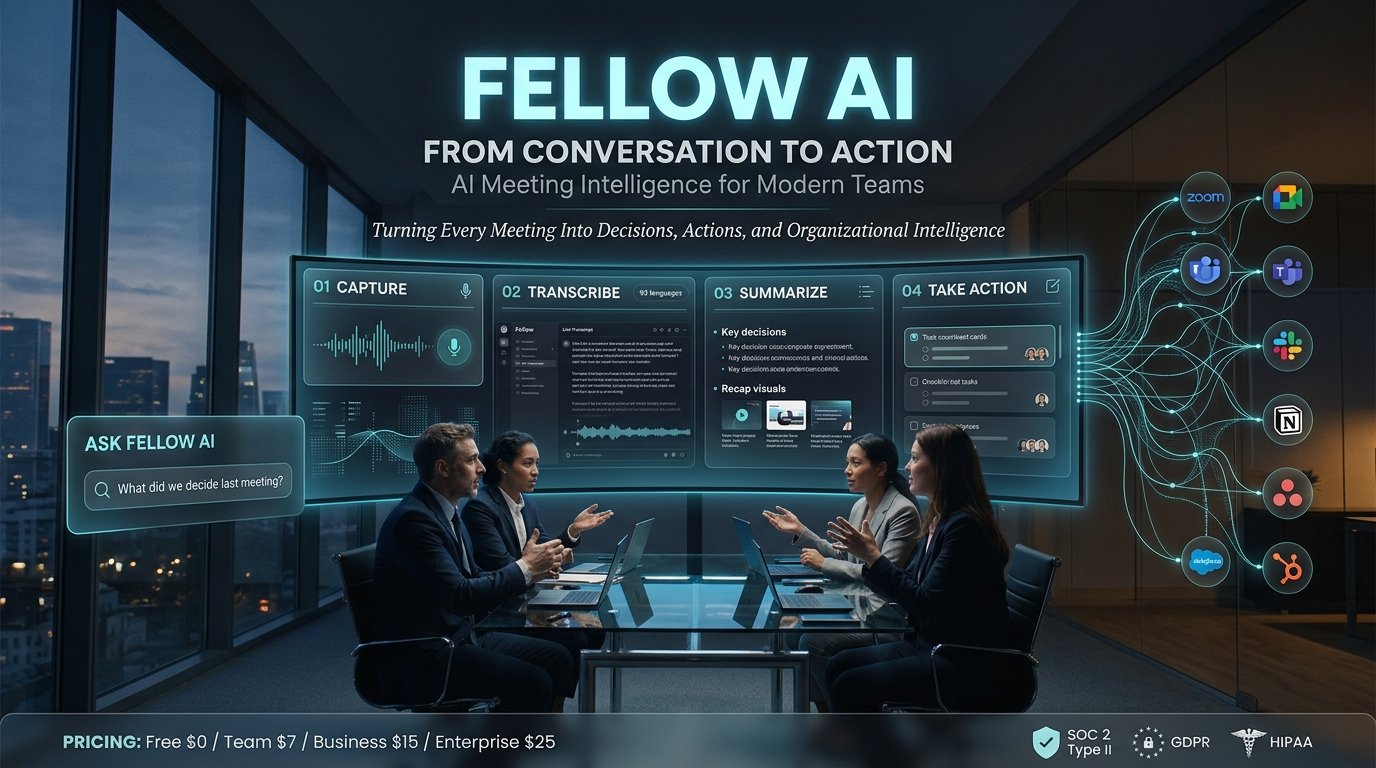
Fellow AI is an AI-powered meeting assistant that records, transcribes, summarizes, and organizes conversations into searchable meeting notes, decisions, and action items. It also offers Ask Fellow, meeting preparation tools, workflow integrations, and different recording methods for individuals and teams.
Fellow AI at a Glance
- Product category: AI meeting assistant and meeting management platform.
- Primary purpose: Automate meeting documentation and improve team follow-through.
- Core capabilities: Recording, transcription, summaries, action items, and searchable meeting history.
- Supported meeting platforms: Google Meet, Zoom, Microsoft Teams, and Slack Huddles, with additional recording options.
- AI assistant: Ask Fellow can search meeting history, answer questions, and generate documents.
- Pricing: Free plan available, with paid Team, Business, and Enterprise options.
What Is Fellow AI?
Fellow AI is an AI-powered meeting management platform developed by Fellow. It helps individuals and organizations manage meetings before, during, and after conversations.
Traditional meeting software primarily focuses on scheduling and communication. Fellow combines meeting agendas, collaborative notes, recordings, transcription, and AI-generated summaries in one workspace.
Its main purpose is straightforward: reduce manual note-taking and make meeting outcomes easier to find and act upon.
For example, imagine a marketing team discussing a product launch. Several people contribute ideas, deadlines, and decisions. Instead of relying on someone to document everything manually, Fellow can generate a transcript, summarize the discussion, and identify potential action items.
The team can then review the recap, confirm responsibilities, and share the relevant information.
Fellow is therefore more than a transcription application. It combines AI note-taking with meeting organization and collaboration features.
How Does Fellow AI Work?
Fellow uses a combination of meeting capture, speech recognition, language processing, and AI-generated content to transform conversations into structured information.
The process generally follows five stages.
1. Meeting Preparation
Fellow supports collaborative meeting agendas and preparation workflows.
Users can organize discussion topics, review previous meeting notes, and prepare for upcoming conversations. For recurring meetings, pre-meeting briefs can summarize previous discussions and suggest follow-ups.
This provides useful context before participants enter the meeting.
2. Meeting Recording
Fellow offers several ways to capture conversations.
Depending on the platform and configuration, users can choose:
- Note Taker Bot: Joins supported online meetings as a participant.
- Desktop Botless Recording: Captures meeting audio through the Fellow desktop application.
- Zoom Native Capture: Uses Zoom’s recording infrastructure without a visible meeting bot.
- Mobile Recording: Captures in-person or other conversations through the mobile application.
These methods have different setup requirements and platform limitations.
3. AI Transcription
After capturing a conversation, Fellow processes the audio to generate a written transcript.
The transcript can include speaker identification, timestamps, and the conversation’s content.
Fellow currently documents transcription support for 93 languages in its AI feature overview. Actual transcription quality can vary with audio conditions, accents, overlapping speakers, and specialized terminology.
4. AI Meeting Summaries
Fellow transforms the transcript into a structured meeting recap.
Depending on the meeting, the recap can contain:
- Main discussion points
- Important decisions
- Key takeaways
- Suggested action items
- Full meeting transcripts
- Recording links
The goal is to make long conversations easier to review without replaying the entire recording.
5. Follow-Up and Knowledge Retrieval
Once meeting information is available, users can search previous discussions and use Ask Fellow to retrieve relevant information.
For example, a manager might ask:
“What did we decide about the new customer onboarding process?”
Ask Fellow can search available meeting information and provide a response based on the recorded context.
This is particularly useful when teams manage several recurring meetings and need to recover information from previous conversations.
Key Features of Fellow AI
Fellow’s value comes from combining multiple meeting-related capabilities rather than offering transcription alone.
AI Meeting Note Taker
The AI Note Taker automatically captures meeting conversations and generates structured recaps.
It reduces the need for participants to divide their attention between listening and writing notes.
Users can configure recording behavior based on their meeting schedules and preferences.
Ask Fellow AI Assistant
Ask Fellow is an integrated AI assistant designed to help users interact with meeting information.
Its capabilities include:
- Searching previous meetings.
- Answering questions about recorded discussions.
- Drafting summaries and documents.
- Finding relevant information across meeting history.
- Creating video clips from specific recording moments.
- Helping organize meeting-related information.
It can also search the web when that capability is enabled by the workspace.
An important distinction is that Ask Fellow works with available information. It should not be treated as an infallible source of truth.
Users should verify important decisions, figures, and commitments against the original conversation.
AI-Generated Action Items
Meeting summaries become more useful when they identify what needs to happen next.
Fellow can generate suggested action items from conversations. Teams can use these to establish responsibilities and track progress.
However, AI-generated tasks should be reviewed before distribution.
A conversational statement such as “We should look into that next month” does not necessarily represent a confirmed assignment.
Meeting Agendas and Collaboration
Fellow includes collaborative agendas, shared meeting notes, and recurring meeting workflows.
Teams can organize conversations around specific topics and maintain continuity between meetings.
This helps managers avoid repeatedly discussing the same issues without documenting previous decisions.
Recording Library
Fellow provides a centralized library for recorded and uploaded meetings.
Users can browse recordings, search available meeting information, organize content into channels, and review shared meeting materials.
The library is particularly useful for teams that need to revisit customer conversations, project discussions, and internal decisions.
Meeting Integrations
Fellow connects with commonly used workplace applications.
Its integration ecosystem includes:
- Video conferencing: Zoom, Google Meet, and Microsoft Teams.
- Project management: Asana, Jira, Linear, Trello, and ClickUp.
- Documentation: Notion and Confluence.
- CRM: Salesforce and HubSpot.
- Communication: Slack and Microsoft Teams.
Fellow also supports additional integrations through its broader ecosystem and automation connections.
The practical advantage is that meeting information can move into existing business workflows instead of remaining isolated in a meeting application.
Fellow AI Recording Methods: Bot vs. Botless
One important consideration is how Fellow captures meetings.
Not every recording method works in the same way.
| Recording method | How it works | Main consideration |
|---|---|---|
| Note Taker Bot | Joins the meeting as a participant | Visible meeting bot |
| Desktop Botless | Captures computer audio and microphone audio | Requires desktop permissions |
| Zoom Native Capture | Uses Zoom’s native meeting infrastructure | Zoom-specific requirements |
| Mobile Recording | Captures audio through the mobile app | Suitable for in-person conversations |
Desktop Botless Recording is particularly interesting for people who prefer not to add another participant to their online meetings.
However, it requires the desktop application and microphone and screen-recording permissions.
Zoom Native Capture also avoids a visible bot, but requires the appropriate Zoom configuration and account permissions.
Important: Botless does not mean invisible or exempt from recording-consent requirements. Organizations should inform participants and follow applicable recording laws and internal policies.
Benefits of Using Fellow AI
Fellow can improve meeting workflows in several practical ways.
Less Manual Note-Taking
Employees can spend more time participating in discussions rather than writing down every detail.
Better Meeting Accountability
AI-generated action items make it easier to identify potential next steps and assign responsibilities.
Searchable Meeting History
Teams can retrieve information from previous conversations instead of relying on individual memory.
Improved Meeting Preparation
Pre-meeting briefs and previous notes provide context for recurring discussions.
Connected Business Workflows
Integrations help teams transfer meeting information into project management, CRM, and documentation applications.
Flexible Recording Options
Different recording methods accommodate scheduled video calls, impromptu discussions, Zoom meetings, and in-person conversations.
Fellow AI Pricing in 2026
Fellow offers a free plan and several paid subscriptions.
Its published team pricing currently lists the following rates in US dollars.
| Plan | Annual billing price | Monthly billing price |
|---|---|---|
| Free | $0 | $0 |
| Team | $7/user/month | $11/user/month |
| Business | $15/user/month | $23/user/month |
| Enterprise | $25/user/month | Contact sales for arrangements |
Prices should be checked on the official pricing page before purchasing because subscriptions and plan limits can change.
Free Plan
The Free plan includes:
- Five AI notes per user for the lifetime of the account.
- Five AI recordings per user for the lifetime of the account.
- AI meeting summaries.
- Transcription.
- AI action items.
- Ask Fellow.
- Core meeting integrations.
This is useful for testing the platform, but the lifetime recording allowance is restrictive for regular meeting users.
Team Plan
The Team plan is designed for smaller organizations.
It includes 10 AI notes and 10 AI recordings per user each month, meeting automations, project management integrations, and API access.
The annual price is $7 per user per month.
Business Plan
The Business plan provides unlimited AI notes and recordings.
Additional capabilities include sales recap templates, organization-wide meeting templates, advanced CRM integrations, and keyword tracking.
It is designed for organizations that depend heavily on documented customer and internal meetings.
Enterprise Plan
Enterprise adds administrative and governance capabilities.
These include advanced recording permissions, domain controls, user provisioning, organization-wide analytics, transcript redaction, and additional security controls.
It also supports enterprise requirements such as SSO and HIPAA-related contractual arrangements.
Is Fellow AI Worth Paying For?
The answer depends on meeting volume and how extensively a team uses the platform.
Occasional users may find the Free plan sufficient for evaluation. Small teams may prefer Team, while organizations requiring frequent recordings and CRM workflows may consider Business.
Enterprise is more relevant when centralized administration, security reviews, and organizational controls matter.
One detail deserves attention: a paid plan does not automatically mean every recording method or integration is available without additional configuration.
Check the exact feature requirements before committing to a subscription.
Fellow AI Privacy and Security
Meeting recordings can contain sensitive business information, customer details, employee discussions, and confidential plans.
Privacy should therefore be a major part of any AI meeting assistant evaluation.
Fellow states that it does not use customer meeting data to train AI models. Its published documentation also identifies SOC 2 Type II, HIPAA, and GDPR-related compliance.
The company documents encryption in transit and at rest for its underlying service providers.
However, security certifications and privacy policies should not be interpreted as a guarantee that every data-retention requirement is automatically satisfied.
Does Fellow Store Meeting Recordings?
Yes. Fellow stores meeting recordings, transcripts, and summaries within its platform.
Its documentation states that transcripts and summaries remain stored while the corresponding meeting note exists, unless deleted.
Enterprise administrators can configure scheduled deletion of recordings and transcripts. Deletion-related settings and backup retention periods should be reviewed before adopting the platform.
Does Fellow Use Meeting Data for AI Training?
Fellow states that it does not use meeting data to train AI models.
Its security documentation also describes third-party processing arrangements for transcription and AI functionality.
Organizations should review the current subprocessors list, applicable contractual terms, and data-processing agreements before uploading confidential information.
Is Fellow SOC 2 Certified?
Fellow documents SOC 2 Type II compliance.
For procurement and security reviews, organizations should request the relevant audit documentation rather than relying solely on marketing statements.
SOC 2 Type II does not automatically mean Zero Data Retention. These are different concepts.
What About Recording Consent?
Recording rules vary by jurisdiction and business context.
Organizations should establish clear recording policies and notify participants before capturing conversations.
The availability of botless recording does not remove this responsibility.
Limitations of Fellow AI
Although Fellow offers a broad feature set, it is not necessarily suitable for every user.
Free Usage Is Limited
Five lifetime AI notes and recordings are insufficient for people who attend frequent meetings.
Users may need a paid subscription relatively quickly.
Transcription Still Requires Human Review
Speech recognition can misinterpret names, technical terminology, accents, and overlapping conversations.
Important decisions should always be checked against the original recording or transcript.
Recording Methods Have Different Requirements
The Note Taker bot, desktop recording, and Zoom Native Capture do not offer identical setup experiences.
For example, Zoom Native Capture requires specific Zoom permissions and configuration.
AI Summaries Can Miss Context
AI-generated summaries compress conversations.
They may overlook disagreement, uncertainty, qualifications, or subtle commitments.
Teams should review important summaries before treating them as official meeting records.
Data Governance Requires Attention
Organizations must understand who can access recordings, how information is shared, and when content is deleted.
These decisions should be made before deploying the platform across an organization.
Fellow AI vs. Competitors
Fellow operates in a competitive AI meeting assistant market.
Several platforms offer similar transcription and summarization capabilities, but their workflows differ.
| Platform | Target user | Key strength | Pricing transparency | Main consideration |
|---|---|---|---|---|
| Fellow | Teams and managers | Meeting management and follow-through | Public plan pricing | Recording limits depend on plan |
| Otter.ai | Individuals and teams | Live transcription | Public pricing | Evaluate transcription limits |
| Fireflies.ai | Sales and business teams | Searchable conversations and integrations | Public pricing | Review storage and AI credit limits |
| Fathom | Individuals and teams | Meeting recording and summaries | Public pricing | Team features and plan restrictions vary |
| Granola | Professionals and individuals | Notes without a meeting bot | Public pricing | Different capture workflow |
Fellow vs. Otter.ai
Otter.ai focuses heavily on transcription and searchable conversation records.
Fellow offers a broader meeting-management experience, including agendas, collaborative notes, and structured meeting workflows.
Choose Otter when live transcription is the main requirement. Consider Fellow when meeting preparation and follow-through are equally important.
Fellow vs. Fireflies.ai
Fireflies.ai focuses on recording, transcription, conversation search, and business integrations.
It is relevant for sales and customer-facing teams that want to organize information from calls.
Fellow combines similar AI note-taking capabilities with more emphasis on collaborative meeting management.
Fellow vs. Fathom
Fathom is an AI meeting assistant that records and summarizes online meetings.
It is worth evaluating for users who prioritize meeting recaps and straightforward recording workflows.
Fellow offers additional meeting-management capabilities, including agendas, action-item organization, and recurring meeting preparation.
Fellow vs. Granola
Granola follows a different approach to AI note-taking.
It is designed around notes captured through the user’s computer rather than a traditional meeting bot joining the call.
Fellow provides more extensive team-oriented meeting management and multiple recording methods.
The right choice depends on whether users prioritize personal note-taking or coordinated organizational workflows.
Who Should Use Fellow AI?
Fellow is most relevant for people and organizations that conduct frequent meetings and need reliable documentation.
Managers and team leaders: Useful for tracking decisions, responsibilities, and recurring discussions.
Remote teams: Helps preserve meeting context across distributed employees.
Sales professionals: Can organize customer conversations and support CRM-related workflows.
Project managers: Useful for capturing project updates and identifying follow-up tasks.
Business owners: Helps maintain a searchable record of operational discussions.
Enterprise organizations: Provides administrative controls and governance features for larger deployments.
However, individuals who rarely attend meetings may not need a dedicated meeting management platform.
Practical Example: Using Fellow AI in a Business Meeting
Consider a product development team preparing a new software release.
The team discusses development progress, unresolved bugs, launch dates, and marketing responsibilities.
With Fellow, the workflow could look like this:
- The project manager prepares a meeting agenda.
- Fellow captures the conversation using an approved recording method.
- The platform generates a transcript and AI meeting recap.
- The team reviews the identified decisions and suggested action items.
- Relevant tasks move into the team’s project management workflow.
- Before the next meeting, participants review the previous discussion through a pre-meeting brief.
- A team member uses Ask Fellow to retrieve a previous decision.
The benefit is not simply having a transcript.
It is connecting meeting discussions with the work that follows.
Common Mistakes When Choosing an AI Meeting Assistant
Before purchasing Fellow or another AI meeting platform, avoid these mistakes:
- Ignoring recording limits: Check monthly and lifetime allowances rather than comparing subscription prices alone.
- Assuming every recording method is botless: Confirm which method works with your conferencing platform.
- Treating AI summaries as official records: Review important decisions before sharing them.
- Overlooking data retention: Understand storage, deletion, and backup policies.
- Ignoring integration requirements: Verify that your CRM and project management tools support the intended workflow.
- Skipping consent procedures: Establish participant notification and recording policies.
- Confusing compliance with retention: SOC 2 Type II does not automatically provide Zero Data Retention.
Frequently Asked Questions
1. What is Fellow AI used for?
Fellow AI is used to record, transcribe, summarize, and organize meetings. It generates meeting recaps, identifies suggested action items, and helps users search previous conversations through its AI assistant.
2. Is Fellow AI free?
Yes. Fellow offers a free plan with five lifetime AI notes and five lifetime AI recordings per user. Paid subscriptions provide higher usage allowances and additional team and enterprise features.
3. Does Fellow AI work with Zoom and Microsoft Teams?
Yes. Fellow supports Zoom and Microsoft Teams, as well as Google Meet and Slack Huddles. Recording methods and configuration requirements vary by platform.
4. Is Fellow AI safe for confidential meetings?
Fellow documents SOC 2 Type II, HIPAA, and GDPR-related compliance and states that customer meeting data is not used to train AI models. However, organizations should independently review access controls, data retention, subprocessors, contractual protections, and recording-consent requirements before using it for confidential discussions.
5. What are the best alternatives to Fellow AI?
Relevant alternatives include Otter.ai, Fireflies.ai, Fathom, and Granola. Otter emphasizes transcription, Fireflies focuses on searchable meeting conversations, Fathom offers meeting recording and summaries, and Granola provides a different bot-free note-taking workflow.
Conclusion
Fellow AI combines meeting transcription, AI-generated summaries, collaborative agendas, action items, and searchable meeting history in one platform.
Its biggest distinction is the connection between meeting documentation and team productivity. Features such as Ask Fellow, pre-meeting briefs, integrations, and multiple recording methods make it relevant to organizations with recurring meetings.
However, users should evaluate its recording allowances, subscription costs, transcription quality, integration requirements, and data-retention controls before choosing a plan.
For teams that regularly turn discussions into projects, decisions, and follow-up work, Fellow is worth evaluating. For occasional personal note-taking, a simpler alternative may be sufficient.