DAX AI (Deterministic AI eXecution) is an open-source, terminal-based execution control plane that adds governance, audit trails, and human approval gates to AI-assisted software development. Unlike chat-based coding assistants that prioritize speed, DAX treats every AI action as a reviewable event, using its Run-Audit-Override model to keep engineers in control of sensitive operations. The project is available on GitHub and installs via Homebrew, WinGet, or npm.
At-a-Glance
- What it is: A governed execution workstation for AI-driven software work, not a chat interface
- Core model: RAO (Run, Audit, Override) replaces free-running autonomy with approval gates
- Key differentiator: Every AI action produces a replayable, auditable event trail
- Provider support: OpenAI, Google Gemini, Anthropic, Ollama, and custom MCP servers
- Installation: Free and open-source via Homebrew, WinGet, or npm
- Target user: Engineering teams and builders who need traceability for consequential AI operations
What Is DAX AI?
DAX AI occupies a different category than Cursor, Claude Code, or GitHub Copilot. Those tools optimize for speed and in-editor convenience. DAX optimizes for trust and accountability when AI touches production systems.
The project describes itself as a “projection-first governed execution workstation” . In simpler terms, it is a terminal application that runs AI agents against real repositories while forcing every meaningful action through a structured approval process. The AI proposes. The system audits. The human decides.
This positioning matters because AI coding agents increasingly perform actions with real consequences: modifying files, running shell commands, accessing external directories. Most tools treat these operations as transparent background work. DAX treats them as events requiring explicit authorization.
DAX vs. Mainstream AI Coding Tools
| Dimension | Mainstream AI Coding Tools | DAX AI |
|---|---|---|
| Primary interface | IDE plugin or chat | Terminal workstation (TUI) |
| Action model | Free-running agent autonomy | RAO approval loop |
| Audit trail | Limited or absent | Canonical event language, replayable |
| Human control | Optional checkpoints | Mandatory for sensitive actions |
| Provider lock-in | Often single-vendor | Multi-provider substrate |
How the RAO Governance Loop Works
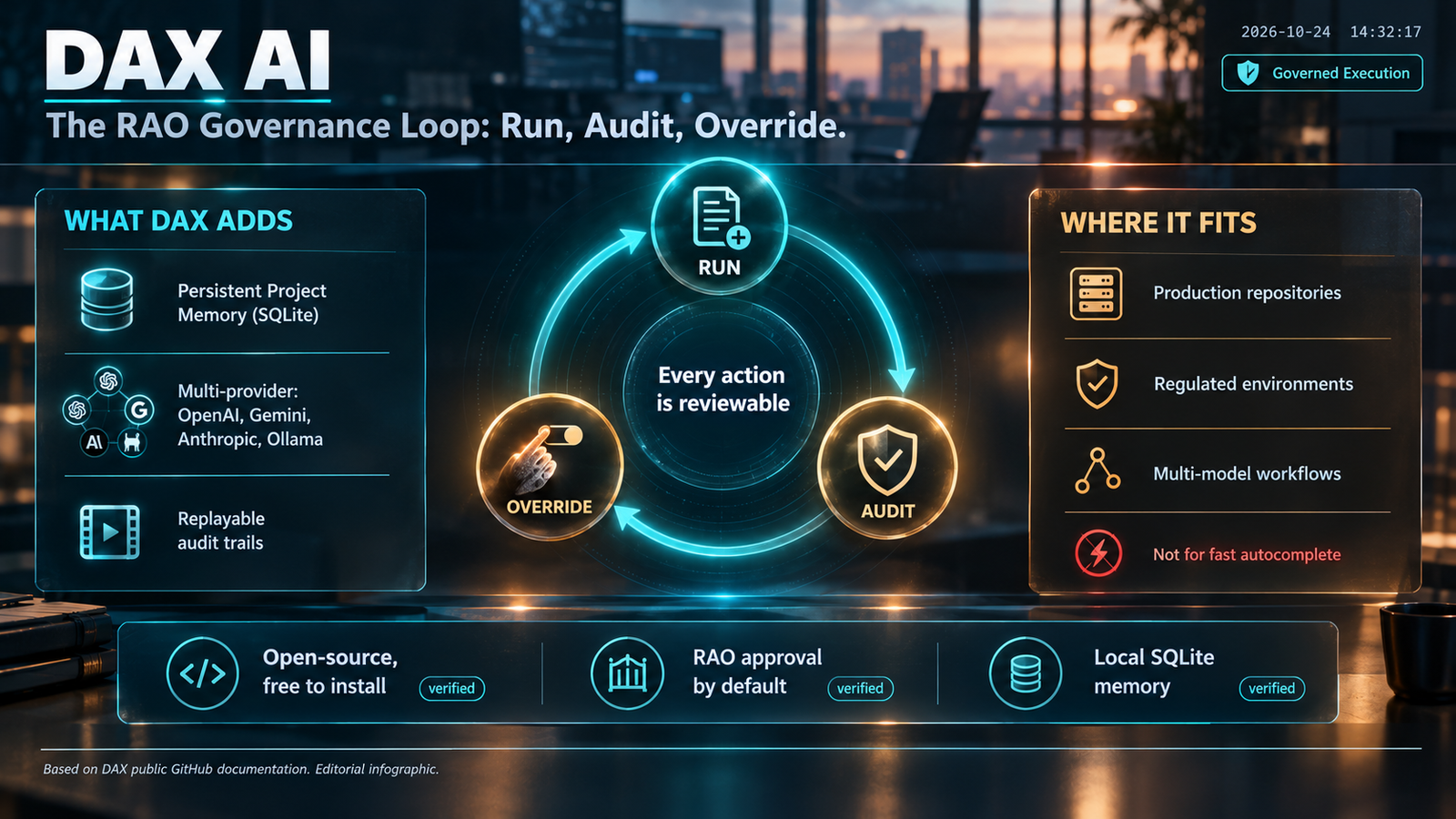
The Run-Audit-Override model is DAX’s core architectural decision. It replaces what the project calls “free-running autonomy” with a structured three-stage cycle .
Run: The language model proposes a technical action or plan. This might be a file edit, a shell command, or a multi-step workflow. The model does not execute directly.
Audit: Automated permission rules and safety gates evaluate the proposed action. DAX ships with default policies, including a “balanced” and “strict” profile that teams can tune per project . External directory access and risky shell commands are permission-gated by default.
Override: A human operator reviews the decision through the terminal interface. The operator can allow the action, deny it, or persist the approval for recurring scenarios. High-risk operations always require explicit human override .
The loop produces a canonical run state. Every approval, denial, and override is recorded. This creates what the project calls an “audit-grade” trail rather than the chat archaeology that most AI tools leave behind.
Project Memory
DAX maintains a persistent Project Memory stored in a local SQLite engine . This memory holds long-lived constraints, preferences, and operational notes that survive across sessions. It stays separate from transient chat state, which means the system can maintain context without pretending to have conversational memory.
The practical effect: a team can encode project conventions once, and DAX will carry them forward without requiring re-prompting every session.
Key Features and Capabilities
Multi-Provider Substrate
DAX does not lock users into a single model vendor. It supports OpenAI, Google Gemini, Anthropic, Ollama, and custom MCP (Model Context Protocol) servers . The configuration allows per-project provider selection, which means a team can route different tasks to different models based on cost, capability, or compliance requirements.
The Google authentication matrix is notably detailed. It distinguishes between direct Gemini API access, Vertex AI with ADC, and Vertex Anthropic routing . This suggests the project was built with enterprise multi-cloud environments in mind.
Built-In Workflow Skills
DAX ships with first-party skills including repo-explore, git-review, release-readiness, and artifact-audit . These are not generic capabilities. They are workflow-specific tools designed around real engineering tasks.
The dax explore command performs structured repository analysis. dax audit provides a real-time trust posture assessment. dax verify validates sessions with evidence. dax plan lets users inspect task graphs before execution .
ELI12 Mode
DAX includes a translation mode called ELI12 (Explain Like I’m 12) that converts technical output into plain language without losing precision . The feature is designed for sharing AI-generated findings with non-technical stakeholders. Both normal and ELI12 modes use the same layout, so the interface does not change dramatically.
Transcript-First Interface
The terminal interface prioritizes a calm narrative stream over raw tool output. DAX reports milestone findings rather than dumping every tool call into the transcript . A separate Trace view keeps detailed execution history available when needed. This design choice reduces noise during long sessions.
Who DAX AI Is For
Appropriate for:
- Engineering teams deploying AI agents against production repositories
- Organizations that need audit trails for AI-initiated code changes
- Developers working in regulated environments where traceability matters
- Teams using multiple model providers who want unified governance
Not appropriate for:
- Users seeking a fast, low-friction coding assistant for quick edits
- Developers who prefer IDE-integrated tools like Cursor or Copilot
- Non-technical users seeking a chat interface
- Teams without the capacity to configure and manage a terminal-based workflow
The project’s own comparison table positions DAX against Cursor, Codex, and Claude Code . It explicitly states that DAX is not trying to be the fastest coding assistant. It is trying to be the most trustworthy execution system “when the work actually matters.”
Limitations and Considerations
Maturity and Adoption
DAX AI is an open-source project maintained under a single GitHub organization. The search results show commit activity and documentation but no evidence of large-scale enterprise adoption or third-party audits. Users should treat it as an emerging tool rather than a proven enterprise platform.
Terminal-Only Interface
The flagship experience is a terminal user interface (TUI). While some developers prefer this, it excludes users who work primarily in graphical IDEs. The project acknowledges this tradeoff by positioning itself as a complement to, not a replacement for, editor-based assistants.
Configuration Overhead
The multi-provider support and policy tuning capabilities require setup. Users must configure provider credentials, policy profiles, and project memory. This is not a zero-configuration tool. The benefit is governance; the cost is configuration time.
No Published Pricing
DAX itself is free and open-source . Users pay for the underlying model providers they connect to. There is no DAX subscription, no credit system, and no vendor-imposed usage caps. The total cost depends entirely on provider choices and usage volume.
Privacy and Data Handling
DAX stores Project Memory locally in SQLite. The project does not describe a cloud component for the core workstation, though a companion platform called Soothsayer is planned for remote observation and cloud approvals . Users should review the security and governance documentation on GitHub for current details before deploying in sensitive environments.
Common Mistakes and Misconceptions
Assuming DAX is a model or an AI provider. DAX is an execution layer. It connects to models from OpenAI, Google, Anthropic, or local Ollama instances. The intelligence comes from the provider; DAX provides governance.
Expecting IDE integration. DAX runs in the terminal. Developers who want in-editor suggestions should use Cursor or a similar tool alongside DAX, not as a replacement.
Believing “governed” means slow. The RAO loop adds approval steps, but the project includes features like persistent approvals for recurring scenarios . Teams can reduce friction for known-safe operations while keeping high-risk actions gated.
Confusing this DAX with Microsoft’s healthcare product. Nuance DAX (now Dragon Copilot) is a clinical documentation tool . DAX AI, the subject of this article, is an open-source software development tool. The shared acronym is coincidental.
Frequently Asked Questions
What does DAX stand for in DAX AI?
DAX stands for Deterministic AI eXecution. The name reflects the project’s emphasis on reproducible, auditable AI operations rather than probabilistic chat behavior. The term is unrelated to Data Analysis Expressions (DAX), the formula language used in Microsoft Power BI .
Is DAX AI free to use?
Yes. DAX is open-source and free to install. The project does not charge for the workstation itself. Users pay only for the model provider APIs they choose to connect, such as OpenAI, Anthropic, or Google. Local Ollama models incur no API costs .
How does DAX AI differ from Claude Code or Cursor?
Cursor and Claude Code optimize for speed and in-editor convenience. DAX optimizes for governance and auditability. It forces sensitive AI actions through a human approval loop and records every decision. The project explicitly positions itself as a control plane for consequential work, not a faster autocomplete .
Does DAX AI support local models?
Yes. DAX supports Ollama as a provider, allowing users to run local open-weight models without sending data to external APIs. The multi-provider configuration lets teams mix local and cloud models based on task requirements .
What is Project Memory in DAX AI?
Project Memory is a persistent storage layer that keeps constraints, preferences, and operational notes across sessions. It uses a local SQLite database and stays separate from transient conversation state. The feature allows teams to encode project conventions once rather than re-prompting every session .
Conclusion
DAX AI is a focused tool for a specific problem: how to let AI agents work on real code without losing human control. Its RAO governance loop, audit trail, and multi-provider architecture address concerns that mainstream coding assistants largely ignore.
What matters most is understanding the tradeoff. DAX is slower and more deliberate than Cursor or Claude Code. It requires terminal comfort and configuration effort. It is not trying to be convenient. It is trying to be accountable.
DAX suits engineering teams that deploy AI against consequential systems and need to prove what happened, when, and who approved it. It does not suit developers seeking frictionless code completion or users who want a chat interface. Before adopting it, teams should evaluate their actual governance requirements, the maturity of the project for their risk tolerance, and whether the terminal-first workflow matches how their engineers actually work.