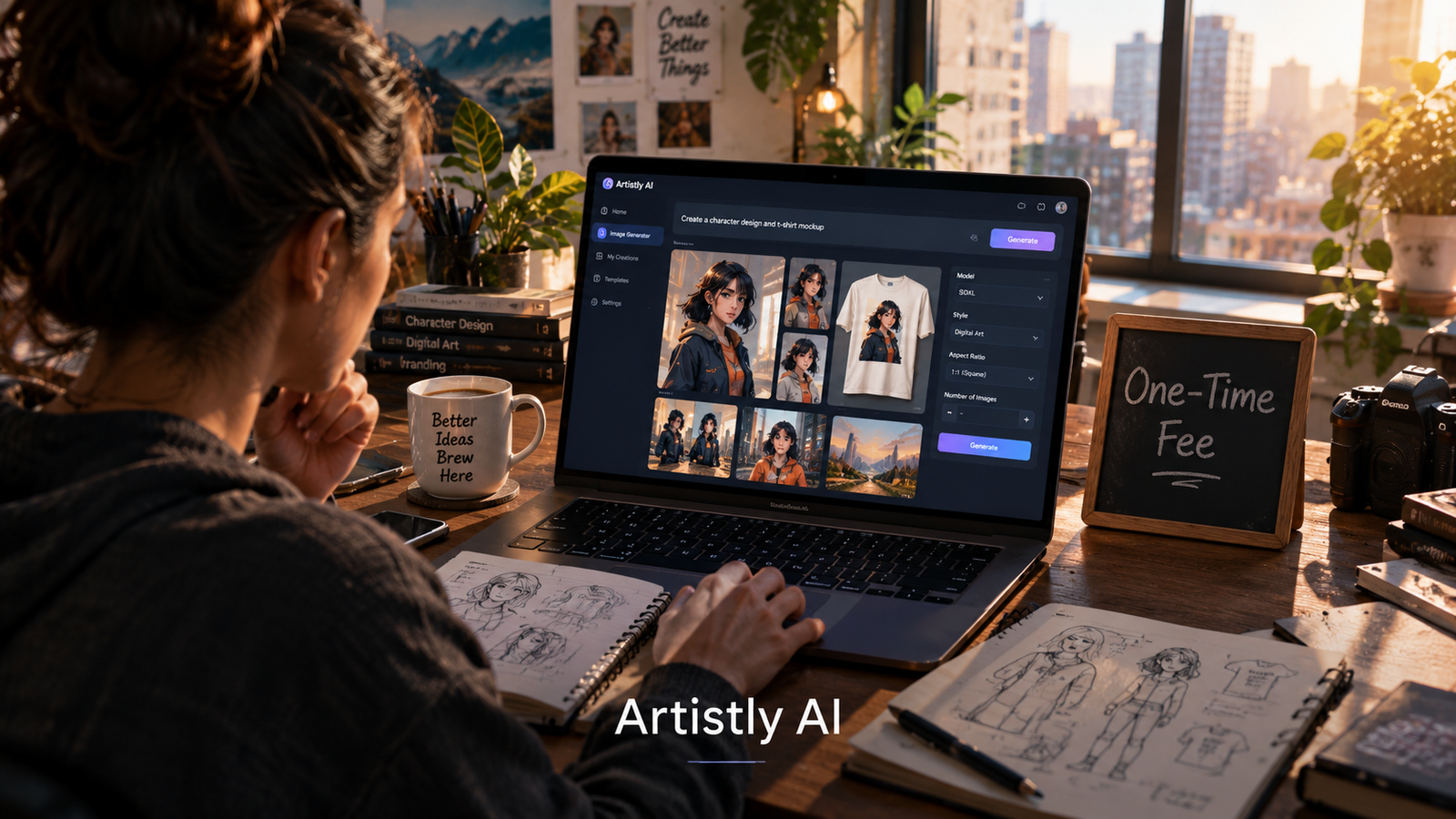
Artistly AI is a browser-based generative design platform that charges a one-time fee for unlimited AI image generation. It bundles text-to-image, inpainting, background removal, consistent character tools, and product mockups into a single canvas workspace, targeting freelancers and small businesses that want to avoid recurring subscriptions. The tradeoff is a dated interface, inconsistent prompt adherence, and no API access.
At-a-Glance
- Pricing model: One-time $147 payment for unlimited image generation, no monthly fees
- Core strength: Unlimited generations plus bundled editing tools at a flat rate
- Key weakness: No API, inconsistent multi-character rendering, and occasional text misspellings
- Best for: Freelancers, small business owners, and content creators on tight budgets
- Not ideal for: Developers needing API access, teams requiring collaboration features, or users demanding photorealistic accuracy
- Free trial: None, but a 30-day money-back guarantee applies
What Is Artistly AI?
Artistly AI is a generative design tool built around a simple proposition: pay once, generate as many images as you want. It runs entirely in a web browser and combines AI image generation with a canvas-style editor.
The platform comes from the same product family as VideoExpress, HumanPal, and DoodleMaker, a suite of AI content tools aimed at budget-conscious creators . Artistly sits at the visual design end of that lineup. It is not a professional design suite, and it does not pretend to be one. It is a practical tool for people who need usable images quickly without a subscription commitment.
The one-time pricing is the headline feature. In a market dominated by monthly subscriptions and credit systems, Artistly’s flat fee stands out. But the pricing model also shapes the product’s limitations, which become clear once you move past the marketing page.
Artistly AI vs. Subscription Competitors
How Artistly AI Works
The workflow follows a standard prompt-to-image pattern with a few distinctive twists.
Step 1: Choose a designer mode. Artistly offers a Fast mode for quick results and an Advanced mode for more detailed generation . The Advanced mode produces better output but takes longer.
Step 2: Set up the project. Users name the project and select dimensions or aspect ratios. The canvas opens with a library of stock elements on the left and generation tools above.
Step 3: Generate or import. The AI Designer accepts text prompts. A “Magic Prompt” option rewrites and expands short prompts into detailed descriptions before generation . Users can also upload existing images and use Mirror Magic to create variations.
Step 4: Edit on canvas. Generated images land on a layered canvas. Users can add text, shapes, and additional images, then apply tools like the AI Stylizer, object remover, or upscaler.
Step 5: Export. Finished designs export as PNG or JPG. Commercial use rights are included with the license .
The Unlimited Claim
Artistly markets “unlimited” generation, and by most accounts it delivers on that promise. Users are not charged per image or restricted by monthly credit allowances. The limitation is not quantity but quality and speed. Some reviewers note that generation can be slow, and occasional failures occur where no image appears at all .
Key Features
Unlimited AI Image Generation
The core offering. Users can generate as many images as they want from text prompts without credit limits or per-image costs . This is genuinely unusual in the current market.
Consistent Character Generation
Artistly can generate the same character across multiple images with consistent appearance. This feature supports comic creation, children’s books, and branded content series . However, user reviews indicate difficulty with multiple characters in a single prompt, especially when detailed descriptions are involved .
Inpainting and Object Removal
Users can erase unwanted elements from images and fill the gaps with AI-generated content. The object remover works on people, animals, and objects . Results vary by complexity.
Background Removal and Image Upscaling
Standard utility features for product photography and marketing assets. Both work adequately but are not differentiated from free alternatives.
Product Mockups
Artistly generates mockups placing designs on t-shirts, mugs, and other products with realistic textures and lighting . Useful for e-commerce sellers testing designs before production.
Book and Coloring Book Generation
The platform can generate illustrated children’s books and coloring book pages from prompts . This is a niche but practical use case for self-publishers.
AI Stylizer and Scene Tools
The Stylizer applies artistic effects to existing images. Instant Scene places subjects into new backgrounds with adjusted lighting . Smart Image Expander extends images beyond their original borders.
Limitations and User Complaints
Prompt Adherence Issues
The most consistent criticism across review platforms is that Artistly does not always generate what the prompt describes. One Capterra reviewer noted that “some items not appearing as described” and that image rendering lags behind competitors like ChatGPT . Another mentioned “inaccuracies and hallucinations” during generation .
Multi-Character Problems
Artistly struggles with prompts involving multiple characters with distinct descriptions. A Capterra reviewer specifically flagged this limitation . For storytelling or scene-based work, this is a meaningful constraint.
Text Rendering Errors
Images containing text frequently contain misspellings, even when the prompt spells the words correctly . This makes Artistly unreliable for logo design or any asset where text accuracy matters.
No API Access
Developer-oriented users cannot integrate Artistly into their own applications or workflows. A reviewer explicitly noted: “There is currently NO API so I cannot call Artistly from other programs” . This limits the tool to manual, browser-based use only.
No Reference Image Option for Characters
Users report no way to upload a reference image to guide character likeness generation . The consistent character feature works from prompts, not visual references, which reduces control.
Browser-Only Limitation
Artistly runs only in a browser. There is no desktop application or mobile app. A reviewer described it as having “no web app only while in browser,” which affects offline access and performance .
Dated Interface
The editor borrows from older Canva-style design patterns. It functions, but it lacks the polish and responsiveness of current-generation design tools.
Pricing and Value
Artistly costs $147 as a one-time payment. There are no recurring charges, no credit top-ups, and no feature gates behind higher tiers .
This pricing structure is the product’s strongest differentiator. Compare it to Canva at $119 annually or Adobe Firefly at $9.99 monthly . Over three years, Artistly costs $147 while Canva costs $357 and Firefly costs roughly $360. For budget-conscious users who generate images regularly, the math favors Artistly.
The absence of a free trial is a barrier. New users cannot test the tool before paying. Artistly mitigates this with a 30-day money-back guarantee, which Unite.AI’s reviewer cited as a confidence factor . Still, the guarantee requires a purchase decision upfront.
Is the Unlimited Claim Sustainable?
Unlimited generation for a one-time fee is unusual in AI tools, where inference costs are ongoing. Artistly has operated on this model for some time, and user reviews do not indicate that the company has throttled heavy users. However, buyers should understand that “unlimited” does not mean “unrestricted quality.” The tool’s output has clear limits regardless of how many images you generate.
Who Should Use Artistly AI
Good fit:
- Freelance designers who need quick concept images and mockups without subscription overhead
- Small business owners creating social media graphics, product photos, and promotional materials
- Self-publishers generating book covers, illustrations, and coloring book pages
- Content creators who want a single tool for image generation and basic editing at a low total cost
Poor fit:
- Developers needing API integration or automated generation pipelines
- Teams requiring collaboration, shared libraries, or review workflows
- Professional designers who need precise control, vector output, or brand consistency at scale
- Anyone producing text-heavy designs where spelling accuracy is critical
Artistly AI vs. Competitors
Artistly competes primarily on price structure, not feature depth. Canva offers a broader design ecosystem with templates, collaboration, and brand management. Firefly integrates with professional Adobe workflows. Artistly’s edge is purely economic: pay once, generate without metering, and accept the quality tradeoffs.
Technical and Privacy Considerations
Artistly does not publicly disclose which foundation models power its generation. It is likely a wrapper product that routes prompts to third-party image models, possibly with proprietary fine-tuning or prompt engineering layered on top. This lack of transparency means users cannot assess model provenance, training data, or update cycles.
The company does not publish a SOC 2 certification, Zero Data Retention commitment, or detailed data retention policy in accessible documentation. Users should assume that prompts and generated images are stored on Artistly’s servers and may be used for service improvement or training unless explicitly stated otherwise. For sensitive commercial work, this is a consideration.
Commercial use rights are included with the license . Users can sell images they generate without additional licensing fees. This is a clear benefit over some competitors that restrict commercial use on lower tiers.
Frequently Asked Questions
Is Artistly AI really a one-time payment?
Yes. Artistly charges $147 once for unlimited image generation and access to its editing tools. There are no monthly fees, credit systems, or renewal charges . A 30-day money-back guarantee is available if the tool does not meet expectations.
Does Artistly AI have a free trial?
No. Artistly does not offer a free trial or a free tier. Users must purchase the $147 license to access the platform. The 30-day guarantee serves as a trial period, though it requires upfront payment .
Can Artistly AI generate consistent characters?
Yes, Artistly includes a consistent character feature that maintains appearance across multiple images. However, users report difficulty with prompts involving multiple characters and no option to upload a reference image for likeness guidance .
Does Artistly AI have an API?
No. Artistly does not provide API access, which means developers cannot integrate its generation capabilities into external applications or automated workflows . It is a manual, browser-based tool only.
Who owns the images generated by Artistly AI?
Artistly grants users a commercial license to use and sell images they generate. The company does not claim ownership of output . Users should review the full terms of service for specific restrictions.
Conclusion
Artistly AI is a practical answer to a specific problem. If you generate images regularly and want to escape subscription fatigue, its one-time $147 fee for unlimited generation is genuinely attractive. The bundled editing tools, consistent character feature, and commercial license add real value for solo creators and small businesses.
What matters most is understanding what you are not getting. Artistly lacks an API, struggles with complex prompts involving multiple characters, and cannot reliably render text. The interface feels dated compared to current design tools. These are real limitations, not minor caveats.
Artistly suits freelancers, small business owners, and content creators who prioritize cost predictability over cutting-edge output quality. It does not suit developers, teams needing collaboration, or professionals producing precision work. Before buying, generate a mental list of your actual use cases, compare the $147 cost against one year of subscription alternatives, and be prepared to use the 30-day guarantee if the output quality falls short of your needs.