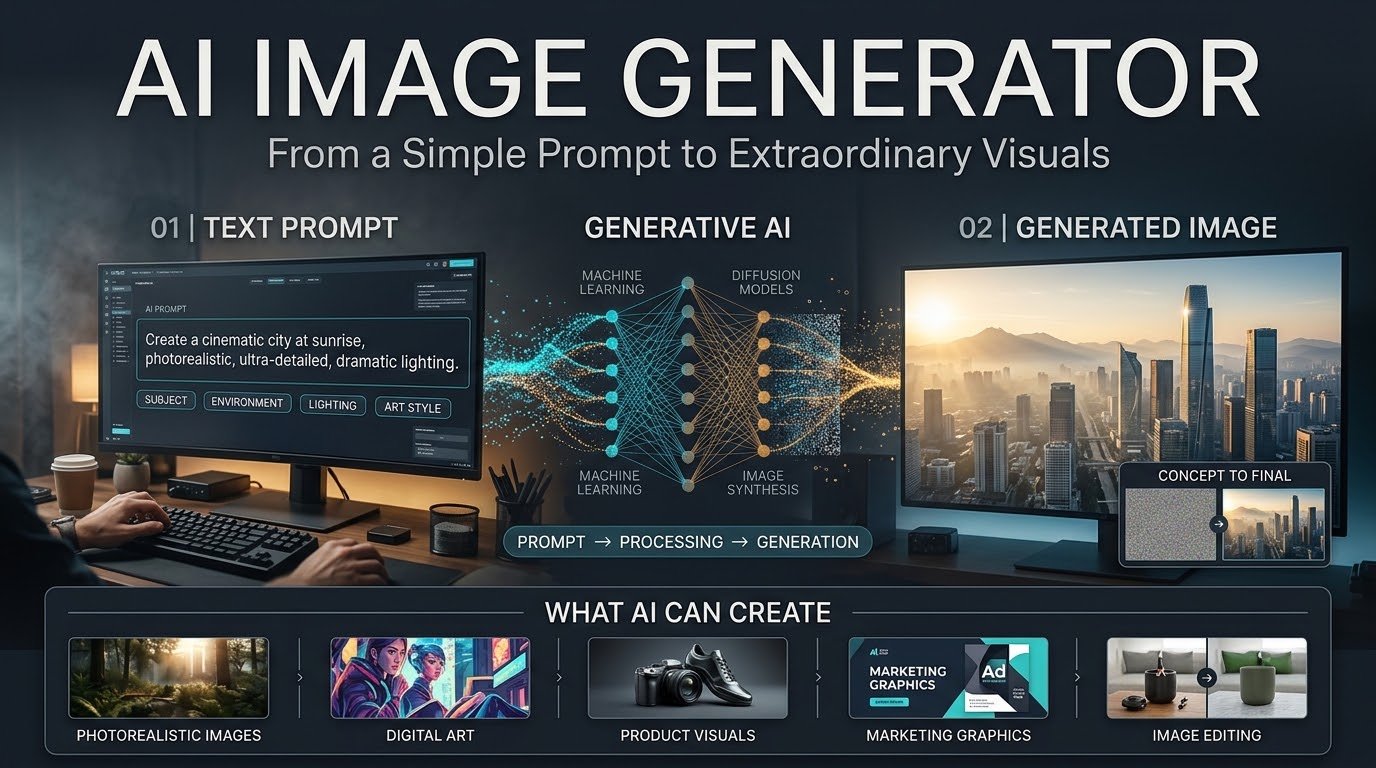
An AI image generator is a generative AI tool that creates or edits images from text prompts, reference pictures, or other visual instructions. It helps individuals and businesses produce original visual content without relying entirely on traditional photography, illustration, or graphic design workflows.
An AI image generator can transform a written description into an original visual in seconds. You can use one to create realistic photographs, illustrations, product concepts, social media graphics, marketing assets, and digital artwork without traditional drawing skills.
However, not every AI image generator works the same way. Some focus on artistic quality, others offer precise editing, accurate text rendering, or professional design workflows. Understanding these differences helps you choose a tool that fits your creative goals, budget, and usage requirements
AI Image Generators at a Glance
- Main purpose: Create images from text descriptions and visual references.
- Common outputs: Photographs, illustrations, concept art, product images, posters, and marketing graphics.
- How they work: Generative models learn visual patterns from training data and produce new images based on user instructions.
- Popular tools: ChatGPT Images, Midjourney, Adobe Firefly, Google Gemini, and Ideogram.
- Main advantages: Faster concept development, creative flexibility, and lower barriers to visual production.
- Important considerations: Pricing, generation limits, image accuracy, privacy, licensing, and copyright.
What Is an AI Image Generator?
An AI image generator is software that uses artificial intelligence to create visual content. You describe what you want, and the system generates an image that attempts to match your instructions.
For example, you could enter:
Create a photorealistic image of a modern glass house surrounded by green mountains at sunrise, with warm natural lighting and a cinematic composition.
The generator interprets the description and produces an image based on the requested subject, environment, lighting, and style.
Some tools also accept reference images. This lets users transform existing photographs, change backgrounds, adjust visual styles, or create variations of an original design.
AI image generators are part of the broader generative AI ecosystem. They are used by designers, marketers, content creators, developers, educators, and businesses.
AI Image Generator vs. Traditional Image Editing
Traditional image editing usually involves changing an existing photograph or graphic. Users work with layers, brushes, masks, filters, and other manual controls.
An AI image generator can create an entirely new visual from a description. Many modern platforms combine both approaches, allowing users to generate an image and then edit selected areas through additional instructions.
| Traditional image editing | AI image generation |
|---|---|
| Usually starts with an existing image | Can start with a text prompt |
| Requires manual editing skills | Uses natural-language instructions |
| Changes are often controlled manually | Changes can be generated automatically |
| Depends heavily on source material | Can create new visual concepts |
| Offers detailed manual control | Offers faster experimentation |
Neither approach replaces the other in every situation. Professional workflows often combine AI generation with conventional editing software.
How Does an AI Image Generator Work?
AI image generators use machine learning models trained on large collections of visual information. During training, these models learn patterns associated with objects, environments, colors, textures, lighting, and visual composition.
When you submit a prompt, the model uses what it learned to generate an image that reflects the requested details.
The exact process depends on the model. Some systems use diffusion-based methods, while others use transformer-based or hybrid architectures.
1. Understanding the Prompt
The system first processes your written instructions.
It identifies important details, including:
- Main subject
- Background and environment
- Actions and positions
- Lighting and camera perspective
- Colors and visual style
- Composition and image format
A prompt such as “a red sports car” provides limited direction. A more detailed description gives the model additional information about the intended result.
2. Generating the Image
The model converts the prompt into information it can use during image generation.
In diffusion-based systems, the model progressively transforms a noisy representation into a structured image. Other architectures may use different generation processes.
The objective is to produce a visual that matches the meaning and details of the prompt.
3. Refining Visual Details
The generated image may include details such as textures, shadows, facial features, reflections, and background elements.
Some platforms also provide additional controls for image quality, aspect ratio, reference images, and visual consistency.
4. Editing and Exporting
After generation, users can often request changes.
For example, you might ask the tool to:
- Replace the background with a city street.
- Change the lighting from daylight to sunset.
- Remove an unwanted object.
- Adjust the image composition.
- Create a different visual style.
- Expand the image to a wider format.
Depending on the platform, users can then download the result or continue editing it in another application.
Popular AI Image Generator Tools
The AI image-generation market includes several established platforms. Their capabilities overlap, but their workflows and strengths differ.
The following comparison focuses on practical differences rather than declaring one universal winner.
1. ChatGPT Images
ChatGPT Images allows users to create and edit visuals through conversational instructions. Instead of learning a complicated design interface, users can describe the desired image and refine the result through follow-up requests.
Its documented capabilities include image generation, editing uploaded pictures, adding text, creating transparent backgrounds, and choosing different aspect ratios.
Suitable for: General users, content creators, marketers, and people who prefer conversational image creation.
Key consideration: Generation limits and available capabilities can vary by account tier and product rollout.
2. Midjourney
Midjourney is an AI image-generation platform known for its visual creation workflow. Users can experiment with prompts, styles, compositions, and variations to develop distinctive images.
It offers subscription plans with different amounts of Fast GPU time. Standard, Pro, and Mega plans include unlimited image generation through Relax Mode, subject to the platform’s terms and usage conditions.
Midjourney also provides Stealth Mode on Pro and Mega plans. This controls visibility on the Midjourney website, but images generated in public Discord channels can remain visible.
Suitable for: Digital artists, concept designers, creative professionals, and users exploring visual styles.
Key consideration: Subscription limits, generation speed, and image visibility depend on the selected plan and workflow.
3. Adobe Firefly
Adobe Firefly brings generative AI into a broader creative software environment. It supports image generation and editing, alongside workflows connected to Adobe’s creative applications.
Its features include image editing, generative fill, and access to selected partner models through eligible plans.
Adobe’s published plans include a free option with limited daily generations. Its Firefly Standard plan is listed at US$9.99 per month, with 2,000 monthly generative credits on the pricing page reviewed for this article.
Adobe states that outputs from Firefly features without a beta label can be used in commercial projects, subject to its applicable terms.
Suitable for: Designers, marketing teams, creative professionals, and users already working with Adobe applications.
Key consideration: Credit consumption and feature availability vary by plan and generation model.
4. Google Gemini
Google’s Gemini image-generation experience uses its Nano Banana model family. Users can create images from text descriptions and refine existing visuals through conversational instructions.
Google documents capabilities such as image editing, reference-image input, subject consistency, and improved text rendering across supported models.
Access to particular models and higher-tier capabilities may depend on the Google AI plan, model selection, and regional availability.
Suitable for: General users, visual storytellers, marketers, and people who want to create and refine images through conversation.
Key consideration: Model access, usage limits, and output capabilities are not identical across all account types.
5. Ideogram
Ideogram is an image-generation platform with tools for creating and editing visual content. It is particularly relevant when a project requires text within an image, such as posters, promotional graphics, or branded visual concepts.
Its features include image generation, editing, remixing, background replacement, and aspect-ratio changes.
Ideogram offers free access with limits and paid plans with additional credits and features. Its pricing page lists a Plus plan at US$20 per month, or US$15 per month when billed annually, with the displayed credit allowance subject to the selected plan.
Suitable for: Designers, social media creators, advertisers, and users creating text-heavy graphics.
Key consideration: Credit usage depends on the model, generation settings, and editing operations.
AI Image Generator Comparison
| Platform | Target user | Main strength | Pricing approach | Main consideration |
|---|---|---|---|---|
| ChatGPT Images | General users and creators | Conversational creation and editing | Account-tier limits | Generation limits vary |
| Midjourney | Artists and designers | Creative image generation | Subscription plans | GPU time and visibility settings |
| Adobe Firefly | Creative professionals | Editing and Adobe workflows | Free access and paid credits | Credit consumption |
| Google Gemini | General users and creators | Conversational image creation | Free access and paid plans | Model access varies |
| Ideogram | Designers and marketers | Text-focused visual creation | Free access and credit plans | Usage depends on credits |
Pricing note: Prices and plan features can change. Check each provider’s official pricing page before subscribing. Regional taxes, currency conversion, and payment availability may also affect the final cost.
What Can You Create With an AI Image Generator?
AI image generators support a wide range of creative and professional tasks. Their usefulness depends on the quality of the model, the clarity of the prompt, and the amount of editing required.
1. Marketing and Social Media Graphics
Businesses can generate visual concepts for social media posts, advertisements, promotional campaigns, and website banners.
For example, a marketing team could create several visual directions for a product launch before choosing one for final production.
2. Product Photography and E-Commerce Concepts
Online sellers can use AI-generated visuals to explore product presentation, backgrounds, lighting, and campaign concepts.
However, generated product images must be checked carefully. AI may alter logos, packaging, labels, product proportions, or other details.
For accurate product listings, use genuine product photographs whenever visual accuracy matters.
3. Blog Images and Editorial Illustrations
Publishers can create featured images, article illustrations, and supporting visuals.
A technology article about artificial intelligence might use an image showing a realistic creative workspace, digital displays, and a visual representation of generative technology.
Custom visuals can help make an article more distinctive, provided they accurately represent its subject.
4. Concept Art and Creative Projects
Artists and creative teams can explore characters, environments, architectural concepts, and visual styles.
AI generation can help develop early ideas before investing time in detailed illustration or production.
5. Presentations and Educational Content
Teachers, students, and business professionals can create visual explanations for presentations, lessons, and reports.
For example, an image generator can produce a conceptual illustration of a solar-powered city or a simplified visual of a manufacturing process.
Important facts, labels, and diagrams should still be reviewed before publication.
Benefits of Using an AI Image Generator
AI image generation offers several practical advantages.
- Faster visual development: Users can explore multiple concepts without creating every version manually.
- Lower creative barriers: People without advanced illustration skills can produce visual ideas.
- Flexible experimentation: Prompts make it easier to test different styles, colors, and compositions.
- Useful for brainstorming: Teams can visualize ideas before starting full production.
- Editing opportunities: Some tools can modify existing images instead of generating everything from scratch.
- Scalable creative workflows: Businesses can use image generation for drafts, concept exploration, and selected production tasks.
These benefits do not mean every generated image is ready to publish. Human review remains important, especially for commercial and factual content.
Limitations of AI Image Generators
Despite their capabilities, AI image generators still have limitations.
Inaccurate Details
An image may look realistic while containing incorrect details. Common problems include distorted hands, inconsistent objects, unusual reflections, and incorrect proportions.
These errors can be difficult to notice in complex scenes.
Text and Typography Problems
Some models can generate readable text, but results may still contain misspellings, incorrect letters, or inconsistent spacing.
For professional posters, logos, and advertising materials, review every word. You may need to add final typography in a dedicated design application.
Limited Control Over Exact Results
A prompt does not always produce the same result every time. Small wording changes can lead to different compositions, objects, or visual details.
This can make precise production work challenging.
Inconsistent Characters and Objects
Maintaining the same character, product, or visual identity across multiple images can be difficult.
Some platforms provide reference-image and consistency features, but results still require inspection.
Copyright and Ownership Questions
The legal treatment of AI-generated images varies by jurisdiction and remains an evolving area.
In the United States, the Copyright Office has explained that copyright protection for AI-assisted work depends on sufficient human authorship. Providing a prompt alone does not automatically establish copyright protection for the generated output.
Users should also consider whether their intended use involves protected characters, trademarks, real people’s likenesses, or copyrighted visual material.
How to Write Better AI Image Generator Prompts
Prompt quality has a major influence on the usefulness of generated images. A clear description gives the model a better understanding of what you want.
A practical prompt structure is:
Subject + Action + Environment + Visual Style + Lighting + Composition + Output Format
For example:
Create a photorealistic editorial image of a modern electric vehicle driving through a mountain road. Show a dramatic sunrise, natural reflections, realistic road textures, cinematic lighting, and a wide 16:9 composition.
This prompt communicates the subject, setting, style, lighting, and framing.
Practical Prompt-Writing Tips
- Describe the main subject clearly. Avoid vague descriptions when a specific object or person matters.
- Explain the environment. Mention the location, background, and surrounding elements.
- Specify the visual style. Choose terms such as photorealistic, editorial, watercolor, or 3D illustration.
- Control the composition. Describe camera angle, framing, and subject placement.
- Mention lighting and colors. These details can strongly influence the visual result.
- Set the aspect ratio. Request 16:9 for wide banners or 1:1 for square social graphics.
- Refine the result. Use follow-up instructions to correct specific details.
Avoid adding unrelated adjectives simply to make a prompt longer. Clear instructions are usually more useful than unnecessary complexity.
Are AI-Generated Images Free to Use Commercially?
Not automatically.
Commercial-use rights depend on the platform’s terms, the selected model, the type of subscription, and the content itself.
For example, Adobe states that eligible Firefly outputs can be used in commercial projects, subject to its terms and feature-specific conditions. Other platforms have their own licensing and usage rules.
Before using an AI-generated image in an advertisement, product, website, or client project, check:
- Whether commercial use is permitted under your plan.
- Whether the output was generated using a beta feature.
- Whether the image contains recognizable copyrighted characters or trademarks.
- Whether the image uses a real person’s likeness.
- Whether attribution or additional restrictions apply.
- Whether your intended use complies with local laws.
Do not assume that paying for a subscription automatically gives you unrestricted ownership or copyright protection.
For high-value commercial work, review the provider’s current terms and obtain legal advice when necessary.
Privacy and Security Considerations
An AI image generator may process more than the prompt itself. If you upload a photograph, the service may receive information about the people, objects, or location shown in it.
Before uploading sensitive material, review the platform’s privacy policy and data controls.
Consider these precautions:
- Avoid uploading confidential business documents or unreleased product designs without approval.
- Do not upload private photographs of other people without appropriate permission.
- Review whether prompts and uploaded images may be retained or used to improve services.
- Check whether private-generation settings are available.
- Understand the difference between private visibility and data retention.
For example, Midjourney’s Stealth Mode controls who can see eligible creations on its website. It does not mean every image generated through a public Discord channel becomes private.
Likewise, a platform’s security certification or enterprise controls should not be treated as proof of zero data retention. These are separate questions that require separate verification.
Free vs. Paid AI Image Generators: Which Should You Choose?
The right plan depends on how frequently you generate images and what you need to do with them.
| Requirement | Free plan may be enough | Paid plan may be more suitable |
|---|---|---|
| Occasional image creation | Yes | Not always necessary |
| Testing prompt ideas | Yes | Useful for frequent testing |
| Regular content production | May have limits | Often more practical |
| High-volume generation | Usually restrictive | Better suited to larger workloads |
| Private generation | Depends on the provider | May require a specific plan |
| Advanced editing features | Availability varies | Often includes additional controls |
A free plan is a sensible starting point for casual users. It allows you to test prompt quality and understand a platform before spending money.
A paid subscription becomes more useful when you need higher usage limits, faster generation, advanced editing, private workflows, or additional commercial features.
However, compare the actual credit system before subscribing. A monthly credit allowance does not always translate into a fixed number of images. Different models, output sizes, and editing operations may consume different amounts.
Common Mistakes to Avoid
New users often expect an AI image generator to understand every instruction perfectly. That expectation can lead to disappointing results.
Avoid these common mistakes:
- Writing overly vague prompts: Give the model a clear subject and setting.
- Adding conflicting instructions: Do not request several incompatible visual styles.
- Ignoring image dimensions: Choose the aspect ratio before generating.
- Accepting the first result: Compare variations and refine important details.
- Ignoring visual errors: Inspect faces, hands, text, logos, and product details.
- Skipping licensing checks: Review usage terms before commercial publication.
- Choosing a tool only because it is free: Consider quality, limits, editing controls, and privacy.
A good workflow combines AI generation with careful human review.
Who Should Use an AI Image Generator?
AI image generators can support different types of users.
Content creators can produce article illustrations, thumbnails, and social media visuals.
Marketing teams can explore advertising concepts and campaign directions.
Graphic designers can develop visual references and creative drafts.
Small businesses can test product presentation and promotional ideas.
Educators and students can create supporting visuals for learning materials.
Developers can generate concept assets and visual prototypes for applications.
However, users who need exact technical drawings, legally controlled product images, or highly consistent brand assets may require additional design and verification workflows.
The Future of AI Image Generation
AI image generation is moving beyond simple text-to-image creation.
Newer systems increasingly combine image generation with editing, reference-image understanding, conversational instructions, and more precise visual controls.
Several developments are shaping this progress.
Better Text Rendering
Image models are improving their ability to place readable words inside generated visuals. This is useful for posters, advertisements, product mockups, and infographics.
More Consistent Visuals
Reference images and character-consistency features help users maintain a recognizable subject across multiple generations.
Conversational Editing
Instead of rebuilding an image, users can describe a change in ordinary language. The system can then attempt to modify the selected subject, background, or visual style.
Integration With Creative Software
AI generation is becoming part of larger design workflows. Users can move between generation, editing, layout, and publishing without treating each task as a separate process.
These improvements are meaningful, but they do not eliminate the need for quality control. Generated visuals still require human judgment, especially when accuracy and brand consistency matter.
Frequently Asked Questions
1. What is the best AI image generator?
There is no single AI image generator that is ideal for every task. ChatGPT Images supports conversational creation and editing, Midjourney offers a creative generation workflow, Adobe Firefly integrates with professional design tools, Gemini supports conversational image creation, and Ideogram is useful for text-focused visuals. The right choice depends on your requirements, budget, and preferred workflow.
2. Can I use an AI image generator for free?
Yes. Several platforms offer free access or limited free generations. However, free plans may restrict the number of images, available models, generation speed, editing features, or output options. Check the current terms of each platform before relying on free access for regular work.
3. How do I create better images with AI?
Write a specific prompt that explains the subject, environment, visual style, lighting, and composition. Choose the correct aspect ratio and refine the output through follow-up instructions. Always inspect important details before using the image.
4. Can AI-generated images be used commercially?
Commercial use depends on the provider’s licensing terms, subscription plan, selected model, and applicable laws. Review the current terms before publishing images in advertisements, products, or client projects. Commercial permission does not automatically guarantee copyright protection.
5. Are AI-generated images copyrighted?
Copyright protection depends on the laws of the relevant jurisdiction and the human contribution involved. In the United States, the Copyright Office has stated that prompts alone do not establish sufficient human authorship. Human-created elements, creative arrangements, and meaningful modifications may affect the copyright analysis.
Conclusion
An AI image generator makes visual creation more accessible by turning written instructions and reference images into new content. It can support marketing, design, education, publishing, and creative experimentation.
However, choosing a platform requires more than comparing image quality. Consider pricing, usage limits, editing controls, privacy, licensing, and the accuracy your project demands.
For occasional creative work, a free option may be enough. For professional production, compare paid plans and test the actual workflow before committing. Most importantly, treat AI-generated images as creative outputs that still need human review.