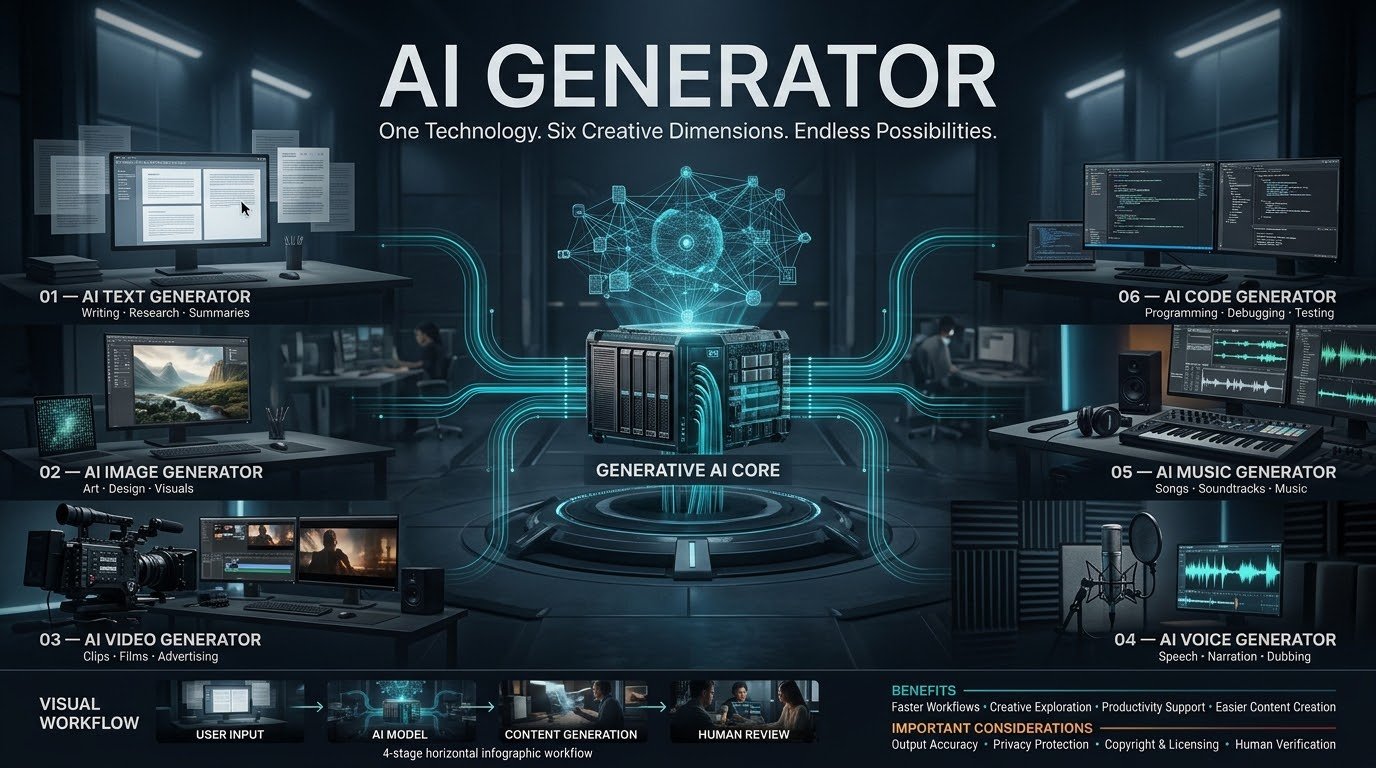
An AI generator is a software application that uses trained artificial intelligence models to create content from prompts, examples, or other inputs. Depending on its purpose, it can generate text, images, videos, music, speech, and code for personal, creative, educational, and business use.
AI Generators at a Glance
- Main purpose: Create digital content using generative artificial intelligence.
- Major categories: Text, image, video, audio, music, and code generation.
- How they work: Process user inputs through machine learning models.
- Popular platforms: ChatGPT, Claude, Gemini, Midjourney, Adobe Firefly, Runway, ElevenLabs, and GitHub Copilot.
- Main advantages: Faster creative workflows, easier experimentation, and productivity support.
- Important limitations: Inaccurate outputs, usage restrictions, privacy concerns, and licensing questions.
What Is an AI Generator?
An AI generator is a digital tool that creates new content using artificial intelligence. Users provide instructions, usually through text prompts or uploaded materials, and the system generates an output.
For example, a writer can request a blog outline. A designer can describe a product advertisement. A developer can ask for a code example.
The platform interprets the input and produces content based on its underlying AI model.
Some generators specialize in one type of output. Others combine several capabilities in a single application.
AI Generator vs. Traditional Software
Traditional software generally relies on predefined tools and user-controlled operations. An AI generator can interpret natural-language instructions and produce new content without requiring every step to be specified manually.
Consider these examples:
| Traditional software | AI generator |
|---|---|
| A word processor helps users write manually. | An AI writing tool can draft or rewrite text. |
| A photo editor changes existing images. | An image generator can create new visuals. |
| A video editor requires manual editing. | A video generator can create clips from prompts. |
| A code editor provides a development environment. | An AI coding assistant can suggest and explain code. |
These technologies are complementary. AI can speed up certain tasks, while traditional software provides precise editing and control.
How Does an AI Generator Work?
AI generators use machine learning models trained to recognize patterns in data. Their exact architecture depends on the type of content they produce.
A language model, for example, processes text differently from an image or video generation model.
Despite these differences, most generative applications follow a similar process.
1. The User Provides an Input
The process begins with a prompt or another type of input.
This could be:
- A written description
- An uploaded photograph
- A document
- An audio recording
- A video clip
- A programming instruction
The clearer the input, the easier it is for the system to understand the intended task.
2. The AI Model Processes the Information
The application sends the input to an appropriate model.
The model uses patterns learned during training to interpret the request. Some systems also use additional information from connected tools, documents, or external sources.
For example, a text generator may use a large language model to understand instructions and produce a response.
3. The Generator Produces Content
The model creates an output based on the input and its learned patterns.
Depending on the application, the result might be an article, photograph, video clip, voice recording, or code snippet.
Some platforms combine multiple models to complete a single task.
4. The User Reviews and Refines the Result
The first output may not meet every requirement.
Users can request changes, adjust the prompt, upload additional references, or edit the result manually.
This step matters because generated content can contain factual mistakes, inconsistent details, or technical errors.
Main Types of AI Generators
AI generators support several content formats. Understanding these categories makes it easier to select the right platform.
1. AI Text Generators
AI text generators produce written content from natural-language instructions. They can draft, summarize, rewrite, translate, and organize information.
Popular platforms include:
- <escape>ChatGPT:</escape> Supports writing, research assistance, brainstorming, summarization, and document-related tasks.
- Claude: Provides writing, document analysis, coding, and reasoning capabilities.
- Google Gemini: Supports content creation, research assistance, and multimodal tasks.
- Jasper: Focuses on marketing content and brand-oriented workflows.
Common uses:
- Blog articles and outlines
- Product descriptions
- Business emails
- Social media captions
- Research summaries
- Marketing copy
Text generators are useful for creating first drafts. However, writers should verify factual claims, statistics, quotations, and references before publishing.
2. AI Image Generators
AI image generators turn written descriptions and reference images into visual content.
They can create illustrations, realistic scenes, product concepts, digital artwork, and marketing graphics.
Popular options include:
- Midjourney: Provides creative image-generation workflows.
- Adobe Firefly: Offers image generation and editing within Adobe’s creative ecosystem.
- ChatGPT Images: Supports conversational image creation and editing.
- Google Gemini: Provides image-generation and editing capabilities through supported models.
- Ideogram: Offers visual generation and tools for text-focused designs.
Common uses:
- Website featured images
- Social media graphics
- Advertising concepts
- Product mockups
- Digital illustrations
- Presentation visuals
Generated images need human inspection. Logos, product labels, text, and important visual details may not always be accurate.
3. AI Video Generators
AI video generators create or modify video content from text prompts, images, or existing footage.
Some focus on cinematic clips. Others provide editing features, visual effects, and production tools.
Examples include:
- Runway: Offers generative video and AI-assisted creative workflows.
- Google Flow: Provides AI-powered filmmaking and video creation tools.
- Adobe Firefly: Includes generative video capabilities alongside other creative features.
- Pika: Focuses on AI-generated video and visual effects.
Common uses:
- Promotional videos
- Social media content
- Product demonstrations
- Storyboarding
- Creative experiments
- Short video advertisements
Video generation can consume significant credits. Check clip duration, resolution, generation limits, and export restrictions before selecting a subscription.
4. AI Voice and Audio Generators
AI voice generators produce synthetic speech from written text or other audio inputs. Some also support dubbing, transcription, and voice design.
Examples include:
- ElevenLabs: Provides AI voice generation, speech, and dubbing tools.
- Murf AI: Focuses on AI voiceovers and audio production.
- Descript: Combines audio and video editing with transcription and AI-assisted features.
Common uses:
- Video narration
- Podcast production
- Educational recordings
- Audiobook projects
- Advertising voiceovers
- Multilingual content
Voice cloning requires particular care. Users should obtain appropriate permission before reproducing another person’s voice.
5. AI Music Generators
AI music generators create musical content from descriptions and other supported inputs.
They can help users explore melodies, instrumental tracks, background music, and song concepts.
Examples include:
- Suno: Provides AI-assisted song creation.
- Udio: Offers AI music-generation workflows.
Common uses:
- Background music concepts
- Songwriting experiments
- Video soundtrack ideas
- Instrumental compositions
- Creative projects
Before publishing generated music, review the provider’s licensing conditions. Subscription access does not automatically resolve every copyright or distribution issue.
6. AI Code Generators
AI code generators help developers write, explain, test, and modify software.
They can interpret programming instructions and suggest code based on the surrounding development context.
Examples include:
- GitHub Copilot: Provides AI coding assistance in supported development environments.
- Cursor: Offers an AI-focused code editor and development workflows.
- Claude: Supports code generation, explanation, and debugging.
Common uses:
- Writing code snippets
- Explaining programming concepts
- Finding potential bugs
- Creating software tests
- Refactoring code
- Developing prototypes
Generated code must be reviewed and tested. It may contain security vulnerabilities, outdated dependencies, or incorrect assumptions.
Popular AI Generator Tools Compared
Different AI tools solve different problems. Comparing them by category is more useful than treating every platform as a direct competitor.
| Platform | Category | Main strength | Target audience | Important consideration |
|---|---|---|---|---|
| ChatGPT | General AI assistant | Multiple content and analysis tasks | Individuals and businesses | Usage limits vary |
| Claude | Text and coding | Document and reasoning workflows | Writers and technical teams | Model access depends on plan |
| Gemini | General AI assistant | Multimodal capabilities | General users and businesses | Feature access varies |
| Midjourney | Image generation | Creative visual workflows | Artists and designers | Subscription and visibility restrictions |
| Adobe Firefly | Image and video | Creative software integration | Designers and professionals | Generative credits apply |
| Runway | Video generation | AI video production | Filmmakers and creators | Generation uses credits |
| ElevenLabs | Voice and audio | AI speech generation | Creators and developers | Usage and licensing conditions |
| GitHub Copilot | Code generation | Coding assistance | Software developers | Usage allowances vary |
Understanding AI Generator Pricing
AI platforms do not all use the same pricing model.
Some charge a monthly subscription. Others provide a limited number of credits or bill according to API usage.
For example, Anthropic’s official pricing page lists free and paid Claude plans, with usage limits that vary by subscription. GitHub Copilot also provides different individual and business plans with different allowances. <Cite refs={[“turn248562search0″,”turn248562search1”]}/>
Runway uses a credit-based system for its creative generation plans. Midjourney uses subscription tiers with different GPU-time allowances and privacy features. <Cite refs={[“turn248562search5″,”turn248562search6”]}/>
Before subscribing, check:
- Monthly or annual subscription costs
- Included credits and usage allowances
- Whether unused credits expire
- Additional usage charges
- Available models and features
- Commercial-use conditions
- Regional payment and tax requirements
A low monthly price does not necessarily mean a low cost per finished project.
Where Can You Discover More AI Generators?
New AI applications appear frequently. Directories and developer communities can help users find tools beyond the most familiar platforms.
Futurepedia
Futurepedia organizes AI applications into categories such as writing, productivity, image generation, video, and business tools.
It is useful when you want to explore products within a particular category.
There’s An AI For That
There’s An AI For That is a searchable AI tool directory organized around different tasks and use cases.
It can help users find applications when they know the problem they want to solve but do not know which product offers the required feature.
Hugging Face Hub
Hugging Face provides access to machine learning models, datasets, and community applications.
Its Spaces section allows users to explore interactive AI demonstrations. It is particularly useful for developers and people interested in experimenting with different models.
Product Hunt
Product Hunt features newly launched software products, including AI applications.
Users can explore product descriptions, launch discussions, and community feedback. However, popularity does not guarantee quality, security, or long-term support.
These platforms are discovery resources. Always evaluate the actual product before relying on it.
Benefits of Using AI Generators
AI generators can support creative and professional workflows in several ways.
Faster Content Production
AI tools can create initial drafts, images, audio, and other materials quickly.
This helps users move from an idea to a working draft without completing every step manually.
Easier Creative Experimentation
Users can explore different visual styles, writing approaches, and content formats.
This makes AI particularly useful during brainstorming and early project development.
Improved Productivity
Some tools can summarize documents, draft emails, generate code, and organize information.
These features can reduce repetitive work and give users more time for important tasks.
Greater Access to Creative Technology
People without professional design or programming experience can explore tasks that once required specialized skills.
AI does not remove the need for expertise, but it can make experimentation easier.
Support for Business Operations
Businesses can use generators for marketing drafts, internal documentation, product concepts, and selected communication tasks.
However, automated outputs should be reviewed before they reach customers or influence important decisions.
Limitations and Risks of AI Generators
AI-generated content is not automatically correct, original, or suitable for publication.
Understanding its limitations helps users avoid costly mistakes.
Inaccurate Information
Text generators can produce incorrect facts, outdated information, or invented references.
Image generators can create distorted objects or misleading visual details.
Always verify information that affects research, business decisions, or public communication.
Inconsistent Results
The same prompt may produce different outputs. Results can also vary between models and generation settings.
A platform that performs well for creative writing may not be suitable for technical documentation.
Copyright and Ownership Questions
Copyright rules differ between countries. The legal treatment of generated content can depend on human contribution, licensing terms, and the material used.
The U.S. Copyright Office explains that AI-generated outputs may qualify for copyright protection when sufficient human-authored expression is present. Providing prompts alone does not automatically establish copyright protection. <Cite refs={[“turn248562search2”]}/>
Privacy and Data Handling
Some AI applications process uploaded documents, images, audio, and other sensitive information.
Before using a service, review its privacy policy, data retention practices, training settings, and available business controls.
A security certification does not automatically guarantee zero data retention. These are separate matters.
Subscription and Usage Restrictions
Free plans may restrict access to models, features, or generation limits.
Paid plans can also include credit allowances, additional usage charges, and different restrictions for individual features.
Check the actual terms before building a professional workflow around a particular service.
Free vs. Paid AI Generators
The right subscription depends on how often you use the tool and what you expect from it.
| Requirement | Free plan | Paid plan |
|---|---|---|
| Occasional experimentation | Often sufficient | Usually unnecessary |
| Basic content creation | Suitable for many tasks | May offer more capacity |
| Regular professional work | May have restrictions | Often more practical |
| Advanced features | Availability varies | May include additional options |
| Higher usage limits | Usually restricted | Often provides larger allowances |
| Team collaboration | Depends on provider | May include team features |
Start with free access when exploring a new platform. Test the output quality before paying.
For professional work, calculate the cost of completing a real task. Check credit expiry, model-specific charges, and additional usage fees.
How to Choose the Right AI Generator
The right AI generator should solve a specific problem. Selecting a platform before identifying your requirements can lead to unnecessary subscriptions.
1. Define Your Main Task
Decide whether you need text, images, video, audio, music, or code.
A specialized generator may offer more relevant controls than a general-purpose assistant.
2. Compare Output Quality
Test realistic prompts and compare the results.
Consider accuracy, consistency, editing controls, and how closely the output follows your instructions.
3. Review Pricing and Limits
Check the monthly allowance, credit system, expiry conditions, and additional usage charges.
For API-based services, consider how model selection and request volume affect your total cost.
4. Examine Privacy and Licensing
Understand how the provider handles uploaded information.
Check whether your intended commercial use is permitted under the relevant subscription and licensing terms.
5. Consider Existing Software
A generator that works with your current design, office, or development applications may fit your workflow more easily.
6. Test Reliability
Repeat similar tasks and compare results. A useful platform should provide an output that you can review, refine, and use consistently.
Common Mistakes When Using AI Generators
Many users expect a perfect result from one prompt. In practice, good results often require testing and refinement.
Avoid these mistakes:
- Using vague prompts: Explain what you want the tool to produce.
- Choosing without comparison: Different platforms have different strengths.
- Trusting every result: Verify factual and technical information.
- Ignoring usage limits: Review credits and subscription restrictions.
- Uploading sensitive data: Understand privacy terms before sharing information.
- Skipping licensing checks: Confirm commercial-use permissions.
- Relying entirely on automation: Keep human review in important workflows.
Treat AI output as a starting point, not an automatically finished product.
Who Should Use AI Generators?
AI generators can support a wide range of users.
| Audience | Practical applications |
|---|---|
| Students | Study materials, explanations, and summaries |
| Content creators | Articles, images, videos, and audio |
| Marketers | Campaign concepts and promotional content |
| Designers | Visual references, mockups, and illustrations |
| Developers | Code suggestions, explanations, and testing |
| Businesses | Documentation and selected workflow automation |
| Researchers | Document analysis and information exploration |
The right tool depends on the task. A general AI assistant may be enough for everyday work, while a dedicated platform may be more suitable for professional production.
The Future of AI Generators
AI generation is moving beyond applications that perform only one task.
More platforms are combining text, image, audio, video, and document capabilities. This creates opportunities for connected creative and business workflows.
Multimodal AI
Multimodal systems can process or generate different types of information.
For example, a model may interpret text and images while also supporting audio or video tasks. This makes it easier to work across different content formats.
AI Agents and Automation
Some AI systems can plan and perform multiple steps rather than generating one response.
Depending on their permissions and connected tools, agents can research information, organize files, prepare reports, and support business processes.
Human supervision remains important, particularly when agents interact with external systems or perform consequential actions.
Specialized AI Models
General-purpose models support many different tasks. Specialized models focus on particular industries, outputs, or technical requirements.
This may create more focused applications for software development, scientific research, visual design, and business operations.
Despite these developments, accuracy, transparency, privacy, and human oversight will remain essential.
Frequently Asked Questions
1. What is an AI generator used for?
An AI generator creates digital content from instructions or reference materials. Depending on the platform, it can produce text, images, videos, music, speech, and computer code. People use these tools for education, marketing, creative projects, software development, and business tasks.
2. Are AI generators free to use?
Many AI generators offer free plans or limited free access. However, these plans may restrict usage, available models, generation speed, or advanced features. Paid subscriptions generally provide additional capacity or capabilities, depending on the provider.
3. Which AI generator is best for beginners?
The right choice depends on the task. General assistants such as ChatGPT and Gemini support multiple everyday activities, while specialized tools such as Midjourney, Adobe Firefly, and ElevenLabs focus on particular creative outputs. Beginners should test available free options before subscribing.
4. Can AI-generated content be used commercially?
Commercial use depends on the provider’s terms, subscription plan, content, and applicable laws. Review licensing conditions before using generated material in advertisements, products, websites, or client projects. Commercial permission does not automatically guarantee copyright protection.
5. Are AI generators safe for private information?
Privacy depends on the provider’s data practices, account settings, and service terms. Some platforms may retain or process submitted information. Avoid uploading confidential material until you understand the service’s data handling and retention policies.
Conclusion
An AI generator uses artificial intelligence to create content across several categories, including text, images, video, audio, music, and code.
These tools can help people explore ideas, produce content, and improve selected workflows. However, their usefulness depends on output quality, pricing, usage limits, privacy, and licensing.
For everyday tasks, a general AI assistant may be sufficient. For specialized creative or technical work, a dedicated generator may provide more relevant features.
Before choosing a platform, test it with real tasks and review its limitations. Human judgment remains essential for accuracy, quality, and responsible use.